작은 챗봇으로 마감

이 챕터에서 배우는 것
- CLI 대화 루프 — 50줄 안에 동화 챗봇
- System prompt · few-shot · sampling 파라미터 의 역할
- 본 책 10M 모델 + Q4_K_M GGUF 로 노트북에서 즉시 챗
- Part 6 마무리 + 캡스톤·Part 7 으로의 다리
전제
Ch 19 양자화, Ch 20 GGUF. dist/tiny-tale-q4km.gguf 가 손에 있음.
1. 컨셉 — 끝까지 굴리는 마지막 한 단계
여기까지 만든 것: - 모델 (Ch 10), 학습 (Ch 15), 평가 (Part 5), 양자화 + GGUF (Ch 19~20)
남은 단계: 사람이 talk 할 수 있게.
본 책 10M 동화 모델은 instruction-tuned 가 아니라 continuation 모델 — 사용자 prompt 를 받으면 그 다음을 이어 짓는다. 챗봇이라기보단 co-writer.
2. 왜 필요한가 — 데모의 가치
| 산출물 | 무엇을 입증 |
|---|---|
| 손실 곡선 | 학습이 진행됨 |
| PPL · benchmark | 능력이 측정됨 |
| CLI 챗봇 | 모델이 진짜 동작함 |
특히 모델을 누군가에게 보여줄 때 (LinkedIn 게시글, 회사 발표, HF Spaces) — 5 분 짜리 영상이 학습 곡선보다 강력. 캡스톤의 마지막 산출물이기도.
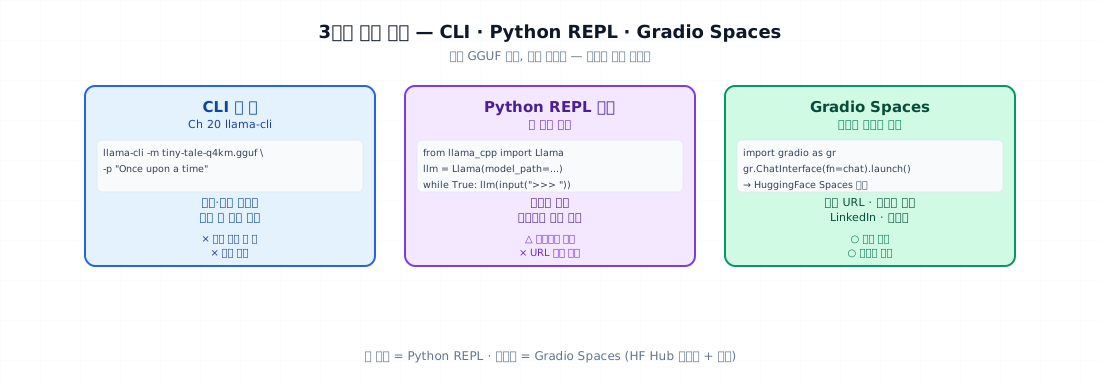
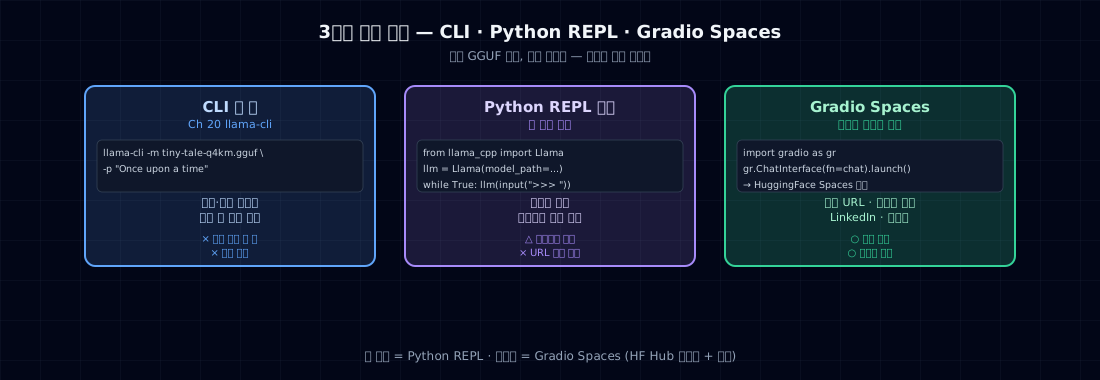
3. 어디에 쓰이나 — 3가지 데모 형태
| 형태 | 도구 | 어디에 |
|---|---|---|
| CLI 한 줄 | llama-cli (Ch 20) |
데모·디버깅 |
| Python REPL 루프 | llama-cpp-python 또는 transformers |
노트북 시연 |
| Gradio Spaces | HF Spaces | 공개 데모 (캡스톤) |
본 챕터는 Python REPL 중심. CLI 는 Ch 20 에서 다뤘고, Spaces 는 캡스톤.
4. 최소 예제 — 30줄 동화 co-writer
- continuation 모델 이라 system prompt 가 아닌 누적 컨텍스트.
- 사용자 turn = 한 줄 추가, 모델이 이어 씀.
- 두 줄 빈 줄 또는 EOS 면 멈춤.
- context 가 너무 길어지면 잘라냄 (모델 max_len=512).
실행
>>> Once upon a time, there was a little girl named
 Lily. She had a small puppy called Max...

>>> One day, they went to
 the park together. The sun was shining brightly...

>>> But suddenly,
 a strong wind came. Lily's hat flew away. Max ran...
관찰: 짧은 입력에 합리적 이어 쓰기. 본 책 10M 모델이 진짜로 동작하는 데모.
5. 실전 — Sampling 파라미터의 역할
3가지 파라미터가 출력 성격을 결정:
| 파라미터 | 효과 | 권장값 (동화) |
|---|---|---|
temperature |
분포 평탄화 | 0.7~0.9 |
top_p |
누적 확률 cutoff | 0.9 |
top_k |
후보 수 cutoff | 50 |
repeat_penalty |
반복 토큰 패널티 | 1.1~1.2 |
동화 vs 챗봇 vs 코드
| 도메인 | temp | top_p | repeat |
|---|---|---|---|
| 동화 (창의) | 0.9 | 0.95 | 1.1 |
| 챗봇 (균형) | 0.7 | 0.9 | 1.05 |
| 코드 (정확) | 0.2 | 0.95 | 1.0 |
| 번역 | 0.0 (greedy) | - | - |
본 책 모델이 동화 모델이라 0.9 / 0.95 권장.
두 극단 비교
| sampling_compare.py | |
|---|---|
예상 출력:
T=0.1: Lily found a magic flower in the garden. She was very happy...
T=0.1: Lily found a magic flower in the garden. She was very happy...   <-- 거의 같음
T=0.1: Lily found a magic flower in the garden. She was very happy...

T=0.7: Lily found a magic stone by the river. It glowed in the sun...
T=0.7: Lily found a magic toy under her bed. She picked it up gently...
T=0.7: Lily found a magic feather. She blew on it and it flew away...

T=1.5: Lily found a magic boots? jumping cloud what fun bird sky...   <-- 깨짐
T=1.5: Lily found a magic skip slide tree happy purple monkey...
T=1.5: Lily found a magic the very loud green dance run ate...
→ 0.7~0.9 가 sweet spot. 0.1 은 반복, 1.5 는 깨짐.
6. (선택) System prompt + few-shot
본 책 모델은 instruction-tuned 가 아니지만, few-shot 으로 형식 유도 가능.
효과: 패턴 인식. 본 책 동화 모델이 어차피 동화 분포라 큰 차이 없지만, 다른 도메인 (예: 레시피, 코드) 학습 모델에선 효과 큼.
캡스톤 또는 Part 7 LoRA 모델에선 instruction-tuned 라 system prompt + chat template 가 표준.
7. 자주 깨지는 포인트
1. context 무한 누적 — n_ctx=512 인데 누적 length > 512 면 처음부터 잘림. trim 필수.
2. stop 토큰 잘못 — \n 만 두면 한 줄에서 멈춤. 동화는 여러 줄. \n\n (빈 줄) 또는 EOS.
3. temperature=0 + repeat_penalty 없음 — 같은 단어 무한 반복. greedy 면 repeat_penalty 1.1 필수.
4. 모델 형식 불일치 — instruction 모델 (Qwen-Instruct, Llama-3-Instruct) 은 chat template 필요. 본 책 10M 은 base 모델이라 plain text.
5. llama-cpp-python 의 thread 수 — Llama(..., n_threads=N) 안 주면 1 thread. M2 8 core 면 n_threads=4~8.
6. GPU 가속 빠뜨림 — Apple Silicon: Llama(..., n_gpu_layers=-1) 로 모두 Metal. 100배 빠름.
7. 메모리 측정 안 함 — 운영 환경에서 OOM. psutil 로 RSS 측정 + 동시 사용자 수에 곱하기.
8. 운영 시 체크할 점
CLI 데모 게이트:
- GGUF 모델 로드 성공
- sampling 파라미터 실험 (temp 3가지)
- context trim 동작
- stop 토큰 적절
- GPU 가속 확인 (Metal/CUDA)
- thread 수 설정
- 메모리 측정 (RSS)
- 처리량 (tok/s) 측정
- 5분 시연 시나리오 (prompt 5개 + 자연스러운 흐름)
9. 연습문제
- 본인 모델로
story_chat.py를 돌려 5번 대화. 모델이 어디서 깨지는가? - temp 0.5 / 0.8 / 1.2 로 같은 prompt 5개 생성. 평균 길이 + 다양성 (Jaccard) 비교.
repeat_penalty를 1.0 / 1.1 / 1.3 로 변경. 같은 단어 반복 횟수가 어떻게 변하나?llama-cpp-python의n_gpu_layers=-1적용 전·후 처리량 비교 (Apple Silicon 또는 CUDA).- (생각해볼 것) 본 책 모델 (continuation) 과 SmolLM2-360M-Instruct (instruction) 의 챗봇 사용성 차이는? 어느 쪽이 사람에게 더 자연스러운가?
Part 6 마무리
| 챕터 | 무엇을 |
|---|---|
| Ch 19 | int8/int4 양자화 — 손으로 한 번 |
| Ch 20 | llama.cpp + GGUF — 변환 + 추론 |
| Ch 21 | CLI 챗봇 — 본 책 모델이 진짜 동작 |
본 책 Part 1~6 졸업 상태:
- 자체 10M 모델 학습 (Part 4 Ch 15)
- PPL · 벤치마크 평가 (Part 5)
- int4 양자화 + GGUF (Ch 19, 20)
- CLI 챗봇 5분 시연 (이 챕터)
다음 → Part 7 파인튜닝 응용. 만든 지식을 기성 모델에 얹는 길.
원전
llama-cpp-python라이브러리 docs- llama.cpp 의 sampling 구현 —
common/sampling.cpp - Holtzman et al. (2019). The Curious Case of Neural Text Degeneration. — top-p 의 의의
- HuggingFace Spaces 의 Gradio 챗봇 템플릿 (캡스톤 참고)