Wrap Up with a Small Chatbot

What you'll learn
- CLI conversation loop — a story chatbot in under 50 lines
- What system prompts, few-shot examples, and sampling parameters actually do
- Chat with the book's 10M model + Q4_K_M GGUF right on your laptop
- Part 6 wrap-up and the bridge to the capstone and Part 7
Prerequisites
Ch 19 Quantization, Ch 20 GGUF. You have dist/tiny-tale-q4km.gguf ready.
1. Concept — The Last Step to Make It Real
Here's what you've built so far:
- Model (Ch 10), training (Ch 15), evaluation (Part 5), quantization + GGUF (Ch 19–20)
What's left: let a human talk to it.
The book's 10M fairytale model isn't instruction-tuned — it's a continuation model. Give it a prompt and it writes what comes next. Think of it less as a chatbot and more as a co-writer.
2. Why This Matters — The Value of a Demo
| Artifact | What it proves |
|---|---|
| Loss curves | Training progressed |
| PPL / benchmarks | Capability is measurable |
| CLI chatbot | The model actually works |
When you want to show someone what you built — a LinkedIn post, a company presentation, HF Spaces — a 5-minute video beats a training curve every time. This is also the final deliverable of the capstone.
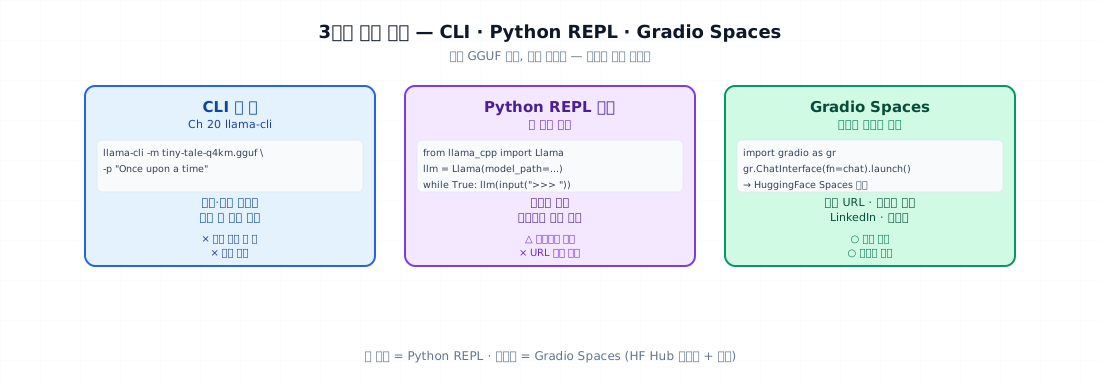
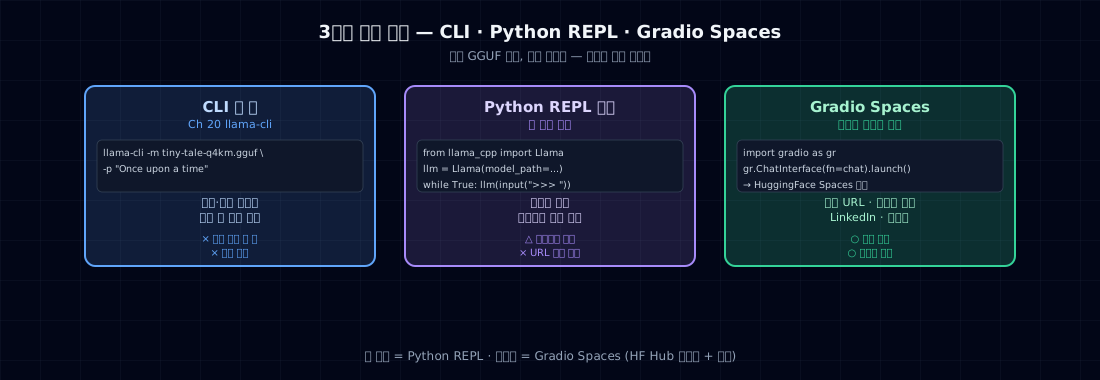
3. Three Demo Forms
| Form | Tool | Where |
|---|---|---|
| One-line CLI | llama-cli (Ch 20) |
demos, debugging |
| Python REPL loop | llama-cpp-python or transformers |
notebook demos |
| Gradio Spaces | HF Spaces | public demo (capstone) |
This chapter focuses on the Python REPL. CLI was covered in Ch 20, and Spaces is covered in the capstone.
4. Minimal Example — 30-line Story Co-writer
- Continuation model — uses accumulated context, not a system prompt.
- Each user turn adds a line; the model continues from there.
- Stop on double newline or EOS.
- Trim context when it gets too long (model max_len=512).
Running it
>>> Once upon a time, there was a little girl named
 Lily. She had a small puppy called Max...

>>> One day, they went to
 the park together. The sun was shining brightly...

>>> But suddenly,
 a strong wind came. Lily's hat flew away. Max ran...
Observation: short input, reasonable continuation. This is the book's 10M model working for real.
5. Sampling Parameters
Three parameters control the character of the output:
| Parameter | Effect | Recommended (fairytales) |
|---|---|---|
temperature |
flattens the distribution | 0.7–0.9 |
top_p |
cumulative probability cutoff | 0.9 |
top_k |
candidate count cutoff | 50 |
repeat_penalty |
penalty for repeated tokens | 1.1–1.2 |
Fairytales vs chatbots vs code
| Domain | temp | top_p | repeat |
|---|---|---|---|
| Fairytales (creative) | 0.9 | 0.95 | 1.1 |
| Chatbot (balanced) | 0.7 | 0.9 | 1.05 |
| Code (accurate) | 0.2 | 0.95 | 1.0 |
| Translation | 0.0 (greedy) | - | - |
Since this model was trained on fairytales, 0.9 / 0.95 is the right starting point.
Two extremes compared
| sampling_compare.py | |
|---|---|
Expected output:
T=0.1: Lily found a magic flower in the garden. She was very happy...
T=0.1: Lily found a magic flower in the garden. She was very happy...   <-- nearly identical
T=0.1: Lily found a magic flower in the garden. She was very happy...

T=0.7: Lily found a magic stone by the river. It glowed in the sun...
T=0.7: Lily found a magic toy under her bed. She picked it up gently...
T=0.7: Lily found a magic feather. She blew on it and it flew away...

T=1.5: Lily found a magic boots? jumping cloud what fun bird sky...   <-- incoherent
T=1.5: Lily found a magic skip slide tree happy purple monkey...
T=1.5: Lily found a magic the very loud green dance run ate...
0.7–0.9 is the sweet spot. 0.1 repeats, 1.5 falls apart.
6. (Optional) System Prompt + Few-shot
This model isn't instruction-tuned, but you can guide its format with few-shot examples.
Effect: pattern recognition. Since the model was already trained on fairytales, the difference here is small — but few-shot matters much more for models trained on other domains (like recipes or code).
For capstone or Part 7 LoRA models — which are instruction-tuned — a system prompt + chat template is the standard approach.
7. Common Failure Points
1. Context growing without bounds — n_ctx=512 means anything beyond 512 tokens gets truncated from the front. Trim is required.
2. Wrong stop tokens — Using just \n stops after one line. Fairytales need multiple lines. Use \n\n (blank line) or EOS.
3. temperature=0 + no repeat_penalty — Same word repeats infinitely. Greedy decoding needs repeat_penalty of at least 1.1.
4. Model format mismatch — Instruction models (Qwen-Instruct, Llama-3-Instruct) need a chat template. The book's 10M is a base model — plain text only.
5. Not setting thread count in llama-cpp-python — Llama(..., n_threads=N) defaults to 1 thread. On an M2 with 8 cores, set n_threads=4–8.
6. Missing GPU acceleration — Apple Silicon: use Llama(..., n_gpu_layers=-1) to offload everything to Metal. Can be 100× faster.
7. Not measuring memory — In production, you'll hit OOM. Use psutil to measure RSS and multiply by concurrent user count.
8. Ops Checklist
CLI demo gate:
- GGUF model loads successfully
- Sampling parameter experiments (3 temperature values)
- Context trimming works correctly
- Stop tokens are appropriate
- GPU acceleration confirmed (Metal / CUDA)
- Thread count configured
- Memory measured (RSS)
- Throughput measured (tok/s)
- 5-minute demo scenario ready (5 prompts + natural flow)
9. Exercises
- Run
story_chat.pywith your model. Have 5 conversations. Where does the model break down? - Generate 5 outputs with temp 0.5 / 0.8 / 1.2 from the same prompts. Compare average length + diversity (Jaccard).
- Change
repeat_penaltyto 1.0 / 1.1 / 1.3. How does the repetition count change? - Measure throughput before and after applying
n_gpu_layers=-1inllama-cpp-python(Apple Silicon or CUDA). - (Think about it) How does the user experience differ between this book's model (continuation) and SmolLM2-360M-Instruct (instruction)? Which feels more natural for a human to talk to?
Part 6 Wrap-Up
| Chapter | What you did |
|---|---|
| Ch 19 | int8/int4 quantization — by hand |
| Ch 20 | llama.cpp + GGUF — convert and serve |
| Ch 21 | CLI chatbot — the book's model, actually working |
Where you stand after completing Parts 1–6:
- Trained your own 10M model from scratch (Part 4, Ch 15)
- Evaluated with PPL and benchmarks (Part 5)
- int4 quantization + GGUF (Ch 19, 20)
- 5-minute CLI demo (this chapter)
Next → Part 7 Fine-tuning Applications. Time to apply everything you've learned to models that already exist.
References
llama-cpp-pythonlibrary docs- llama.cpp sampling implementation —
common/sampling.cpp - Holtzman et al. (2019). The Curious Case of Neural Text Degeneration. — the case for top-p
- HuggingFace Spaces Gradio chatbot template (capstone reference)