서빙 — llama.cpp server · vLLM · 지연 예산¶

이 챕터에서 배우는 것
- 3가지 서빙 스택 —
llama.cpp server/ vLLM / HF TGI - 지연 예산 산수 — 토큰 수 × TPS = 지연
- 배치·동시성·KV cache — 같은 GPU 에서 처리량 5~10×
- Speculative decoding — 우리가 만든 작은 모델을 draft 로 써서 지연 2~3× 단축
- 헬스체크·그레이스풀 셧다운·어댑터 핫스왑
전제
Ch 19 양자화, Ch 20 GGUF. 운영 추론 책임을 진다는 자리.
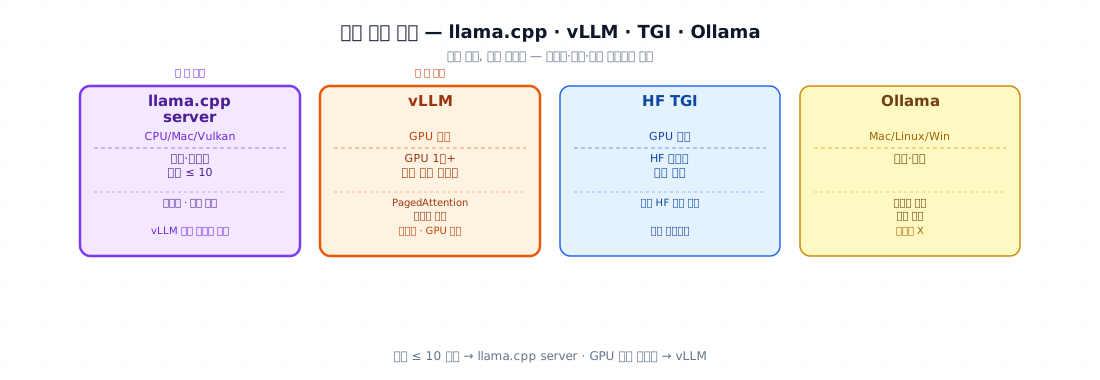
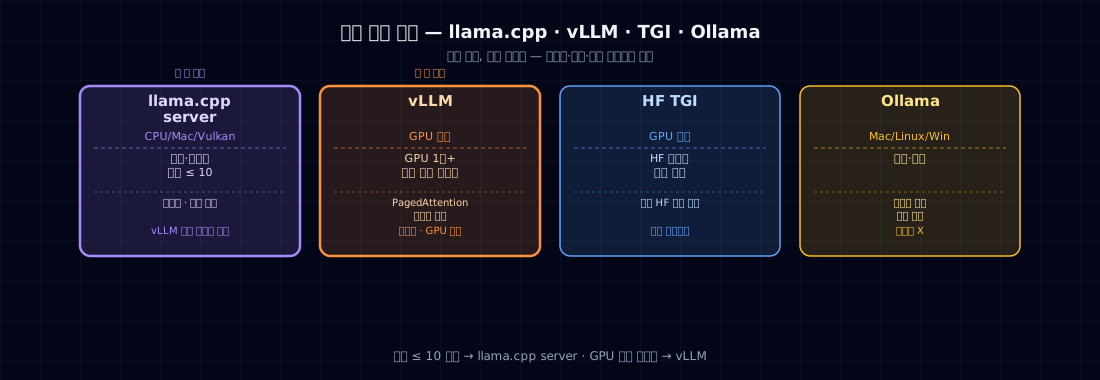
1. 서빙 스택 비교¶
| 스택 | 강점 | 약점 | 어디 |
|---|---|---|---|
| llama.cpp server | CPU/Mac/Vulkan 모두 OK, 가벼움 | 큰 모델·많은 동시 사용자 약함 | 사내망·노트북·작은 서비스 |
| vLLM | PagedAttention, 처리량 최강 | GPU 만, 무거움 | GPU 한 장+ 많은 사용자 |
| HF TGI | 표준 HF 모델 자동 지원 | 운영 학습곡선 | HF 의존 환경 |
| Ollama | 사용자 친화 | 운영급 X | 데모·개발 |
본 책 운영 권장: - 사내·작은 서비스 (동시 ≤ 10) → llama.cpp server - GPU 한 장+ 많은 사용자 → vLLM
2. 지연 예산 산수¶
지연 = prefill_time + decode_time
prefill_time = (입력 토큰 수) / prefill_TPS
decode_time  = (출력 토큰 수) / decode_TPS
본 책 모델 (Qwen 0.5B Q4, M2 Pro):
| 항목 | 값 |
|---|---|
| prefill TPS | ~2000 tok/s |
| decode TPS | ~150 tok/s |
| 입력 200 토큰 | 0.1 초 |
| 출력 100 토큰 | 0.7 초 |
| 합계 | ~0.8 초 |
p95 지연 예산이 1.5 초면 통과. 동시 사용자 5명 = 가능. 동시 50명 = vLLM 또는 GPU 필요.
3. llama.cpp server — 사내 작은 서비스¶
./llama.cpp/llama-server \
    -m dist/tiny-tale-q4km.gguf \
    --host 0.0.0.0 --port 8080 \
    --ctx-size 1024 \
    --threads 8 \
    --n-gpu-layers -1                 # Apple Silicon Metal
OpenAI 호환 API 자동 생성:
from openai import OpenAI
client = OpenAI(base_url="http://localhost:8080/v1", api_key="dummy")
resp = client.chat.completions.create(
    model="tiny-tale",
    messages=[{"role":"user","content":"옛날 옛적에"}],
    temperature=0.8, max_tokens=120,
)
print(resp.choices[0].message.content)
장점: 표준 OpenAI 클라이언트 그대로. 마이그레이션 부담 0.
4. vLLM — GPU 처리량 최대¶
pip install vllm
python -m vllm.entrypoints.openai.api_server \
    --model Qwen/Qwen2.5-0.5B-Instruct \
    --host 0.0.0.0 --port 8000 \
    --max-model-len 4096 \
    --gpu-memory-utilization 0.9
vLLM 의 핵심 — PagedAttention (Kwon et al., 2023): - KV cache 를 page 단위로 관리 - 동시 요청 간 메모리 공유 - 처리량 5~10× vs naïve 서빙
A100 80GB 에서:
| 모델 | 동시 사용자 | 처리량 (tok/s, total) |
|---|---|---|
| Qwen 0.5B | 100 | 5,000+ |
| Qwen 7B | 30 | 2,500+ |
언제 vLLM: GPU 가 있고 동시 사용자 ≥ 30.
5. 배치·동시성¶
서빙의 두 패턴: - Static batching: 한 batch 만들고 끝까지. 작은 동시성. - Continuous batching (vLLM/TGI): 다른 시점에 들어온 요청을 매 step 합침. 처리량 ↑.
5b. Speculative decoding — 작은 모델의 또 다른 자리¶
지연을 줄이는 다른 축이 있습니다. Speculative decoding: 작고 빠른 draft 모델이 토큰 여러 개를 앞질러 추측하고, 크고 정확한 target 모델이 그 추측을 한 번에 검증해 맞는 데까지 받아들입니다. 출력 분포는 target 모델과 동일하게 보장되면서(품질 손실 0), 메모리 대역폭에 묶인 디코딩을 2~3× 앞당깁니다.
이 책 입장에서 특별한 이유: 우리가 만든 작은 모델이 바로 그 draft 모델이 됩니다. 같은 토크나이저 계열의 0.5~1B 모델이 7B~70B target 의 가속기로 붙는 식 — SLM 의 또 다른 출구입니다.
언제 효과적인가:
- 단독 사용자·낮은 동시성에서 토큰당 지연(latency)이 중요할 때 — speculative 의 주 효과는 지연 단축이다.
- draft 가 잘 맞을수록(같은 도메인·토크나이저) 채택률↑ → 가속↑. 도메인 SLM 을 draft 로 쓰면 궁합이 좋다.
함정: 높은 동시성에서는 이득이 줄어든다. continuous batching 이 이미 GPU 를 꽉 채우면 draft 검증이 오히려 오버헤드일 수 있다. §5 의 배치 전략과 둘 중 무엇이 병목인지(지연 vs 처리량) 보고 고를 것.
6. 헬스체크·그레이스풀 셧다운·어댑터 핫스왑¶
헬스체크¶
| health.py | |
|---|---|
K8s/Docker 의 liveness probe 에 연결.
그레이스풀 셧다운¶
새 요청 차단 → 기존 요청 처리 완료 대기 → 종료. K8s preStop hook + SIGTERM 처리.
어댑터 핫스왑 (LoRA)¶
vLLM 은 LoRA 어댑터 동적 로드 지원:
# vLLM serve 시 --enable-lora --max-loras 4
# 추론 시 어댑터 지정
resp = client.chat.completions.create(
    model="qwen-with-adapter-v2",          # 어댑터 이름
    messages=[...]
)
→ 롤백 30초 안 가능 (어댑터 swap 만, base 재로드 X). Ch 32 의 운영 사이클.
7. 자주 깨지는 포인트¶
- n_gpu_layers=-1 빼먹음 — Apple Silicon 에서 CPU only 로 떨어져 30× 느림.
- ctx-size 너무 큼 — 메모리 폭발. 본 책 모델 1024 충분.
- 동시 사용자 측정 X — 1명일 때만 빠름. 운영 부하 측정 필수.
- vLLM 메모리 부족 —
gpu-memory-utilization0.9 가 표준. KV cache 자리 남김. - 헬스체크 없음 — 모델 죽어도 모름. K8s/Docker 차원.
- 그레이스풀 셧다운 X — 배포 시 사용자 요청 끊김.
- 어댑터 합치기 후 swap 어려움 — LoRA 분리 유지하면 핫스왑.
- OpenAI 호환 API 검증 X —
/v1/chat/completions가 실제 OpenAI SDK 와 호환되는지 직접 테스트.
8. 운영 시 체크할 점¶
서빙 게이트:
- 스택 결정 (llama.cpp / vLLM / TGI)
- 지연 예산 산수 (p50/p95)
- 단일 요청 latency 측정
- 동시 10/50/100 사용자 부하 테스트
- OpenAI 호환 API 검증
- 헬스체크 endpoint
- 그레이스풀 셧다운
- (LoRA) 어댑터 핫스왑 가능
- 모니터링 (Ch 32)
9. 연습문제¶
- 본 책 GGUF 모델을
llama-server로 띄워 OpenAI SDK 로 호출. - 단일 요청 vs 동시 10 vs 동시 50 의 p50/p95 측정.
- vLLM (가능하면) 으로 같은 부하 테스트. 처리량 차이.
- 어댑터 2개를 vLLM 에 동시 로드 → 요청별 다른 어댑터 사용.
- (생각해볼 것) AICC 콜 마감 후 1초 안에 요약 — p95 1초 예산이라면 어느 스택?
원전¶
- Kwon et al. (2023). Efficient Memory Management for Large Language Model Serving with PagedAttention. (vLLM) arXiv:2309.06180
- Leviathan et al. (2023). Fast Inference from Transformers via Speculative Decoding. arXiv:2211.17192
- Chen et al. (2023). Accelerating Large Language Model Decoding with Speculative Sampling. (DeepMind) arXiv:2302.01318
- llama.cpp
examples/server/README - HuggingFace TGI docs
- "Designing Data-Intensive Applications" (Kleppmann) — 서빙 패턴 일반