Serving — llama.cpp server · vLLM · Latency Budget¶

What you'll learn
- 3 serving stacks —
llama.cpp server/ vLLM / HF TGI - Latency budget arithmetic — token count × TPS = latency
- Batching, concurrency, KV cache — 5–10× throughput on the same GPU
- Speculative decoding — use the small model you built as a draft model to cut latency 2–3×
- Health checks, graceful shutdown, adapter hot-swap
Prerequisites
Ch 19 Quantization, Ch 20 GGUF. You're now taking responsibility for production inference.
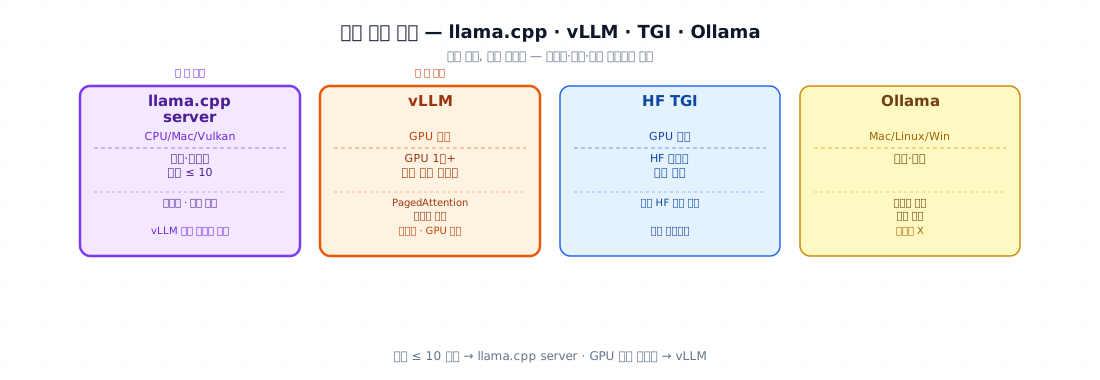
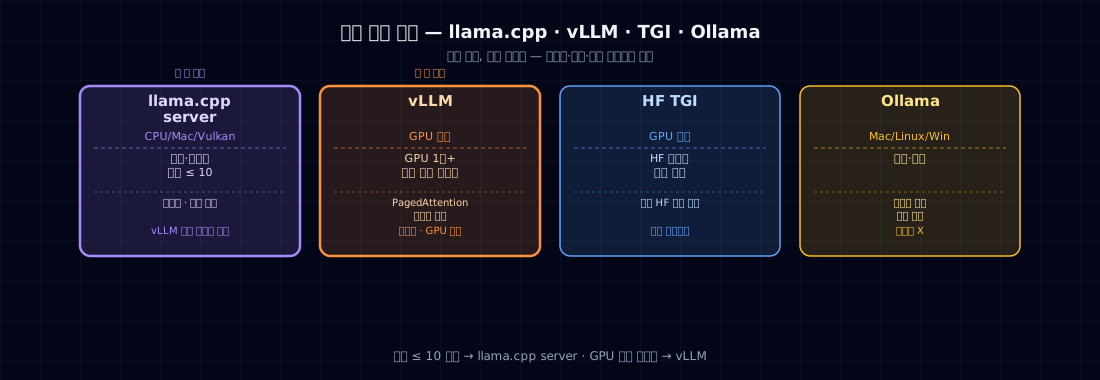
1. Serving Stack Comparison¶
| Stack | Strengths | Weaknesses | Best for |
|---|---|---|---|
| llama.cpp server | CPU/Mac/Vulkan all work, lightweight | Struggles with large models and high concurrency | Internal network, laptops, small services |
| vLLM | PagedAttention, best throughput | GPU only, heavyweight | 1+ GPUs with many concurrent users |
| HF TGI | Auto-supports standard HF models | Operational learning curve | HF-native environments |
| Ollama | User-friendly | Not production-grade | Demos, development |
Recommendation for this book: - Internal/small service (≤ 10 concurrent users) → llama.cpp server - 1+ GPU with many users → vLLM
2. Latency Budget Arithmetic¶
latency = prefill_time + decode_time
prefill_time = (input token count) / prefill_TPS
decode_time  = (output token count) / decode_TPS
This book's model (Qwen 0.5B Q4, M2 Pro):
| Item | Value |
|---|---|
| Prefill TPS | ~2000 tok/s |
| Decode TPS | ~150 tok/s |
| 200 input tokens | 0.1 s |
| 100 output tokens | 0.7 s |
| Total | ~0.8 s |
If your p95 latency budget is 1.5 s, you're fine. 5 concurrent users: feasible. 50 concurrent users: you need vLLM or a GPU.
3. llama.cpp server — Internal Small Service¶
./llama.cpp/llama-server \
    -m dist/tiny-tale-q4km.gguf \
    --host 0.0.0.0 --port 8080 \
    --ctx-size 1024 \
    --threads 8 \
    --n-gpu-layers -1                 # Apple Silicon Metal
It auto-generates an OpenAI-compatible API:
from openai import OpenAI
client = OpenAI(base_url="http://localhost:8080/v1", api_key="dummy")
resp = client.chat.completions.create(
    model="tiny-tale",
    messages=[{"role":"user","content":"Once upon a time"}],
    temperature=0.8, max_tokens=120,
)
print(resp.choices[0].message.content)
Benefit: the standard OpenAI client works unchanged. Zero migration friction.
4. vLLM — Maximum GPU Throughput¶
pip install vllm
python -m vllm.entrypoints.openai.api_server \
    --model Qwen/Qwen2.5-0.5B-Instruct \
    --host 0.0.0.0 --port 8000 \
    --max-model-len 4096 \
    --gpu-memory-utilization 0.9
vLLM's key innovation — PagedAttention (Kwon et al., 2023): - Manages KV cache in page-sized blocks - Shares memory across concurrent requests - 5–10× throughput vs. naive serving
On an A100 80GB:
| Model | Concurrent users | Throughput (tok/s, total) |
|---|---|---|
| Qwen 0.5B | 100 | 5,000+ |
| Qwen 7B | 30 | 2,500+ |
When to use vLLM: you have a GPU and ≥ 30 concurrent users.
5. Batching and Concurrency¶
Two serving patterns: - Static batching: fill one batch, run it to completion. Works for low concurrency. - Continuous batching (vLLM/TGI): merges requests from different arrival times at every decode step. Throughput scales up.
5b. Speculative decoding — another seat for small models¶
There's a different axis for cutting latency. Speculative decoding: a small, fast draft model guesses several tokens ahead, and the large, accurate target model verifies those guesses in a single pass, accepting them up to the first mismatch. The output distribution is guaranteed identical to the target model's (zero quality loss), while memory-bandwidth-bound decoding speeds up by 2–3×.
Why this matters for this book in particular: the small model you built is exactly that draft model. A 0.5–1B model from the same tokenizer family attaches as an accelerator for a 7B–70B target — another exit ramp for an SLM.
When it helps:
- Single user / low concurrency, where per-token latency is what matters — speculative decoding's main payoff is lower latency.
- The better the draft matches (same domain and tokenizer), the higher the acceptance rate → more speedup. A domain SLM makes a great draft.
Gotcha: the gain shrinks at high concurrency. If continuous batching already saturates the GPU, draft verification can become overhead. Look at which one is your bottleneck (latency vs throughput) and choose alongside the batching strategy in §5.
6. Health Checks · Graceful Shutdown · Adapter Hot-Swap¶
Health check¶
| health.py | |
|---|---|
Wire this into your Kubernetes/Docker liveness probe.
Graceful shutdown¶
Block new requests → wait for in-flight requests to finish → exit. Use the Kubernetes preStop hook + SIGTERM handling.
Adapter hot-swap (LoRA)¶
vLLM supports dynamic LoRA adapter loading:
# Start vLLM with --enable-lora --max-loras 4
# Specify the adapter at inference time
resp = client.chat.completions.create(
    model="qwen-with-adapter-v2",          # adapter name
    messages=[...]
)
→ Rollback in under 30 seconds — just swap the adapter, no base model reload needed. This connects to the production cycle in Ch 32.
7. Common Failure Modes¶
- Forgetting
--n-gpu-layers -1— falls back to CPU on Apple Silicon; runs ~30× slower. - ctx-size set too large — memory blows up. 1024 is enough for this book's models.
- Never measuring concurrent users — fast at 1 user, broken at 20. Measure production load.
- vLLM OOM —
gpu-memory-utilization 0.9is the standard. Leaves room for the KV cache. - No health check — the model dies and you don't know. Handle this at the Kubernetes/Docker level.
- No graceful shutdown — user requests get cut off during deployments.
- Merging the adapter before hot-swap — keep LoRA separate if you want to swap it live.
- Not validating OpenAI API compatibility — test
/v1/chat/completionsdirectly against the real OpenAI SDK.
8. Operational Checklist¶
Serving gates:
- Stack chosen (llama.cpp / vLLM / TGI)
- Latency budget arithmetic (p50/p95)
- Single-request latency measured
- Load test at 10/50/100 concurrent users
- OpenAI-compatible API validated
- Health check endpoint
- Graceful shutdown
- (LoRA) Adapter hot-swap working
- Monitoring set up (Ch 32)
9. Exercises¶
- Serve this book's GGUF model with
llama-serverand call it via the OpenAI SDK. - Measure p50/p95 for single request, 10 concurrent, and 50 concurrent users.
- Run the same load test on vLLM (if you have a GPU). Compare throughput.
- Load two adapters into vLLM simultaneously and route individual requests to different adapters.
- (Think about it) An AICC call needs a summary within 1 second of hanging up. Your p95 budget is 1 s. Which stack can you use?
References¶
- Kwon et al. (2023). Efficient Memory Management for Large Language Model Serving with PagedAttention. arXiv:2309.06180
- Leviathan et al. (2023). Fast Inference from Transformers via Speculative Decoding. arXiv:2211.17192
- Chen et al. (2023). Accelerating Large Language Model Decoding with Speculative Sampling. (DeepMind) arXiv:2302.01318
- llama.cpp
examples/server/README - HuggingFace TGI docs
- "Designing Data-Intensive Applications" (Kleppmann) — serving patterns