Build Your Own Domain SLM

What you'll do in this capstone
- A · From scratch — data → BPE →
GPTMinitraining and evaluation → reproducible PyTorch package → Hub - B · Compatible deployment — HF-compatible sLLM → domain fine-tuning → evaluation → GGUF →
llama.cpp→ Hub and demo - Keep the model card, license, tokenizer, config, and usage code aligned with the path that actually runs
- Complete the book without assuming that every custom architecture automatically becomes GGUF
Prerequisites
All of Parts 1–8. At minimum: Ch 4 (open-weight landscape), Ch 22 (choosing an sLLM), Ch 27 (distillation), Ch 29 (data pipeline) — especially the PII and licensing sections.
1. Concept — Becoming Someone Else's "Off-the-Shelf sLLM"
In Ch 22 you learned how to read HuggingFace model cards — 7 items: total/active parameters, training tokens, data composition, context length, license, tokenizer, and quantization. This capstone is your turn to fill in those 7 items yourself.
Choose the completion criterion first.
| Track | Choose it when | Final artifact | Claim you do not make |
|---|---|---|---|
| A · From scratch | Your goal is to design and understand the transformer | GPTMini code, checkpoint, tokenizer, config, reproduction script, model card |
No GGUF or AutoModel compatibility without converter support |
| B · Compatible deployment | Your goal is to experience the deployment ecosystem | HF-compatible model, evaluation, GGUF, llama.cpp, optional demo |
No claim that you designed the architecture from scratch |
Both are complete capstones; they optimize for different learning outcomes.
Both contracts are executable in examples/deployment-boundary. The current local baseline requires a 0.0 maximum logit delta after Track A reload and a successful llama.cpp call against a real Q4 GGUF for Track B.
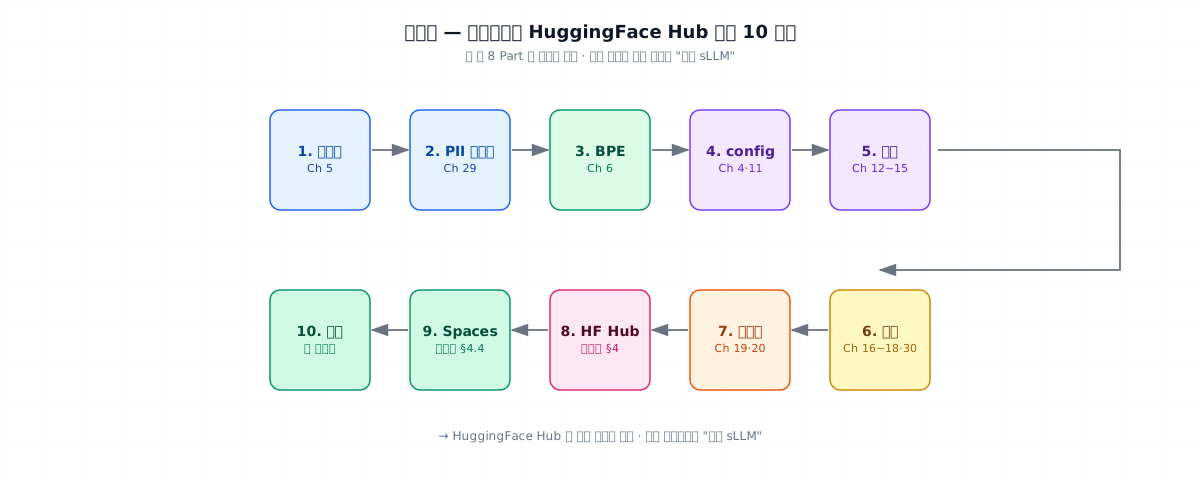
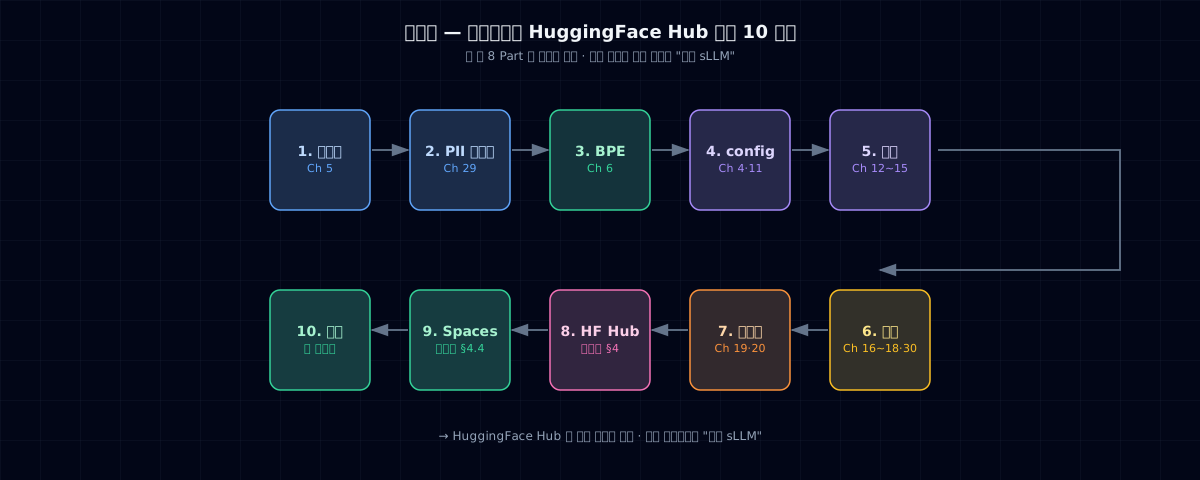
2. The 10 Steps
| Step | What | Related chapter |
|---|---|---|
| 1 | Choose domain + collect/synthesize data | Ch 5, 7 |
| 2 | PII masking + dedup + license cleanup | Ch 7, 29 |
| 3 | Train BPE tokenizer | Ch 6 |
| 4 | Decide model config (10M–30M, dense, decoder-only) | Ch 4, 11 |
| 5 | Train (mixed precision, grad accum, checkpointing) | Ch 12–15 |
| 6 | Evaluate (perplexity + domain probe + regression) | Ch 16–18, 30 |
| 7 | A: PyTorch quantization experiment · B: int4 + GGUF conversion | Ch 19, 20 |
| 8 | Upload to HuggingFace Hub | (this chapter) |
| 9 | A: reproduction notebook · B: optional Spaces demo | (this chapter) |
| 10 | Retrospective — "What would I change next time?" | — |
Do not mix tracks halfway through
Wrapping a Track A checkpoint in a GPT-2 config does not make it HF-compatible. Fine-tuning an existing Track B model does not make it from-scratch. Record the path honestly in the model card.
3. Candidate Domains
| # | Domain | Data | Evaluation |
|---|---|---|---|
| 1 | Korean fairy-tale generator | TinyStories Korean synthetic (5K–50K stories) | Human eval + perplexity |
| 2 | Recipe assistant | Ingredient → steps pairs, synthesized | Structured output format compliance |
| 3 | Commit message generator | diff → one-line pairs (collected from open source) | Human eval |
| 4 | Domain NER (e.g., call transcripts) | 10K synthetic labels | F1 |
Default recommendation: #1 Korean fairy-tale generator (most impressive visual demo; stays true to the spirit of TinyStories).
4. Uploading to HuggingFace Hub — Step by Step
4.1 Prerequisites
4.2 Push model + tokenizer
{username}/{model-name}format. Put the domain code name in the model name. Decide public vs. private upfront (private repos may require a Pro account).- Track A: upload
nano_gpt.py, checkpoint, book-specificconfig.json,tokenizer.json,requirements.txt, and a reproduction script. Track B: upload the standard HF config, safetensors, and tokenizer files. - Upload GGUF only for Track B. If Track A has no GGUF support, say so explicitly in the model card.
4.3 Model card (README.md)
This file becomes the front page of your Hub repo. It's your turn to fill in the 7 items from Ch 22.
---
license: apache-2.0
language:
  - ko
tags:
  - text-generation
  - small-language-model
  - tinystories
  - korean
datasets:
  - desty/tinystories-ko-synthetic   # if you uploaded the dataset too
base_model: null                      # null for from-scratch
---

# Tiny Tale KO 10M

A 10M-parameter Korean fairy-tale generator, trained from scratch as the
capstone of [Tiny LLM from Scratch](https://desty.github.io/study-tiny-llm/).

## Model — 7 Items

> The values below illustrate the model-card format. Replace every value with observed training logs and license-review results before publishing.

| Item | Value |
|---|---|
| Total / active parameters | 10M / 10M (dense) |
| Training tokens | 200M (Chinchilla 20×) |
| Training data | TinyStories-KO synthetic (50K stories) |
| Context length | 512 |
| License | Apache 2.0 |
| Tokenizer | BPE 8K vocab (Korean character-level) |
| Distribution | PyTorch checkpoint + reproduction code (Track A) |

## Usage

\`\`\`python
import json, sys, torch
from huggingface_hub import snapshot_download

repo = snapshot_download("desty/tiny-tale-ko-10m")
sys.path.insert(0, repo)
from nano_gpt import GPTConfig, GPTMini

cfg = GPTConfig(**json.load(open(f"{repo}/config.json")))
model = GPTMini(cfg)
checkpoint = torch.load(f"{repo}/final.pt", map_location="cpu")
model.load_state_dict(checkpoint["model"])
model.eval()
\`\`\`

This is a custom `GPTMini` architecture, so it does not currently support GGUF or `AutoModelForCausalLM`.

## Limitations

- Narrow domain — breaks on non-fairy-tale input
- Context 512 — not suitable for RAG
- Korean only — English input breaks
Track B usage
For Track B, record the real base model and provide both AutoModelForCausalLM.from_pretrained(...) and llama-cli -m model-q4km.gguf ... examples. Do not copy those claims into a Track A model card.
4.4 Track B: Optional Spaces Demo
A standard HF architecture in Track B can use this short Gradio demo. Track A needs a GPTMini loader instead of the code below.
5. Common Failure Modes
1. PII left in training data — once you go public on HF, recovery is nearly impossible. Run the Ch 29 PII masking pipeline before you upload.
2. License conflicts — TinyStories (CDLA-Sharing), FineWeb-Edu (ODC-By), Cosmopedia (Apache 2.0) — your training data licenses affect your model license. Audit each data source before choosing Apache 2.0 / MIT / CC-BY-SA.
3. Empty model card — HF's search and trust scores both suffer for models without a README. At minimum: the 7 items from Ch 22 + a Limitations section.
4. Missing execution code — a Track A checkpoint alone is not reproducible. Upload nano_gpt.py, the exact config, tokenizer, dependencies, and loader example. Track B still needs the standard tokenizer files for from_pretrained.
5. Mixing the two tracks in the model card — claiming that Track A works with GGUF/AutoModel, or calling Track B from-scratch. Document only the execution path you verified.
6. Mistakes when going public after private — once public, taking it back is hard. Finish your PII and copyright review before flipping the switch.
6. Operational Checklist — Final Gate Before Upload
- PII masking complete on training data (Ch 29)
- Training data licenses audited + model license decided
- Model card: 7 items + Limitations + usage code
-
tokenizer.jsonincluded - A: model code + config + checkpoint + reproduction script included
- B:
from_pretrainedworks from the standard HF directory - B: GGUF included only after pre/post-conversion evaluation passes
- (Optional) safetensors format, with a matching custom loader when needed
- Regression evaluation passed (Ch 30)
- Upload private first and run the documented usage in a clean environment
- Then flip to public
7. Retrospective (The Last Page)
After uploading, write one page in your own notes. What would you change if you did this again?
- Data — would you increase the synthetic fraction? The human-review fraction?
- Model size — was 10M right, or should it have been 30M?
- Training time — should you have gone to 100× overtraining?
- Evaluation — which probes were most useful?
- Quantization — how much did int4 hurt in your domain?
- Model card — what sections should have been added?
This retrospective is the starting point for the next model you build.
8. Graduation
If you've made it here, the artifact meets these conditions:
- It is live on Hugging Face Hub (
https://huggingface.co/{username}/{model}) - Track A: code, config, checkpoint, and tokenizer reproduce
GPTMiniin a clean environment - Track B: both
from_pretrainedand GGUF execution are verified, with the base model disclosed - Someone else can evaluate it with the Ch 22 decision tree
That's where all 8 parts of the book come together.
References
- HuggingFace Hub docs — Model Cards · Spaces · GGUF
- HuggingFace
huggingface_hubPython library - Tiny LLM from Scratch Parts 1–8 — every chapter is one step of the capstone