llama.cpp and GGUF¶

What you'll learn
- GGUF format — what's inside it and why it became the standard
- Convert a HuggingFace model to GGUF in one step (
convert_hf_to_gguf.py) - Run inference on your laptop with llama.cpp / llama-cli
- Distinguish the deployment boundary between custom
GPTMiniand HF-compatible models
Prerequisites
Ch 19 Quantization. A model in HuggingFace transformers format (safetensors + config.json + tokenizer.json).
1. Concept — What Is GGUF¶
GGUF (GPT-Generated Unified Format) is a single-file model format defined by the llama.cpp project. It evolved from GGML in 2023 to GGUF in 2024.
What's inside one GGUF file¶
[header]
  magic bytes "GGUF"
  version
  metadata key-value pairs
    arch:           "llama" / "gpt2" / ...
    n_layer:        12
    n_head:         8
    vocab_size:     8000
    rope_freq_base: 10000.0
    quantization:   "Q4_K_M"
[tokenizer]
  vocab + merges
[weights]
  layer_0_attn_qkv  (int8 or int4 quantized)
  layer_0_attn_proj
  layer_0_ffn_w1
  ...
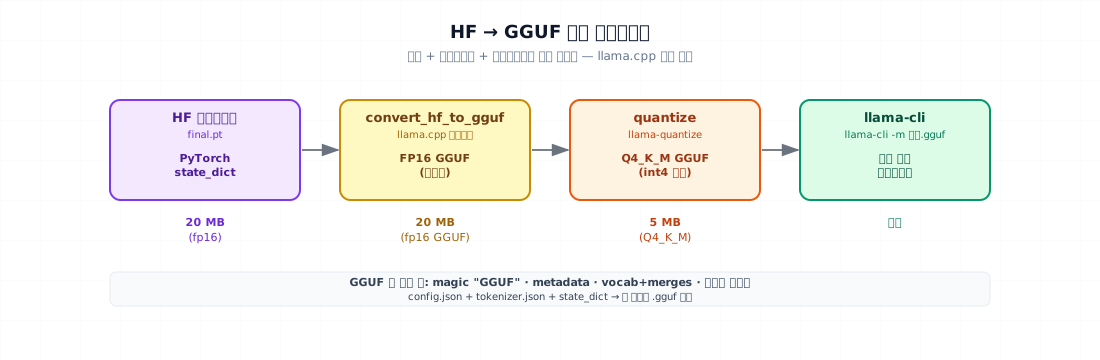
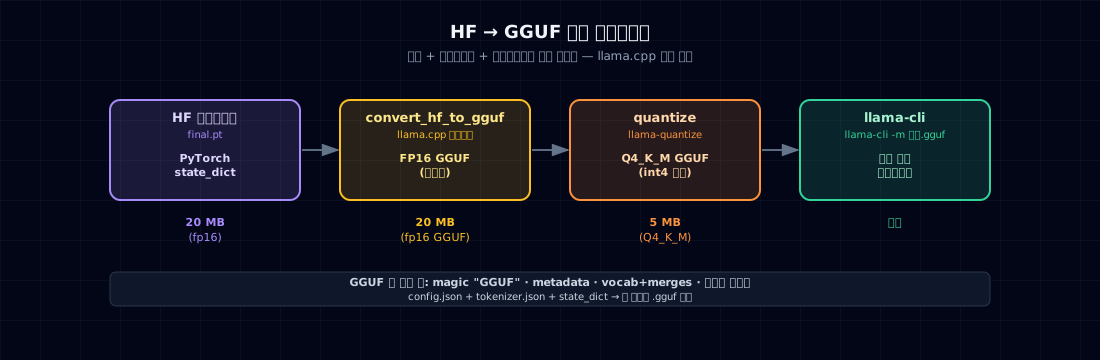
Model + tokenizer + metadata — all in one file. It bundles PyTorch state_dict + config.json + tokenizer.json into a single artifact.
Why it became the standard¶
| Aspect | Original (HF) | GGUF |
|---|---|---|
| File count | 5–10 files | 1 file |
| Quantization | separate library | built into the format |
| Inference | PyTorch / Transformers | llama.cpp (C++, Python wrapper) |
| Devices | mainly GPU | CPU / Apple Silicon / CUDA / Metal / Vulkan |
| Memory | partial mmap | 100% mmap — load large models instantly |
The de facto standard for laptop, mobile, and Apple Silicon inference.
2. Why Use It — Separate the Two Paths¶
This book has two different model paths.
| Path | Model | Where this chapter ends |
|---|---|---|
| From scratch | The custom 10M GPTMini |
Reproducible PyTorch checkpoint + code + tokenizer |
| Compatible deployment | An HF model supported by the llama.cpp converter |
GGUF quantization + llama-cli |
GGUF is not a universal serialization format for arbitrary PyTorch models. llama.cpp must know the architecture and tensor mapping. Exporting GPTMini therefore requires architecture support and a converter implementation. The book no longer assumes that work is already done.
This chapter uses a supported HF model to teach the deployment ecosystem. The from-scratch model finishes as a PyTorch package in Track A of the capstone.
Boundary verified in code
examples/deployment-boundary saves and reloads the Track A checkpoint and requires identical logits, then invokes a real Q4 GGUF through a llama.cpp backend for Track B. Both checks passed in the 2026-07-19 local run; Track A is intentionally recorded as unsupported by AutoModel and GGUF.
3. GGUF Quantization Variants¶
Quantization types defined by llama.cpp:
| Format | Approx. bits | Size vs F16 | Tradeoff |
|---|---|---|---|
| F16 | 16 | 1× | Baseline · largest |
| Q8_0 | 8 | about 1/2 | Prioritizes quality retention |
| Q5_K_M | 5 | about 1/3 | Middle ground |
| Q4_K_M | 4 | about 1/4 | Common practical choice |
| Q3_K_S | 3 | about 1/5 | Smaller, with higher regression risk |
Actual size and quality loss depend on architecture, tensor layout, and evaluation set. Do not treat an average PPL number as a guarantee for your model; evaluate before and after conversion.
4. Minimal Example — HF → GGUF Conversion¶
4.1 Install llama.cpp¶
git clone https://github.com/ggml-org/llama.cpp
cd llama.cpp
cmake -B build                # CPU; Metal is enabled by default on Apple Silicon
# For NVIDIA CUDA: cmake -B build -DGGML_CUDA=ON
cmake --build build --config Release
pip install -r requirements/requirements-convert_hf_to_gguf.txt
Build options can change; use the official llama.cpp build guide for other backends.
4.2 Convert¶
First save a converter-supported model as a standard HF directory.
from transformers import AutoModelForCausalLM, AutoTokenizer

model_id = "HuggingFaceTB/SmolLM2-360M"
out_dir = "runs/compatible_hf"

model = AutoModelForCausalLM.from_pretrained(model_id)
tokenizer = AutoTokenizer.from_pretrained(model_id)
model.save_pretrained(out_dir, safe_serialization=True)
tokenizer.save_pretrained(out_dir)
Then convert that directory.
# 1. Convert to fp16 GGUF                                              (1)
python llama.cpp/convert_hf_to_gguf.py \
    runs/compatible_hf \
    --outfile dist/model-f16.gguf \
    --outtype f16

# 2. Quantize to Q4_K_M                                                (2)
./llama.cpp/build/bin/llama-quantize \
    dist/model-f16.gguf \
    dist/model-q4km.gguf \
    Q4_K_M

ls -lh dist/
# Size depends on the selected model.
- The script needs a HuggingFace transformers format directory, not a raw PyTorch state_dict. Export with
model.save_pretrained(...). - fp16 GGUF → Q4_K_M quantization. Measure runtime on the selected model and hardware.
4.3 Why GPTMini → GPT2LMHeadModel Is Not a Format Conversion¶
GPTMini uses RoPE, RMSNorm, and SwiGLU; GPT-2 uses absolute position embeddings, LayerNorm, and GeLU. Copying tensors with similar shapes does not preserve the model. A method named save_pretrained() or a config.json file does not create architecture compatibility.
Taking a custom model to GGUF requires all of the following:
- Custom
PreTrainedModelandPretrainedConfigsupport intransformers - Weight-mapping tests that prove output equivalence
- Architecture loader and GGUF converter support in
llama.cpp - Logit and PPL regression tests between the PyTorch and GGUF versions
That is a valuable advanced project, not a 30–50-line format conversion. Track A finishes in PyTorch; Track B uses a supported HF model.
5. Serving with llama-cli¶
Once you have a GGUF file:
./llama.cpp/build/bin/llama-cli \
    -m dist/model-q4km.gguf \
    -p "Once upon a time" \
    -n 100 \
    --temp 0.8 \
    --top-p 0.9 \
    --no-display-prompt
Typical output:
Once upon a time, there was a little girl named Lily. She loved to play with
her teddy bear in the garden. One sunny day, Lily found a small flower under
the apple tree...

llama_print_timings:        load time =     45.32 ms
llama_print_timings:      sample time =     12.45 ms /   100 runs
llama_print_timings: prompt eval time =      8.12 ms /     5 tokens
llama_print_timings:        eval time =    234.56 ms /    99 runs
Measure throughput on your own hardware. Model size is only one variable; context length, prompt processing, batching, CPU/GPU offload, and build flags can all change the result. Do not present someone else's benchmark as your deployment performance.
Python wrapper (optional)¶
| llama_cpp_python.py | |
|---|---|
6. Common Failure Points¶
1. Trying to convert the book's nanoGPT directly — convert_hf_to_gguf.py does not know GPTMini. An HF wrapper alone is insufficient; llama.cpp also needs architecture, tensor-mapping, converter, and runtime support.
2. Missing tokenizer — GGUF must include its own vocab/merges. convert_hf_to_gguf.py handles this automatically, but tokenizer.json must be in the export directory.
3. Missing RoPE base in metadata — For Llama-compatible conversions, rope_freq_base (default 10000) must be in the metadata or inference will use a different RoPE.
4. Skipping PPL checks after quantization — There is no universal acceptable quality delta. Always compare PPL and task metrics before and after conversion.
5. llama.cpp build errors — The current official path uses CMake. Metal is enabled by default on Apple Silicon; CUDA uses -DGGML_CUDA=ON. Check the build log and actual offload state.
6. Not enough RAM for mmap — Very large models (70B Q4 = 40 GB) can exceed RAM. mmap lets the OS handle it automatically, but enabling swap is recommended.
7. Trying to use a larger context than the model supports — If GGUF metadata says n_positions=512, you can't use 4K. Set it at conversion time or pass --ctx-size at inference.
7. Ops Checklist¶
GGUF conversion + deployment gate:
- Export to HF transformers format (
save_pretrained) - Include
tokenizer.json+tokenizer_config.json - Run
convert_hf_to_gguf.py→ fp16 GGUF - Run
llama-quantize→ Q4_K_M (or compare Q5_K_M, Q8_0) - Compare PPL before and after conversion
- Generate 5 samples with
llama-cli— compare fp16 vs Q4 output - Measure throughput (tokens/sec)
- Measure memory (RSS)
- When uploading to HuggingFace Hub, include the
.gguffile (capstone §4)
8. Exercises¶
- Download SmolLM2-360M and convert it to both fp16 GGUF and Q4_K_M GGUF. Compare file sizes.
- Run both GGUFs with
llama-clion the same prompt. Compare throughput (tok/s) and output quality. - Try
convert_hf_to_gguf.pywith--outtypeset tof16,bf16, andq8_0. Compare conversion time and file size. - Reimplement the book's 10M model as a Llama-compatible class and convert to GGUF. What's the Q4_K_M PPL loss?
- (Think about it) How does GGUF replace PyTorch state_dict + safetensors? What does it mean that HuggingFace now natively supports GGUF?
References¶
- llama.cpp repo — https://github.com/ggml-org/llama.cpp
- GGUF spec — https://github.com/ggml-org/ggml/blob/master/docs/gguf.md
- llama.cpp quantization variant comparisons (PR #1684 etc.) — definitions of Q4_K_M, Q5_K_M
- HuggingFace GGUF integration docs (2024)