Mixed Precision and Gradient Accumulation

What you'll learn
- bf16 vs fp16 — stability, range, and hardware differences. Why bf16 became the LLM standard
- Mixed precision with one line of PyTorch
torch.autocast - Gradient accumulation — faking large batches on a small GPU
- Gradient checkpointing — cutting activation memory by 1/√L
- Practical settings for this book's 10M / 30M / 125M models
Prerequisites
The 5-step loop from Ch 12. Ch 11 memory arithmetic — the breakdown of params + grads + Adam state + activations.
1. The precision trade-off
| Format | bytes | exponent bits | mantissa bits | range | precision |
|---|---|---|---|---|---|
| fp32 | 4 | 8 | 23 | ±3.4×10³⁸ | very high |
| fp16 | 2 | 5 | 10 | ±6.5×10⁴ | lower, overflow risk |
| bf16 | 2 | 8 | 7 | ±3.4×10³⁸ (same as fp32) | lower, no overflow |
| fp8 | 1 | 4 or 5 | 3 or 2 | narrow | very low |
The key difference:
- fp16 — decent precision but narrow range. If a gradient exceeds 6.5×10⁴, it overflows to NaN.
- bf16 — same range as fp32. Lower precision but no overflow. That's why it became the LLM standard.
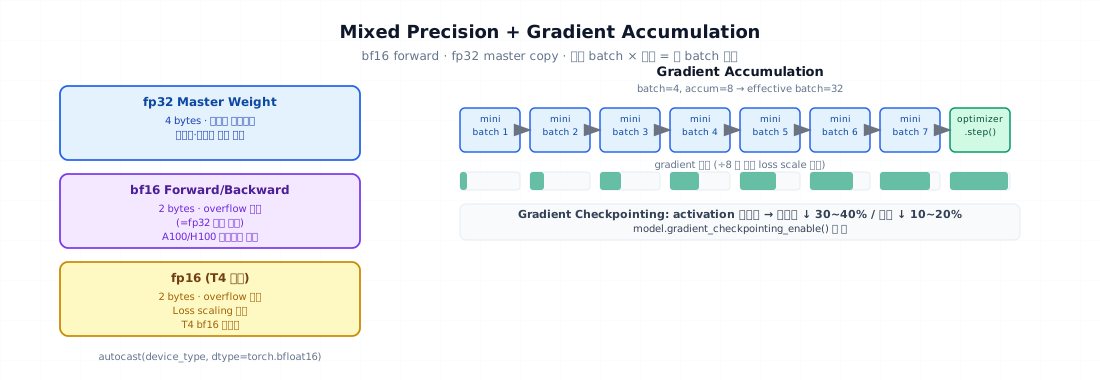
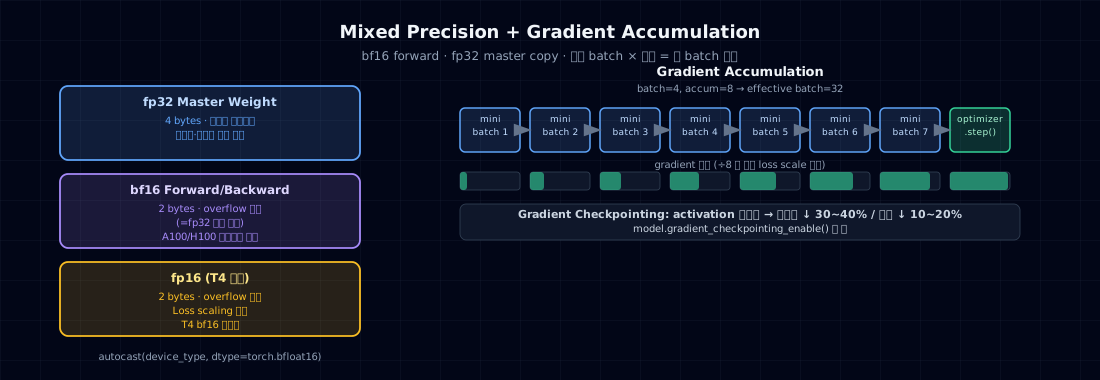
→ A100 / H100: use bf16. T4: use fp16 (T4 doesn't support bf16).
2. Why it matters — memory and speed both
Memory
From Ch 11: bf16 mixed precision halves the memory for params/grads compared to fp32.
| Model | fp32 training memory | bf16 mixed |
|---|---|---|
| 10M | 160 MB | 120 MB |
| 125M | 2 GB | 1.5 GB |
| 1B | 16 GB | 12 GB |
Speed
- A100 / H100 Tensor Cores — bf16/fp16 matmul is 2~8× faster than fp32.
- T4 fp16 = 65 TFLOPS, fp32 = 8 TFLOPS — 8× difference.
→ Without mixed precision, training effectively never finishes.
3. How mixed precision works
It's called "mixed" because not every operation runs in bf16.
| Part | dtype | Why |
|---|---|---|
| Forward (matmul, ffn) | bf16 | faster, lower memory |
| Stored activations | bf16 | lower memory |
| Loss computation | fp32 | precision required |
| Gradients | bf16 → fp32 when accumulating | stability |
| Optimizer state (Adam m, v) | fp32 | critical for training stability |
| Master weights | fp32 (shadow) + bf16 (compute copy) | small updates survive |
→ That "12 bytes/param + 2 bytes/param ≈ 14 bytes/param" formula from Ch 11 comes from exactly this.
4. Minimal example — autocast in one line
PyTorch handles mixed precision automatically.
- With fp16,
GradScaleris required — tiny gradients underflow to 0 in fp16. The scaler multiplies loss up before backward, then divides back before the step. bf16 doesn't need this because its range is wide enough. - The forward pass inside
autocastruns automatically in bf16. So does backward.
T4 (fp16) version
scaler.scale(loss)— multiplies loss by a large number before backward to prevent underflow.
5. Gradient accumulation — faking large batches
The problem
Stable training wants large batches. But GPU memory caps you at batch=32.
The solution
Run forward+backward N times, accumulating gradients → take one optimizer step on step N. Effective batch = batch × N.
- Divide loss by N — so that N accumulations produce an average, not a sum.
backward()runs N times. Gradients accumulate automatically.- Step + zero_grad on the Nth iteration. Scheduler too.
Trade-offs
- Upside: memory stays the same (1× batch), but the effective batch is N×.
- Downside: takes N× longer. (Sometimes running a smaller batch directly is actually more efficient.)
6. Gradient checkpointing — cutting activation memory
From Ch 11: activations account for more than half of training memory. To reduce it:
The idea
Don't store all intermediate activations during the forward pass — only store layer boundaries. During backward, recompute activations by running forward again.
| Mode | Memory | Time |
|---|---|---|
| Standard | store all activations | 1× |
| Checkpointing | 1/√L activations | 1.3× (recompute overhead) |
Code
checkpoint(fn, *args)— rerunsfnduring backward.use_reentrant=Falseis the PyTorch-recommended setting.
The 10M model in this book doesn't need this (plenty of memory). Use it for 30M+ or large batch sizes.
7. Common failure points
1. Using fp16 without GradScaler — NaN from the very first step, or suddenly NaN after training for a while.
2. Forcing bf16 on a GPU that doesn't support it — T4, V100 don't support bf16. Pascal/Volta: fp16 only. Ampere/Hopper (A100/H100/RTX 30+): bf16 supported.
3. Forgetting to divide loss by accum_steps — gradients become N× larger, effectively N× the learning rate. Training diverges.
4. Running loss.backward() outside autocast — backward runs in autocast automatically anyway. Don't worry about it. Just make sure forward is inside.
5. RNG state with gradient checkpointing — if dropout randomness differs between the two forward passes, you get training inconsistency. PyTorch handles this automatically, but be aware.
6. Clipping before unscaling in fp16 — with fp16 + scaler, call scaler.unscale_(optimizer) before clipping.
7. Assuming mixed precision is always faster — on small models (1M) or short sequences, autocast overhead can actually slow things down. Always measure.
8. Production checklist
Recommended settings for this book:
| Model / Environment | Precision | accum | checkpoint |
|---|---|---|---|
| 10M / M2 MPS | bf16 | 1 | no |
| 10M / Colab T4 | fp16 + scaler | 1 | no |
| 10M / Colab A100 | bf16 | 1 | no |
| 30M / T4 | fp16 + scaler | 2~4 | no |
| 125M / T4 | fp16 + scaler | 4~8 | yes |
| 125M / A100 | bf16 | 1 | no |
Checklist:
- Confirm GPU dtype support (
torch.cuda.is_bf16_supported()) - Use
GradScalerfor fp16 - No scaler needed for bf16
-
autocast(device_type, dtype)— wrap forward only - Don't forget to divide loss by accum_steps
- Watch out for dropout consistency when using checkpointing
9. Exercises
- Run the same training for 1000 steps in fp32 / bf16 / fp16 on your GPU. Compare (a) time, (b) memory, (c) loss.
- Keep effective batch at 128, vary accum_steps at 1 / 4 / 16. Compare time, memory, and final loss.
- For a 30M model, measure memory and time with vs without gradient checkpointing. Does the 1.3× time cost actually justify the 1/√L memory savings?
- During fp16 training, deliberately set a high lr (3e-3) to trigger overflow → NaN. Observe how
GradScalerresponds (printscaler.get_scale()). - (Think about it) If bf16 has the same range as fp32, why is full fp32 training still occasionally necessary? At which point does precision become a problem?
References
- Micikevicius et al. (2017). Mixed Precision Training. arXiv:1710.03740
- Kalamkar et al. (2019). A Study of BFLOAT16 for Deep Learning Training. arXiv:1905.12322
- Chen et al. (2016). Training Deep Nets with Sublinear Memory Cost. arXiv:1604.06174 — gradient checkpointing
- PyTorch docs —
torch.amp.autocast,torch.utils.checkpoint - nanoGPT
train.py— bf16 + accumulation pattern