Loss Curves and Checkpoints¶

What you'll learn
- 5 loss curve patterns — healthy / diverging / stuck / spiking / overfitting
- One-line diagnosis: "X happened → suspect Y"
- Resumable checkpoints — model + optimizer + scheduler + step + RNG
- A mini logging and checkpoint infrastructure for this book's training runs
Prerequisites
Ch 12 training loop and Ch 13 mixed precision. Having run training at least once and watched loss fall.
1. The curve tells you what the model is doing¶
The training loss over time is the most important signal about model state. Five patterns, and you can diagnose all of them just by looking at the curve.
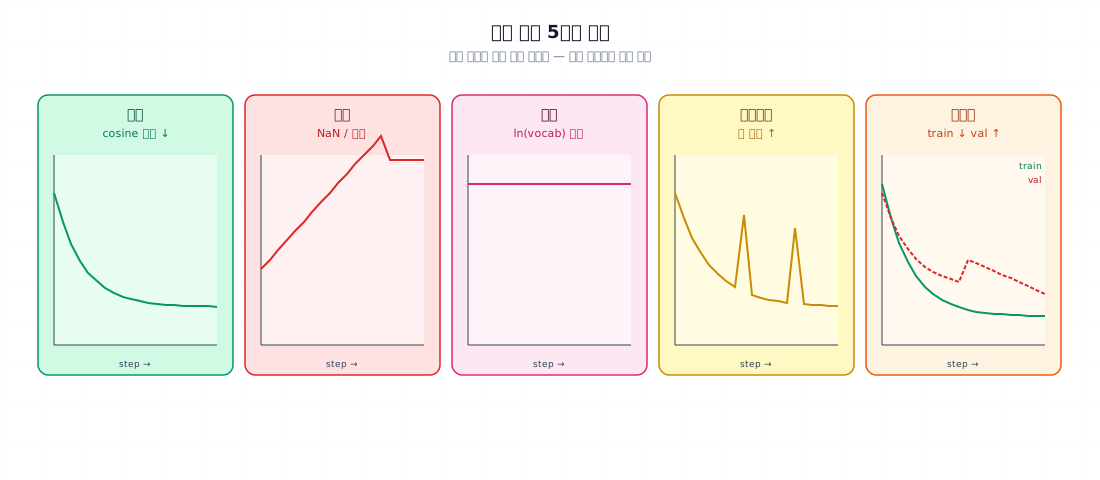
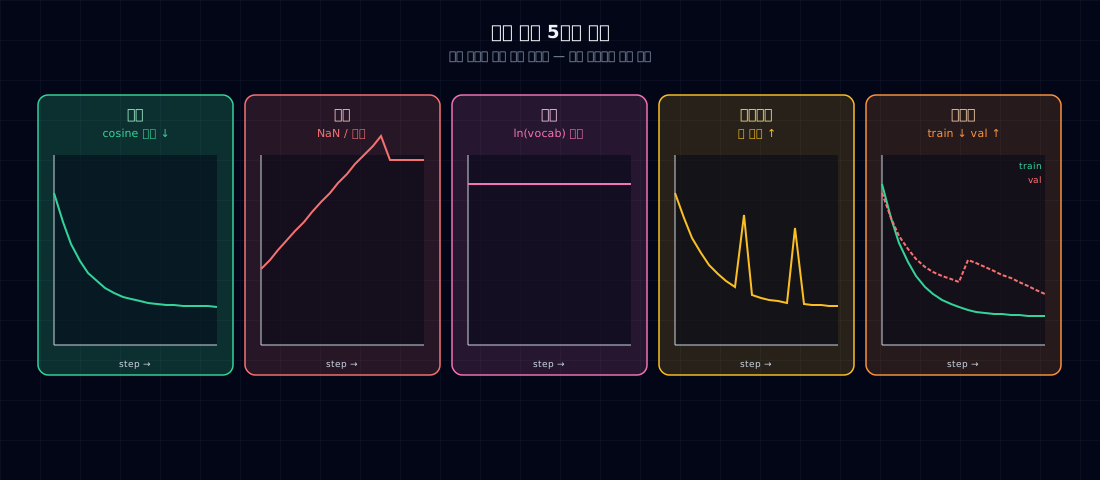
| Pattern | What you see | Diagnosis |
|---|---|---|
| Healthy | warmup drop, then smooth fall following cosine | training is progressing |
| Diverging | NaN or explosion upward | lr too high, fp16 overflow |
| Stuck | hovering near ln(vocab) from the start | training isn't happening (lr=0, broken model) |
| Spiking | smooth then sudden jump | outlier batch, missing gradient clip |
| Overfitting | train ↓ but val ↑ | insufficient data, model too large |
2. Why it matters — catch problems before they waste hours¶
With a 4-hour 10M model run, most problems show up within the first 30 minutes. Catching bad signals early means:
- Diverging → stop immediately, lower lr
- Stuck → check model init / loss function
- Spiking → strengthen grad clip or inspect batch
- Overfitting → separate val set, adjust model size or data
If you run all 4 hours and discover NaN or OOM at the end, you've lost 4 hours. Checking the curve every 100 steps is cheap insurance.
3. The 5 patterns in detail¶
Healthy curve¶
loss
 ↑ 9.0 ─╮
       │ \___
       │     \____
       │          \____________________
       │                                \____
   2.5 ─                                     \___
        └─────────────────────────────────────────→ step
        0    1K(warmup)              50K
Features: warmup ends → fast drop → gradual plateau. For this book's 10M model on TinyStories, expect 9 → around 2.5.
Diverging¶
Likely causes: - lr too high (common at 1e-3+) - fp16 overflow + no GradScaler - no gradient clip + outlier batch - bad model init (RMSNorm γ=0)
Fix: halve lr, switch to GradScaler or bf16, add clip=1.0, check init.
Stuck¶
Likely causes:
- lr=0 (scheduler bug)
- no weight tying + uninitialized embedding
- wrong loss function (e.g., ignore_index not set, so padding is trained on)
- gradient is 0 (wrong requires_grad=False)
Fix: run the single-batch overfit check from Ch 12 §5.
Spiking¶
Likely causes: - no gradient clip — outlier sample shakes the model - lr peak too high — diverges after warmup ends - temporary fp16 overflow
Fix: force clip at 1.0, lower lr slightly.
Overfitting¶
loss
 ↑     train ↓                          val
   8 ─╮                              ╭── ─ ─
     │ \                            ╱
     │   \________________╮       ╱
   2 ─                     \_____╱
        └────────────────────────→ step
Likely causes: - too little training data (10M model on 10M tokens) - low data diversity (no dedup from Ch 7) - model too large
Fix: more data, smaller model, dropout (usually 0 for small models).
4. Minimal example — logging + visualization¶
- Line buffering — you can
tail -fthe file in real time, and if training crashes, everything up to the last line is safely on disk.
Visualization — mini dashboard¶
wandb / tensorboard work fine too, but this book uses plain jsonl + matplotlib to keep dependencies minimal.
5. Resumable checkpoints¶
When training gets interrupted, you want to pick up exactly where you left off. Save these 5 things:
- Save step too — so the scheduler resumes from the right position.
- scheduler.load_state_dict — the lr curve picks up from where it left off.
Auto-save + resume pattern¶
- On startup, auto-resume if last.pt exists.
- Save a numbered checkpoint every 1,000 steps (for history).
- last.pt overwrites every time — always the latest state.
How often to save¶
| Training duration | Recommended frequency |
|---|---|
| Under 1 hour | only at the end |
| 4 hours (this book) | every 30 minutes or 1000 steps |
| 12+ hours | every 10 minutes |
| Days (large models) | every 5 minutes |
Saving cost: one 10M model checkpoint is about 200MB and takes 0.5 seconds. Negligible.
6. Common failure points¶
1. Not saving step — scheduler restarts from zero, warmup runs twice. Training breaks.
2. Not saving RNG state — DataLoader resumes in a different order, so some batches are seen twice and others are skipped.
3. Not saving optimizer state — Adam m and v reset to 0 → suddenly large steps → loss spike.
4. Not saving scaler state — in fp16 training, the scale value resets, risking divergence for the first 100 steps after resuming.
5. Saving checkpoints too often — saving every 100 steps in a 4-hour run fills up disk and creates I/O bottleneck. Save every 1,000~5,000 steps.
6. Keeping only last.pt — can't go back to a branching point. Keep at least: best loss / final / one mid-point.
7. Only watching training loss, never validation — you can't catch overfitting. Run eval every 1000 steps too.
8. Using only print() — if training crashes, logs disappear. Always write to a file like jsonl.
7. Production checklist¶
Before starting a run:
- Logging — jsonl with step / loss / lr / (optional) val_loss
- Checkpoints — model + optimizer + scheduler + step + RNG (+ scaler)
- Save frequency — every 1,000 steps or 30 minutes
- Both last.pt and step_NNNN.pt
- Auto-resume — load last.pt at startup if it exists
- Disk space — 200MB × N checkpoints × safety margin
- (Colab) Mount Drive and save there
During training: - [ ] Plot the loss curve every 5~10 minutes - [ ] Diagnose divergence, stall, or spikes immediately - [ ] Run val_loss every 1,000 steps
8. Exercises¶
- Run your training for 100 steps with jsonl logging, then visualize using the plot from §4. Compare raw vs EMA curves.
- Deliberately set lr to 1e-2 to trigger divergence. Record the loss curve and note when NaN appears.
- Interrupt training with Ctrl+C, then resume from
last.pt. Confirm that step and lr resume exactly where they left off. - Save a checkpoint missing one of step / RNG / optimizer, then resume. What symptom appears?
- (Think about it) Is "a smoothly falling loss curve means training succeeded" always true? What's a scenario where the curve looks smooth but the model is actually broken?
References¶
- Karpathy. nanoGPT
train.py— same checkpoint pattern - Anthropic / OpenAI training infrastructure blog posts — checkpoint frequency
- PyTorch docs —
torch.save,torch.utils.data.DataLoader(RNG) - "Deep Learning Tuning Playbook" (Google, 2023) — loss curve diagnosis section