Learning System
This site is built to be read like a book and finished by building. Run through it once and you'll have one working AI assistant — chapters connect on purpose.
Design principles
- Ordered, not a blog — earlier chapters are prerequisites for later ones, not standalone posts.
- Diagrams before paragraphs — concepts arrive visually first.
- Code is copy-pasteable — Colab one-click, line highlights, inline annotations.
- Footguns are not hidden — every tutorial ends with the mistakes you'll make.
1. Site map
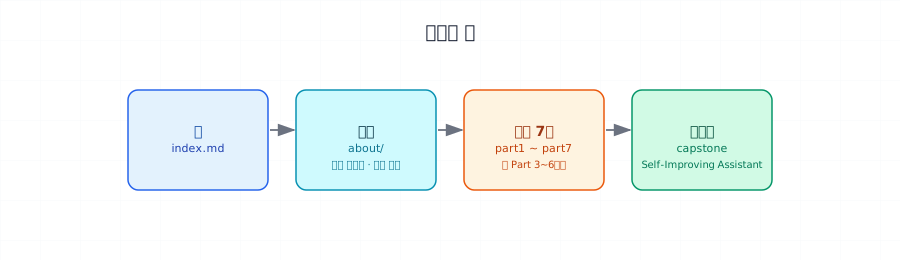
Parts 1 → 7 are sequentially layered. Skip earlier chapters and the later ones float without ground.
2. Chapter template
Every chapter follows the same 8-section structure. Aim for 20–40 minutes per chapter.
| # | Section | Purpose | Tool |
|---|---|---|---|
| 1 | Concept | Definition + intuition | Prose, analogy |
| 2 | Why it matters | Problem context | Tables, admonitions |
| 3 | Where it's used | Real use cases | Tables, examples |
| 4 | Minimal example | Shortest working code | Code block |
| 5 | Hands-on | Run it yourself | Colab badge + tabs + code |
| 6 | Common pitfalls | Debugging hooks | !!! warning |
| 7 | Production checklist | What ops cares about | Task list |
| 8 | Exercises & next chapter | Practice + link forward | Task list |
3. Stack
MkDocs Material
Python-friendly static site generator. Dark mode, search, sidebar built in.
diagram-svg skill
Chapter signature SVGs are generated from Python and verified with rsvg-convert. Custom design system.
MathJax
LaTeX rendering for the model and fine-tuning chapters.
Colab badges
All hands-on runs in the browser. GPU-free.
4. Code & diagram rules
- File name with
```python title="app.py" - Highlight key lines:
hl_lines="6 10" - Inline explanations:
# (1)!annotation anchors - Hard cap: 40 lines per block. Split if longer.
Three tools cover everything:
- Sequences and steps → markdown tables
- Comparison cards →
.infocardsHTML - All flow diagrams →
diagram-svgskill — Python generator →docs/assets/diagrams/*.svg
Nine role colors share one palette across light and dark pairs.
Source lives in _tools/gen_*.py. Reuse primitives from _tools/svg_prim.py (node, arrow_line, group_around_nodes, etc.).
from svg_prim import svg_header, svg_footer, node, arrow_line

def my_diagram(theme):
    lines = svg_header(960, 400, theme)
    # nodes / arrows / legend
    lines.extend(svg_footer())
    return '\n'.join(lines)
Always emit both themes:
open('docs/assets/diagrams/my-thing.svg', 'w').write(my_diagram('light'))
open('docs/assets/diagrams/my-thing-dark.svg', 'w').write(my_diagram('dark'))
Embed with Material's #only-light / #only-dark pair:


Verify with rsvg-convert -w 1920 foo.svg -o foo.png. PNGs are verification only — git-ignored.
- Use for 4–7 concepts compared side by side
- First column is always the term/name; last column is why it matters or when to use
Don't use ↑, |, and whitespace to align "art" inside code blocks.
Korean, English, emoji, and punctuation render at different widths. Even monospace fonts disagree. The result will look fine on your machine and broken everywhere else.
| Situation | Use instead |
|---|---|
| 2D relationship | Table |
| Flow / arrow / hierarchy | SVG (diagram-svg skill) |
| Single-line emphasis | Inline code or <mark> |
5. Adding a new chapter
- Create
docs/partN/NN-slug.md(anddocs/en/partN/NN-slug.mdfor the English edition) - Fill the 8-section template
- If you need a signature visual, generate
docs/assets/diagrams/<chapter>-<purpose>.svgwith the diagram-svg skill - Add to
nav:inmkdocs.yml - Verify
mkdocs build --strictis clean
Quality checklist
- Diagram appears within the first scroll of the page
- Every code block has a file name and line highlight
- At least one "common pitfall"
- Link to the next chapter
6. Deployment
A GitHub Actions workflow ships on main push:
mkdocs build --strictactions/upload-pages-artifact@v3actions/deploy-pages@v4to GitHub Pages
Locally, mkdocs serve is enough. Set repo Settings → Pages → Source to "GitHub Actions".