Ch 22. Tool Use in Production — ACI Design

What you'll learn
- ACI (Agent-Computer Interface) — the five fields an LLM uses to understand a tool
- Data / Action / Orchestration categories and their risk mapping
- Human-in-loop approval queues — the execution gate for high-risk Action tools
- Three root causes of parameter errors: overlapping names, vague descriptions, error raises
- Why "more tools = better agent" is backwards
Prerequisites
Ch 8 (Tool Calling) — basic tool_use loop and the three categories. Ch 20·21 — agents and patterns. Here we bring it to production quality.
1. Concept — ACI is not an API
APIs are written for programmers. ACI (Agent-Computer Interface) is read and decided on by an LLM. Even the same function needs different design when framed as ACI.


An LLM understands a tool through five fields only:
| # | Field | Role | Common mistake |
|---|---|---|---|
| ① | Name | Tool identifier (snake_case) | Vague names like get_data · overlapping with other tools |
| ② | Description | When and why to use it | Single-line "order lookup" — gives no selection criteria |
| ③ | Input Schema | Parameter JSON Schema | Only type — missing pattern, enum |
| ④ | Return Shape | Result format | Dumping a huge dict → wastes tokens |
| ⑤ | Error Contract | What happens on failure | raise that kills the loop |
These five must be solid. Only then does the LLM pick the right tool with the right parameters.
2. Why it matters — three failure modes
Most agent failures aren't model problems. They're ACI problems.
① Tool selection error. "Do I use this tool or that one?"
→ Root cause: description is vague or two tool names are similar (search_orders, find_order)
② Parameter error. Right tool, wrong arguments.
→ Root cause: input_schema lacks pattern · enum · example. LLM guesses.
③ Error loop breaks. Tool fails → raise → whole agent stops.
→ Root cause: no error contract. Error should be a tool_result, not an exception.
The fix: follow the five-element principle in this chapter and all three drop dramatically.
3. Tool categories — Data · Action · Orchestration
Briefly introduced in Ch 8. Here we reframe through risk · approval · monitoring.
| Category | Examples | Side effects | Auto-execute? | On failure |
|---|---|---|---|---|
| Data | get_order · search_docs · read_file | Read-only | ✅ Yes | Retry · try alternative tool |
| Action | send_email · refund · delete_record · post_slack | External state changes | ❌ No — needs approval | Rollback or escalate to human |
| Orchestration | invoke_agent · start_workflow · schedule_task | Runs other agent/flow | Case-by-case | Trace · escalate to parent |
Core distinction: can you undo it? If not, it needs approval by default.
4. Minimal example — one well-designed tool
- Name — verb_noun.
get_order_detail_by_idis bloat.get_ordersuffices. - Pattern — prevents the LLM from dropping the "O-" prefix or sending
order-1024. - Errors also return normally — LLM can reason "not found, try a different ID".
- Polish the return — three to five fields, not a 100-field dict.
- Stringify exceptions too — keeps the agent loop alive.
5. Hands-on — high-risk Action tools + approval queue
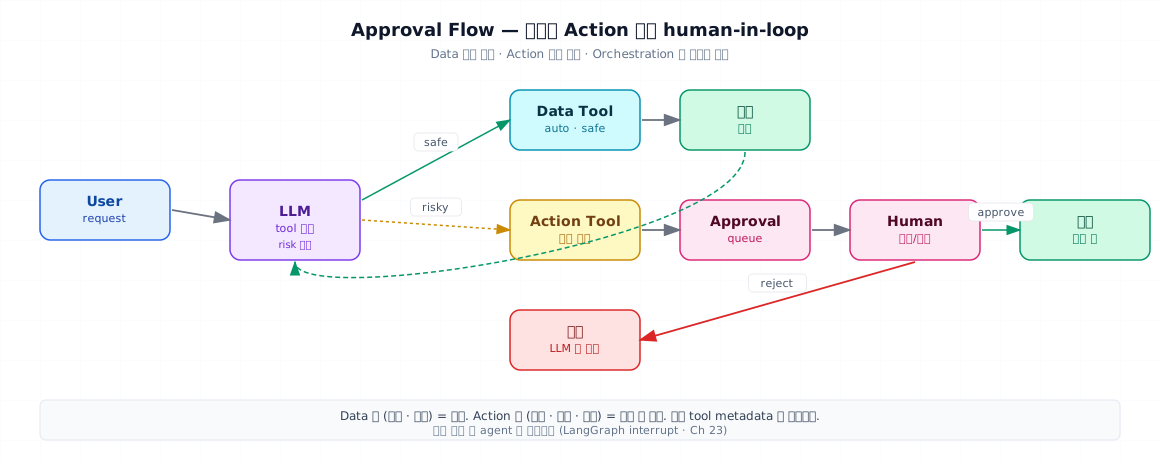
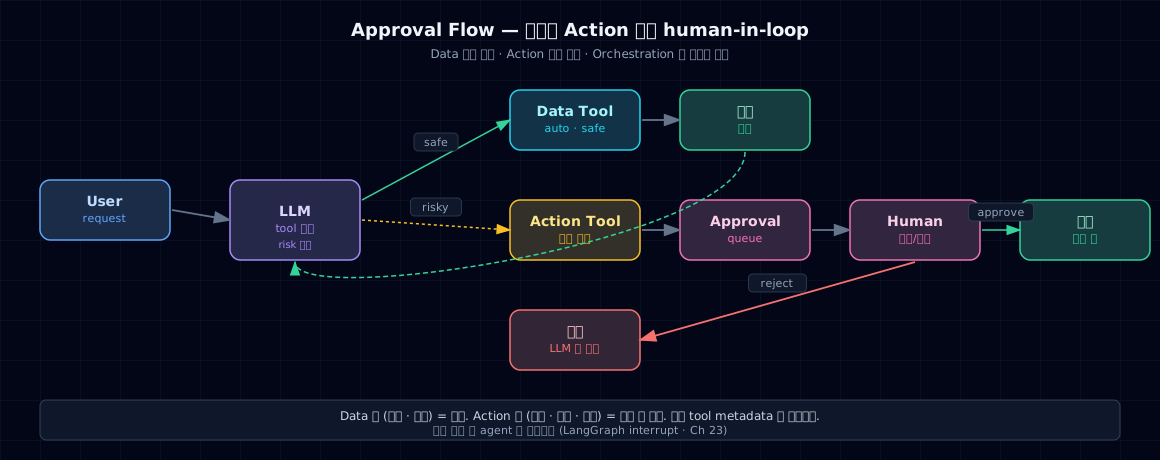
Refunds · deletions · sends must never execute on LLM decision alone. You need an approval gate.
5-1. Pattern — "request → queue → human → execute"
5-2. How the LLM reads this result
The agent sees status: pending_approval in the tool_result and:
- Replies to the user: "I've requested operator approval. It'll be processed shortly."
- Or uses LangGraph
interrupt()to pause the agent itself (Ch 23)
Never do this: have the LLM see pending_approval and then say "well, let me try a different approach…" to bypass the queue. Prevent it with a system prompt directive:
"If you see a pending_approval response, tell the user about it and wait. Do not try other tools to work around it."
5-3. Bake risk into tool metadata
risk='high' lets you control whether the tool even appears in the system prompt or requires extra logging.
6. Common pitfalls
6-1. Overlapping tool names
If you have both search_customers and find_customer, the LLM won't pick consistently. Standardize to one, or add to the description: "use this instead of [other tool] when [condition]."
6-2. The "more tools = smarter agent" trap
As tool count and description overlap grow, prompts get longer and selection can become less reliable. Evaluate instead of relying on a fixed count; when many tools are needed, use routing (Ch 21) to expose only the relevant subset.
6-3. Description says "what" but not "when"
Bad: "Look up an order"
Good: "Retrieve order details. Use when checking refund eligibility or shipping status."
When to use it is what drives the LLM's choice.
6-4. Schema has no examples
"order_id": {"type": "string"}          // Weak
"order_id": {"type": "string",
             "pattern": "^O-[0-9]{4}$",
             "description": "e.g., O-1024"}  // Strong
6-5. Raising instead of returning errors
raise ValueError(...) → agent dies → "An error occurred." LLM never gets to recover: return {"error": "..."} gives it a chance.
6-6. Huge returns
get_order returning the order + customer + items + logs (100KB total) → blows up context in one call. Return only what's needed + keep it under ~2KB.
7. Production checklist
- Each tool has all five elements (Name · Description · Schema · Return · Error) explicitly defined
- Description includes "when to use it" — at least one to two sentences
- Input schema has
pattern·enum·examplewhere appropriate - Tool count ≤10 (routing subsets count toward this)
- Names and descriptions don't overlap with other tools (check PR diffs)
- Action tools have risk metadata + approval queue
- All tools return errors as dict/str, never
raise - Return size is capped around 2KB
- Tool calls and failures are traced (Part 4 Ch 19)
- High-risk tools also have audit logging (Part 6)
8. Exercises
Check your understanding
- In one sentence, explain the difference between ACI and API. Then list the five ACI elements.
- Name one Data, one Action, and one Orchestration tool from your domain.
- Explain in one sentence each (accuracy · tokens · debugging) what can go wrong as tool count and description overlap grow.
- Using an agent loop diagram, explain why "return errors as tool_result" beats "raise".
Hands-on
- Pick one tool from your prototype and run it through the five-element checklist. Strengthen any missing fields.
- Wrap one high-risk tool in the approval-queue pattern. Trace how
status: pending_approvalshows up in the agent's next step.
Sources
- Anthropic — Building Effective Agents — ACI and tool design sections. In the project:
_research/anthropic-building-effective-agents.md - OpenAI — A Practical Guide to Building Agents — Three tool categories (Data / Action / Orchestration). In the project:
_research/openai-practical-guide-to-agents.md
Next → Ch 23. LangGraph — State Graphs Replace your loop with state graphs · checkpointers · interrupts and your agent gains real superpowers.