Ch 29. Human-in-Loop Design¶

What you'll learn
- Two triggers to escalate to humans — failure threshold · high-risk action
- Approval queue state machine — pending · approved · rejected · expired
- Approval interface via Slack and internal dashboard
- Audit log JSON schema — who · when · what · why
- Connection to LangGraph
interrupt_before(Ch 23) - Five failure modes (all-escalate · indefinite pending · missing TTL · missing context · missing audit trail)
Prerequisites
Ch 23 LangGraph interrupt · Ch 28 Tool Safeguard — high-risk classification. You understand how guardrails escalate to humans.
1. Concept — two triggers to call a human¶
Automation's goal isn't automate everything. It's automate only what you can handle. Two cases must land with a human.
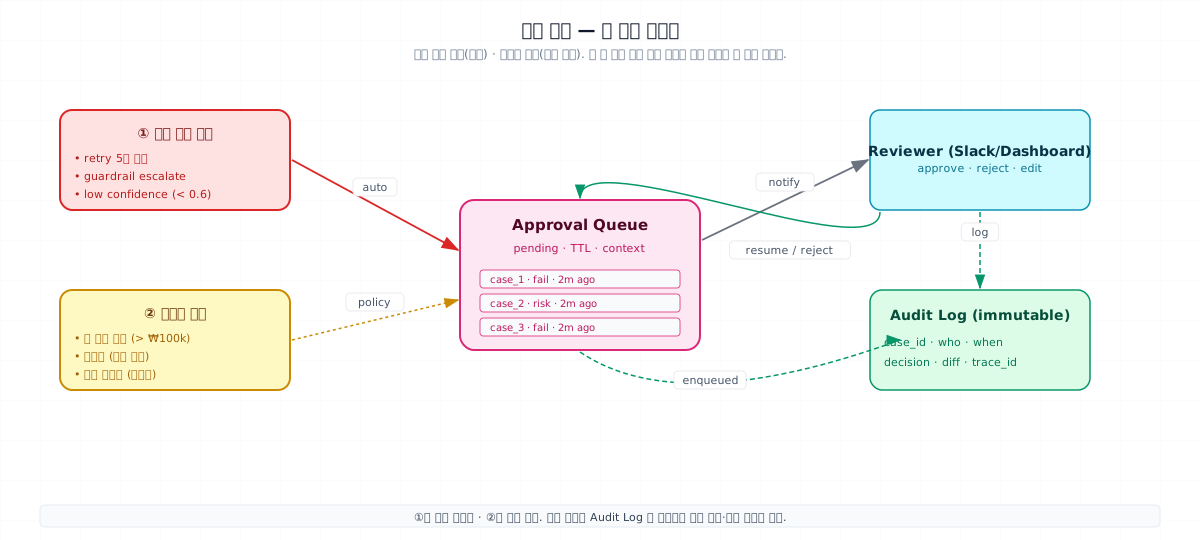
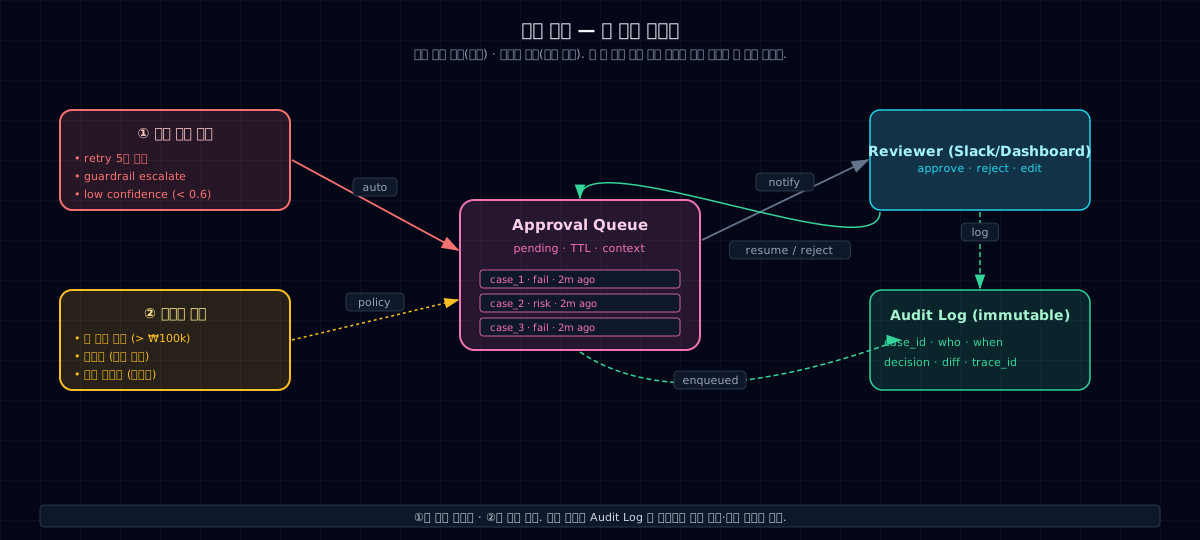
| Trigger | Character | Example |
|---|---|---|
| ① Failure threshold exceeded | Automatic (system signal) | 5 retries failed · guardrail escalate · confidence < 0.6 |
| ② High-risk action | Pre-policy (humans decide upfront) | Large refund · irreversible (delete account) · external message |
Both must flow into the same approval queue. If you split queues by trigger, your audit trail scatters. You can't track who decided what.
"Plan for human intervention with two triggers: failure thresholds and high-risk actions." — OpenAI Practical Guide
2. Why you need this — automation alone isn't enough¶
① Accountability. If the AI approves a ₩1M refund wrongly, who's liable? The company. But if a human clicked approve and there's a record, liability spreads, and you have grounds for policy improvement.
② Irreversibility. Account deletion, DB DROP, external email send — you can't undo them. Even at 99% reliability, the 1% irreversible case means recovery costs exceed your automation savings.
③ Out-of-distribution cases. LLMs are strong inside their training distribution. When confidence dips, it's safer to escalate than to guess.
④ Learning signal. Human decisions = labels. If you log approval/rejection with reason, it joins your evaluation set (Ch 16).
3. Where it's used — threshold design¶
| Domain | Automate | Needs human |
|---|---|---|
| CS refund | < ₩50k · policy clear | ≥ ₩100k · policy fuzzy · VIP customer |
| HR time off | Standard 1–3 day leave | >5 days · unpaid leave · >50% concurrent |
| Payment | Regular purchases | New customer's first ₩1M · risky country card |
| Document send | Internal memo | External customer email · press release · legal doc |
| DB change | SELECT · pre-validated INSERT | DELETE · DROP · ALTER |
Domain experts set the threshold. Don't guess. Thresholds aren't magic numbers baked into handlers. They live in a policy registry and get PM/legal review on PRs.
4. Minimal example — approval queue and LangGraph interrupt¶
- Embed trace_id at case creation to link to LLM trace (Ch 27).
- Redis TTL 24h. Auto-deletes on expiry + separate expired handling (below).
- Reviewer decides. Reason is nearly required.
- Every decision goes to immutable audit log.
Combining with LangGraph¶
LangGraph's interrupt_before (Ch 23) is your human gate's infrastructure:
- Inside
approve_gate_node, callenqueue(...)when amount > threshold. - Graph pauses before
execute— human decides, then you resume viaapp.invoke(None, config).
5. Hands-on — state machine and approval UI¶
An approval queue is a state machine. Every case terminates on exactly one path.
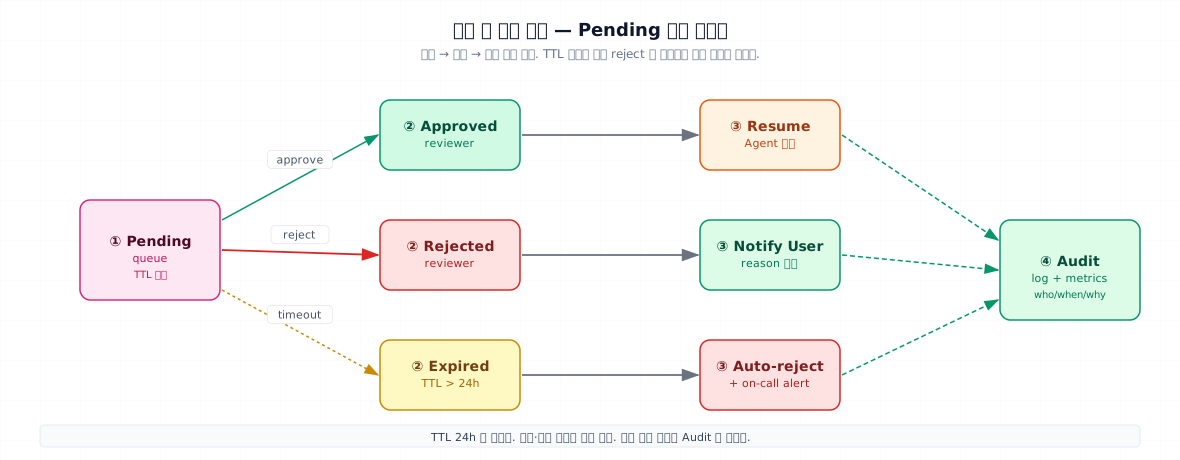
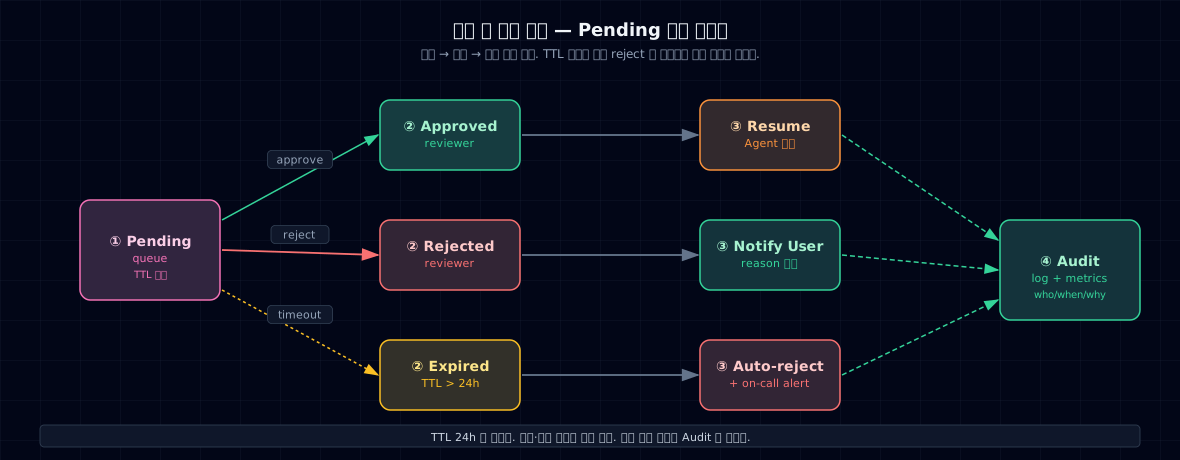
| State | Next | Trigger |
|---|---|---|
| Pending | Approved / Rejected / Expired | Reviewer decides or TTL |
| Approved | Resume (agent resumes) | Reviewer approve |
| Rejected | Notify user (with reason) | Reviewer reject |
| Expired | Auto-reject + on-call alert | 24h elapsed |
| Audit | (final) | All exit paths converge |
Slack approval UI¶
Fastest way: Slack interactive message.
- Trace link is critical. The reviewer needs to see the LLM's reasoning to make an informed call.
Audit log schema¶
Append-only. Write once, can't edit. Compliance audits typically want 7 years of retention; rules vary by domain.
TTL expiry handling¶
# cron · runs every 1 minute
async def expire_worker():
    async for key in r.scan_iter("case:*"):
        raw = await r.get(key)
        if not raw: continue
        case = json.loads(raw)
        if time.time() - case["created_at"] > TTL_SECONDS:
            case["state"] = State.EXPIRED
            await audit_log(case)
            await alert_oncall(case)                                     # (1)!
            await r.delete(key)
- Expired is auto-reject, but also alert on-call. "Cases no one reviewed in 24h" = operational signal.
6. Common failure modes¶
- Escalate everything. When you start, you're conservative, the queue floods, ops burns out. Monitor trigger rate daily + tune thresholds weekly.
- No TTL. Pending cases stack forever. One reviewer takes a day off, user waits indefinitely. 24h TTL + auto-reject + on-call alert.
- Missing context. Slack message shows only args, no trace link → reviewer doesn't know why this is high-risk. Attach trace_id · guardrail reason · similar past cases.
- Silent UX during approval wait. User refreshes the app, sees "processing" forever. Show "In review — avg 12 min" ETA.
- Mutable audit log. Someone edits it after the fact, audit is worthless. Append-only DB · S3 object lock · WORM storage.
- PII in plaintext audit log. Redact what you need for the decision, store the original in a short-TTL vault elsewhere.
- Thresholds as magic numbers.
if amount > 100000buried in a handler — policy change requires a PR. Use separate policy.yaml + reviewer assignment.
7. Operations checklist¶
- Both triggers (failure threshold · high-risk policy) converge into one queue
- Thresholds defined outside code (policy.yaml · feature flag)
- Case TTL 24h baseline + after-hours/holiday policy
- Expired → auto-reject + on-call alert
- Slack/dashboard message includes trace_id link
- Reviewer must provide reason on approval/rejection
- Audit log append-only · 7-year retention (per domain regulation)
- No plaintext PII in queue or log — mask it
- Metrics: queue length · mean decision time · expiry rate
- LangGraph interrupt tied to queue via case_id (resumable)
- Reviewer decisions join evaluation set as labels (Ch 16)
8. Exercises & next chapter¶
- Design auto/human thresholds for a CS refund chatbot (amount · customer tier · reason on 3 axes). Create a table; justify each threshold in one line.
- Take the
enqueue / decidefrom §4 and implement the expired worker. Expired cases must log to audit. - What three pieces of info would you add to the Slack approval message so reviewers decide better? Explain why.
- Assume you set thresholds too conservatively and the queue floods. Design three metrics to diagnose it, then design a threshold adjustment procedure.
Next → Ch 30 Cost & Latency Optimization — guardrails and approval are live; now cut costs and latency.
Sources¶
- OpenAI — A Practical Guide to Building Agents §Plan for Human Intervention
- LangGraph docs —
interrupt_before·get_state· resume patterns - Slack — Interactive components (block kit · action buttons)
- AWS Well-Architected — Operational Excellence (audit · runbook)