Ch 7. Streaming and UX¶

What you'll learn
- Why TTFT (Time to First Token) is the key to perceived speed
- The SDK's
stream()event flow — delta, start, stop - How to handle cancellation · timeouts · partial responses
- The pattern for rendering tokens as they arrive in a chatbot UI
- Stream errors mid-flight and the markdown partial-render pitfall
Prerequisites
Ch 4 · Ch 6 through. All code in this chapter is async — familiarity with Python async basics helps.
1. Concept — tokens already come in order¶
From Part 1 Ch 2: an LLM generates tokens one at a time. If a response takes 5 seconds, the first token is ready around 0.3 seconds in. The remaining 4.7 seconds are spent sending the rest.
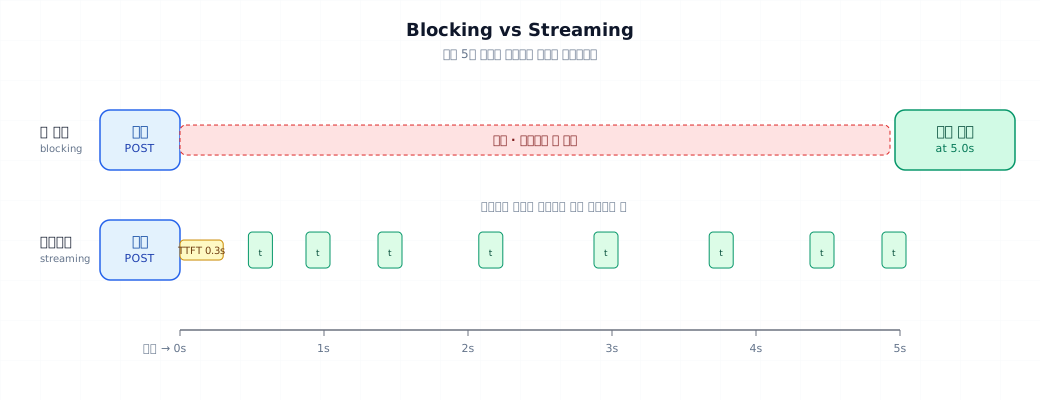
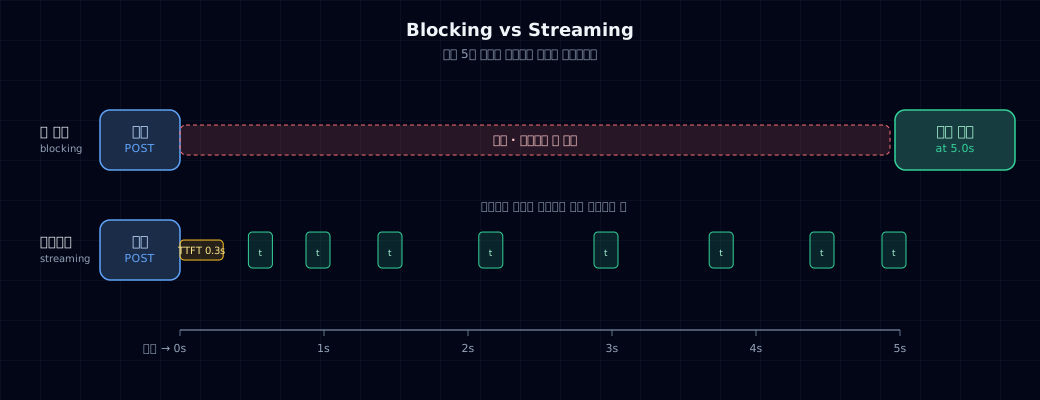
With blocking, you stare at a blank screen for 5 seconds. With streaming, the first character appears in 0.3 seconds — then the rest flows like typing. The total response length is the same, but perceived speed differs by 10–20×.
2. Why it matters¶
TTFT (Time to First Token)¶
- Blocking: TTFT = TTLC (Time to Last Character) — you wait for everything
- Streaming: TTFT ≈ 0.3–1 second — feedback the moment the first token drops
| Metric | Blocking | Streaming |
|---|---|---|
| First character (TTFT) | 5.0s | 0.3s |
| Complete response (TTLC) | 5.0s | 5.0s |
| User feels it "works" | After 5.0s | Instantly |
| Can cancel | After 5.0s | Anytime |
Other wins¶
- Memory efficient — no need to buffer the entire response
- Essential for long generations — a 1-minute summary over sync times out
- Shows agent thinking (Part 5)
3. Where it's used¶
- Chatbot UI — ChatGPT, Claude.ai style typing effect
- Long-form generation — summaries, translations, drafts (1000+ tokens)
- Agents — watch reasoning happen in real time (Ch 8, Part 5)
- Terminal tools — instant feedback
4. Minimal example — 10-line stream¶
| hello_stream.py | |
|---|---|
- Use
messages.stream()instead ofmessages.create()— context manager cleans up resources automatically. text_streamis a convenience iterator that yields text deltas only, in order.flush=Truewrites immediately without buffering — see the streaming effect.
Run it and text appears like typing. The sync version (create) sits silent for 5 seconds, then dumps everything at once.
5. Hands-on¶
5.1 Stream event structure¶
What actually flows through the stream() API:
| Event | Meaning | When |
|---|---|---|
message_start |
Response beginning | Once at stream start |
content_block_start |
Text or tool block starts | Per content block |
content_block_delta |
Token increment | Each token (the meat) |
content_block_stop |
Block ends | Per block |
message_delta |
Metadata updates (usage) | Near end |
message_stop |
Entire response done | Once at the very end |
text_stream is just the text from content_block_delta — a shortcut. For fine-grained control, use raw events:
| raw_events.py | |
|---|---|
5.2 Measuring TTFT and TPS¶
Track these in production — user experience = TTFT + perceived TPS (tokens per second).
Record these to compare models and track network issues.
5.3 Cancellation and timeouts¶
Good UX means users can stop anytime.
- Ctrl+C sets
stop=True. The HTTP connection also closes — the SDK handles cleanup when webreak. - Key: after cancellation,
stream.final_messagestill holds what you received.
Timeouts work the same as in Ch 4: Anthropic(timeout=30.0). Streams respect it too.
5.4 Logging partial responses and error recovery¶
If the network dies mid-stream, don't throw away tokens you already paid for.
5.5 UI integration — SSE, WebSocket, React¶
Three stacks for streaming LLM responses in a browser:
| Stack | Server | Browser | When |
|---|---|---|---|
| SSE (Server-Sent Events) | FastAPI StreamingResponse |
EventSource API |
One-way, simple (most cases) |
| WebSocket | FastAPI WebSocket |
WebSocket API |
Two-way (user cancels, etc) |
| Fetch + ReadableStream | Same | fetch().body.getReader() |
Keep plain HTTP |
FastAPI SSE example:
- SSE format:
data: <payload>\n\n.
Browser React example:
const [text, setText] = useState("");

useEffect(() => {
  const es = new EventSource(`/stream?q=${encodeURIComponent(query)}`);
  es.onmessage = (e) => setText(prev => prev + e.data);
  es.addEventListener("done", () => es.close());
  return () => es.close();  // Cleanup on unmount
}, [query]);
The markdown partial-render trap
Parsing markdown every token isn't expensive, but **bold unfinished... renders weirdly.
Fix: only parse every 100ms · during streaming, show raw text outside code fences.
6. Common pitfalls¶
Mistake 1: parsing JSON mid-stream
Receive {"item": "shoe and you try json.loads() — boom. Structured output + streaming is dangerous.
Fix: use non-streaming for structured output (Ch 6). If streaming is essential, wait for content_block_stop then parse all at once.
Mistake 2: throwing away partial responses on error
Network glitch drops your 300 tokens. You paid for them but can't see them.
Fix: §5.4 pattern — buffer everything immediately. On exception, log the partial.
Mistake 3: broken markdown render
Render **bold mid-stream and your UI looks broken.
Fix: stream in <pre> text only, render markdown after done. Or use a parser that handles incomplete markdown.
Mistake 4: dangling connection after Ctrl+C
You break but don't exit the with block — the socket stays open.
Fix: wrap the whole with in try/except KeyboardInterrupt, or use a stop flag like §5.3.
Mistake 5: streaming lifetime doesn't match DB/file I/O
Writing every token to the database = 500 queries per response. DB melts.
Fix: buffer in memory → flush on a schedule (1 second, 200 chars) or save once at the end.
7. Production checklist¶
- TTFT and TPS metrics logged per call → p50/p95 dashboard
- Max response time enforced (e.g., 60 seconds). Exceed it? Force kill.
- User cancellation path works (browser
EventSource.close(), server HTTP cancel) - Partial responses saved — even if cancelled, you paid for tokens
- Concurrent stream limit on server (connection pool)
- Reconnect logic in browser (SSE auto, WebSocket manual)
- Structured output and streaming separated in policy (never together)
8. Exercises¶
- Run §4
hello_stream.pyand §2's blocking version (messages.create) on the same prompt. Measure TTFT for each. - Run §5.2's TPS test on both
claude-haiku-4-5andclaude-opus-4-7. Three runs each. Average the TPS diff. - Generate 4096 tokens, then Ctrl+C. Check
stream.get_final_message()— what's in the partial? - Trigger a server error (bad model name). Stream fails. Check the buffer — what did you lose?
- Build a simple FastAPI SSE server + HTML page with
<pre>text render. Stream from the browser.
9. References¶
- Anthropic Streaming: docs.anthropic.com/streaming
- OpenAI Streaming: platform.openai.com/docs/api-reference/streaming
- Server-Sent Events (MDN): developer.mozilla.org/en-US/docs/Web/API/Server-sent_events
- FastAPI StreamingResponse: fastapi.tiangolo.com/advanced/streaming-response/
Next → Ch 8. Tool Calling Basics
So far LLMs return only text. Next, you'll make the LLM call functions — the foundation of agents (Part 5).