Ch 33. LoRA / QLoRA in Practice (Colab)¶

What you'll learn
- Full FT vs LoRA — what actually gets updated
- QLoRA — train an 8B model on a single Colab T4 with 4-bit quantization
- Meaning of rank
r· alphaα·target_modules, and sensible starting values - Hugging Face PEFT + TRL SFTTrainer in 30 lines
- VRAM allocation — where OOM happens
- Saving · loading · merging adapters
- Six common pitfalls (rank too large · missing target_modules · watching eval loss only · runaway seq_len · base model mismatch · wrong learning rate)
Prerequisites
Passed the 4 gates from Ch 32 and have a PoC signal. This chapter is hands-on — the goal is to run the notebook once.
1. Concept — Full FT vs LoRA in one diagram¶
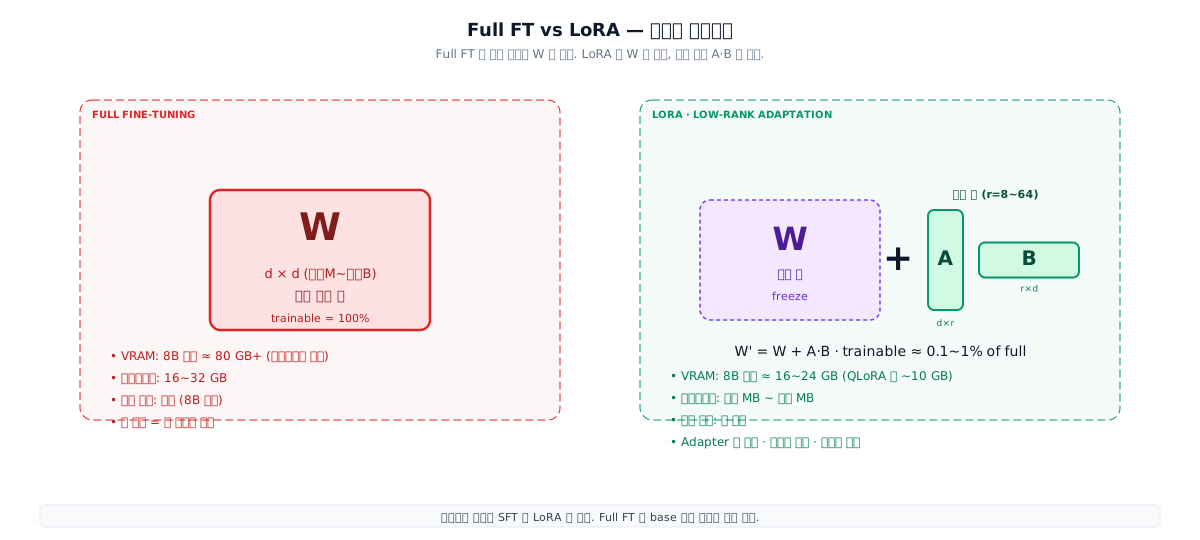
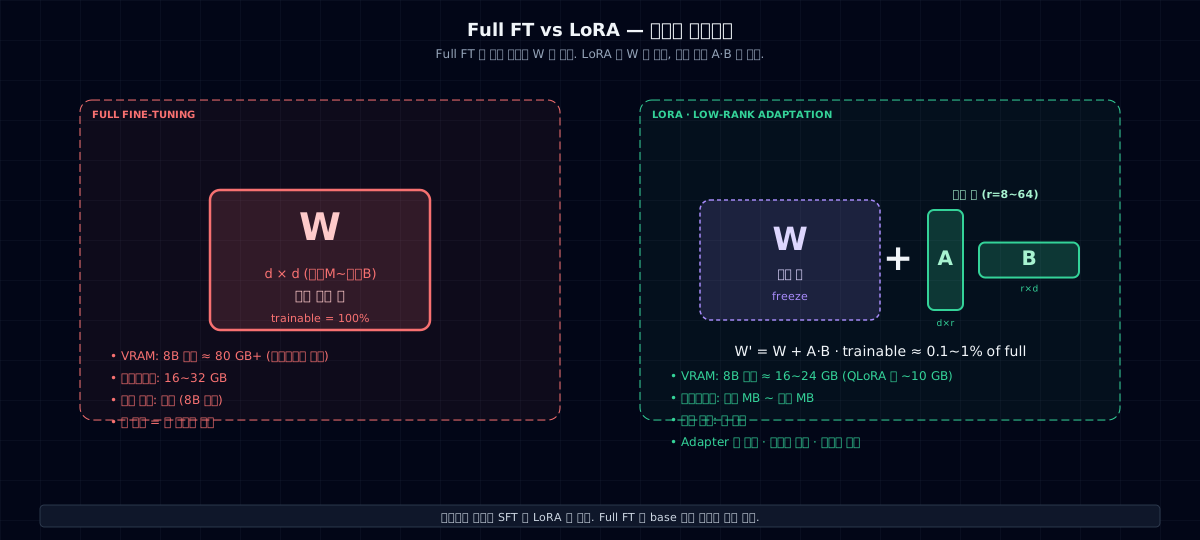
Full FT: You update every weight W in the model. If the model has 10 billion weights, you update 10 billion.
LoRA (Low-Rank Adaptation): Freeze W, and train only two small matrices A and B on the side.
- Trainable parameters ≈ 0.1–1% of the total
- Base model stays the same → you can have multiple domain adapters at once and swap them
- At inference, merge
W + ABinto one weight matrix with zero added latency
"Training an 8B model's LoRA takes one notebook GPU. Full FT needs an H100 cluster with 8 GPUs."
QLoRA = LoRA + 4-bit quantization¶
LoRA is already light. Add 4-bit compression of the base model, and it shrinks to ~5GB — small enough to fit on a single Colab T4 (16GB).
The key trick: base is 4-bit, LoRA matrices are 16-bit. You only need high precision where you're learning.
2. Why you need this — cost, speed, operations¶
| Aspect | Full FT | LoRA | QLoRA |
|---|---|---|---|
| VRAM (8B) | 80+ GB | 16–24 GB | 8–10 GB |
| Training time | Days | Hours | Hours |
| Checkpoint | 16–32 GB | 50–500 MB | 50–500 MB |
| GPU | H100 ×4–8 | A100 ×1 / RTX 4090 | T4 (Colab) |
| Cost (per run) | \(5K–\)50K | \(50–\)500 | \(0–\)50 |
| Swap in production | Hard (whole model) | Easy (adapter only) | Easy |
For most domain fine-tuning, LoRA is enough. Full FT is only needed when you're building the base model itself.
3. Where you use it — hyperparameter starting values¶
| Parameter | Meaning | Start with | Tuning |
|---|---|---|---|
r (rank) |
Training capacity | 16 | Too small? ↑ (32, 64). Overfitting? ↓ (8) |
lora_alpha |
Scale factor (usually 2r) | 32 | r×2 is solid |
target_modules |
Where to attach LoRA | q_proj, v_proj |
More power: add k_proj, o_proj, then FFN |
lora_dropout |
Regularization | 0.05 | Overfitting? use 0.1 |
learning_rate |
Learning rate | 2e-4 | LoRA learns faster than full FT |
num_train_epochs |
Epochs | 3 | Early stopping recommended |
batch_size |
Batch size | 4 (gradient_accumulation 4) | Limited by VRAM |
max_seq_length |
Sequence length | 1024 | Match your data distribution |
rank 16 + α=32 + q,v_proj is the most common starting point. If it doesn't work, add target_modules; if still stuck, increase r.
4. Minimal example — 30 lines on Colab¶
- Standard QLoRA setup: NF4 quantization + double-quant + bf16 compute.
- r=16 · alpha=32 · q/v only. The safest starting point.
- Chat data should be preprocessed with
apply_chat_templatefirst; thetextfield in jsonl is ready. - seq_len 1024 won't OOM on T4. Go longer and you'll need to drop batch size.
Data format¶
{"text": "<|im_start|>user\nWhat's your refund policy?<|im_end|>\n<|im_start|>assistant\nWe offer 30-day refunds...<|im_end|>"}
{"text": "..."}
Or use messages format and let the tokenizer's apply_chat_template convert it. Use the base model's chat template — special tokens differ by model.
After training — save the adapter only¶
trainer.save_model("out/adapter")            # adapter only ~50MB
# save tokenizer too
tok.save_pretrained("out/adapter")
At inference:
from peft import PeftModel
base = AutoModelForCausalLM.from_pretrained(MODEL, quantization_config=bnb, device_map="auto")
model = PeftModel.from_pretrained(base, "out/adapter")                  # attach adapter
Or merge it into a single weight file (simpler for deployment):
merged = model.merge_and_unload()
merged.save_pretrained("out/merged")        # base + adapter combined into one file
5. Hands-on — VRAM allocation and troubleshooting¶
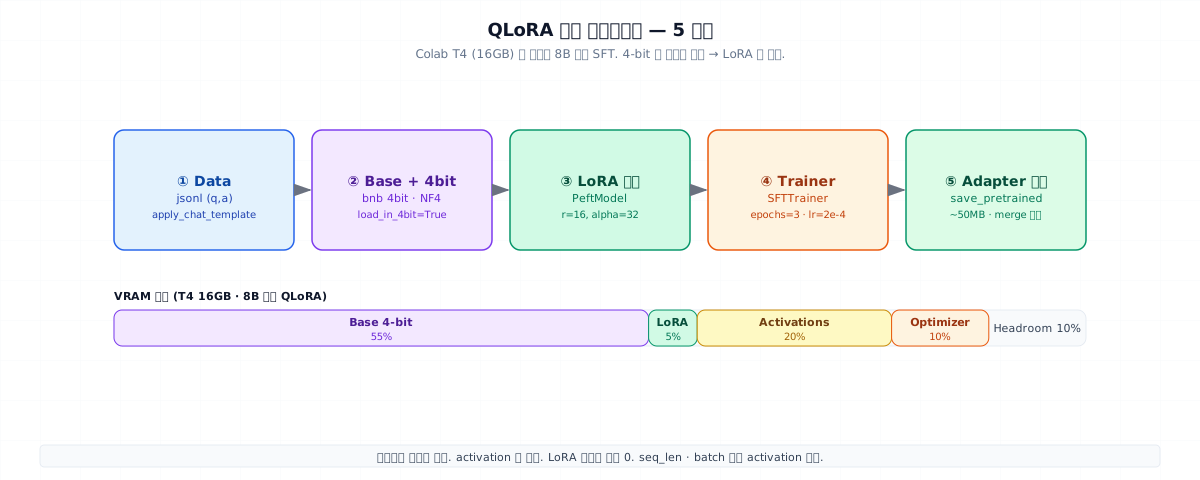
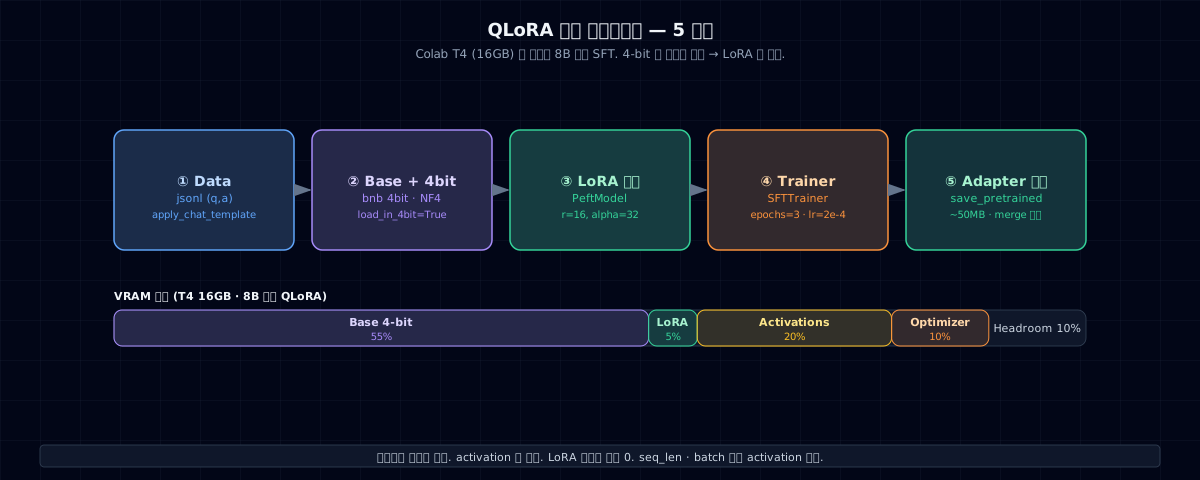
During QLoRA training, memory usually breaks down like this:
| Item | Share | How to cut it |
|---|---|---|
| Base (4-bit) | ~55% | Use a smaller model (3B/7B) |
| Activations | ~20% | seq_len ↓ · batch ↓ · gradient checkpointing |
| Optimizer (Adam) | ~10% | paged_adamw_8bit |
| LoRA + grads | ~5% | r ↓ |
| Headroom | ~10% | Reserve |
OOM diagnosis checklist:
- Is
gradient_checkpointing=True? (cuts activation memory in half) - Is it
optim="paged_adamw_8bit"? (compresses optimizer 4×) - Is
max_seq_lengthtoo large for your data distribution? - If batch_size=1 still OOMs, the model is too big
Monitoring during training¶
| Signal | Meaning |
|---|---|
| Train loss drops slowly | OK |
| Train loss goes to zero | Likely overfitting (too little data) |
| Train loss doesn't drop | LR too small, or target_modules incomplete |
| Eval loss tracks train loss | OK |
| Eval loss climbs faster than train | Overfitting → reduce epochs |
| OOM on first batch | Reduce seq_len or batch size |
Eval — don't just watch loss¶
Training loss is perplexity on your data distribution, not real-world performance. The real signal is accuracy/F1/Judge score on your domain eval set (Chapter 17).
# after each epoch, infer on eval set → Ch 17 LLM-as-Judge
preds = [generate(model, q) for q, _ in eval_set]
score = judge(preds, eval_set)                                          # (1)!
- Use Ch 17 Judge or a domain accuracy metric. A PoC passes if baseline (no FT) < score (with FT) by +5 points.
Adapter merge vs swap¶
| Pattern | Pros | Cons |
|---|---|---|
| Merge (single file) | Simple inference · zero latency | Separate model file per domain |
| Swap (attach adapter) | One base + N adapters · fast swap | Needs PEFT at inference |
If you have 5 domains, run 5 adapters on one server with swapping to save memory.
6. Common pitfalls that break everything¶
- Start rank at 64+. On small data (1K–5K samples), r=64 overfits hard. Start at r=16, measure, then scale up.
- Miss a target_module. Start with
q_proj, v_proj— if it's not powerful enough, addk_proj, o_proj, then FFN (gate_proj, up_proj, down_proj). - Judge by loss alone. Loss drops but domain accuracy stays flat. Domain eval set is the real metric (Ch 32 §5 PoC signal +5pt).
- Seq_len explosion. You set
max_seq_length=4096without checking your data → OOM. Use p95 data length + safety margin (×1.2). - Base model mismatch. Train on Llama-3.1-8B-Instruct but infer on base → garbage output. Match tokenizer + model ID.
- Wrong learning rate. You copy full FT's 1e-5 to LoRA → nothing learns. LoRA usually needs 1e-4 to 5e-4.
- Save checkpoint every step. Disk fills up. Use
save_strategy="epoch"+save_total_limit=2. - Quantization dtype mismatch (bf16 vs fp16). T4 prefers fp16; A100/H100 prefer bf16. Align model dtype +
bnb_4bit_compute_dtype.
7. Operations checklist¶
- PoC (100–500 samples) shows baseline +5pt signal before full training
- Tokenizer · base model · adapter IDs/versions logged
-
chat_templateapplied consistently (train = inference) - Eval uses domain metric (loss + Judge + accuracy)
- Regression test (compare new adapter against previous on same eval set)
- Adapter metadata saved — training data hash, hyperparams, base version
- Safety regression — training didn't break refusal policy (Ch 28)
- Post-quantization inference dtype matches (fp16 / bf16)
- Decide: merge model vs swap operations pattern
- Cost model — GPU hours + labeling + ops (1-year ROI · Ch 32)
8. Exercises & next chapter¶
- Download Llama-3.1-8B-Instruct and run a PoC LoRA on 200 (q,a) samples. Measure effect vs baseline on your domain eval set.
- Train the same data with r=8 / 16 / 32 and create a table: domain accuracy + training time + adapter size.
- Plan for adapter swap operations: one base + 3 domain adapters (CS · tech support · HR). Design memory/latency tradeoffs.
- You hit OOM on the first batch. Walk through the 5-step diagnosis (§5) and identify which one solves it.
Next chapter — small models, distillation, DPO, and wrapping up Part 7. Ch 34 →
References¶
- Hu et al. (2021) LoRA: Low-Rank Adaptation of Large Language Models
- Dettmers et al. (2023) QLoRA: Efficient Finetuning of Quantized LLMs
- Hugging Face — PEFT docs · TRL SFTTrainer docs
- Stanford CME 295 Lec 4