Ch 6. Structured Output¶

What you'll learn
- Why free-text responses are your pipeline's enemy
- Three structured output methods — prompt hints / tool-use schemas / native JSON mode
- Validation with Pydantic + automatic retry on failure
- Real-world schema patterns: nested, optional, enum, list
- The parsing hell you'll hit: quote escaping, date formats, missing fields
Prerequisites
Ch 5: Prompts + Chain-of-Thought — you've already run the "JSON hint prompt" exercise.
1. Concept — why structured output matters¶
Until now, you've been letting the model respond in free text. That breaks pipelines.
# ❌ Trying to parse free text downstream
text = response.content[0].text  # "Order ID A-123, quantity 2, ship to Seoul, Gangnam district."
# ... regex? string splitting? How do you pass this to the next step?
# ✅ Structured JSON
data = {"order_id": "A-123", "quantity": 2, "address": "Seoul, Gangnam"}
# Straight to database, API, conditional branching
Speaking well and outputting machine-readable format are different skills. This chapter locks down the second one.
2. Why it matters — pipeline perspective¶
Go back to the 8-block diagram in Part 1 Ch 3. Every step — understand → retrieve → generate → validate → store — passes objects, not free text. Without structure:
- Understanding block: extracted intent and entities, but the format drifts and parsing fails
- Validation block: can't check against schema
- Storage block: which database columns do you map to?
- Tool calling (Ch 8): parameter extraction fails → tool won't run
Without structured output, every downstream block's reliability drops.
3. Where it's used¶
| Use case | Output schema |
|---|---|
| Order extraction | {item, quantity, address, request_date} |
| Email classification + priority | {category: "refund"\|"shipping"\|..., priority: 1-5} |
| Entity extraction from documents | {people: [...], dates: [...], amounts: [...]} |
| User intent analysis | {intent, confidence, needs_human} |
| Tool parameters (Ch 8) | whatever the tool defines |
4. Minimal example — extract with Pydantic¶
- Pydantic parses the JSON and validates types. If
quantitycomes back as "two" instead of2, you getValidationError.
This is the baseline. But models sometimes mix in speech around the JSON ("Here's the JSON: {...}"), breaking parsing. Section 5 fixes it.
5. Hands-on¶
5.1 Three methods compared¶
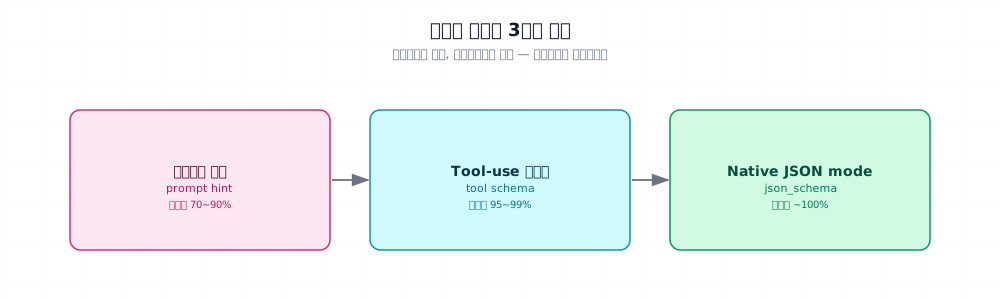
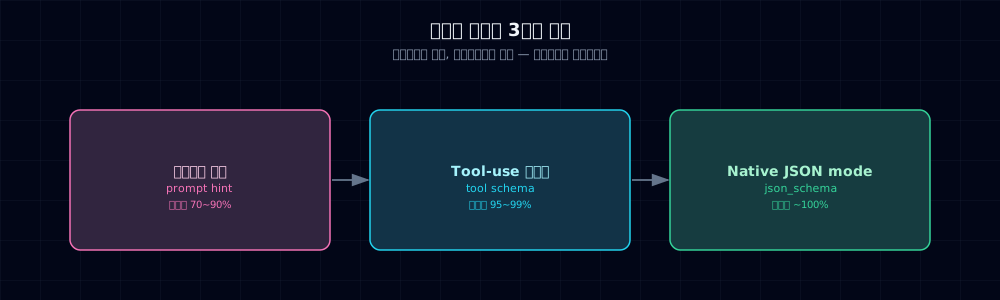
| Method | Implementation | Constraint level | Best for |
|---|---|---|---|
| Prompt hint | Schema + examples in system prompt | Weak · model/task dependent | Early prototypes |
| Tool-use schema | Anthropic tools parameter |
Strong · still validate | Production candidate |
| Native JSON schema | OpenAI response_format={json_schema} |
Strong · check support | Supported models |
Real-world flow: start with prompt hints → if failure rate is high, upgrade to tool-use.
5.2 Structured output via tool-use (Anthropic way)¶
Anthropic's tool_use feature was built for "calling tools," but you can weaponize it for schema enforcement without actually running the tool. You're using it purely to force structured input.
- JSON Schema standard.
type,properties,requiredare mandatory. tool_choiceforces the model to use this tool. Still validate semantic constraints and application invariants with Pydantic.
5.3 Pydantic validation + automatic retry¶
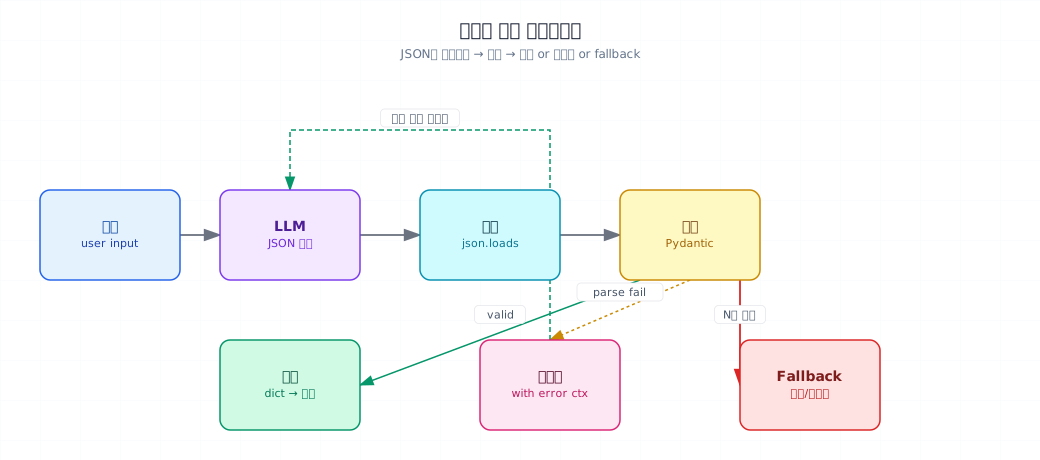
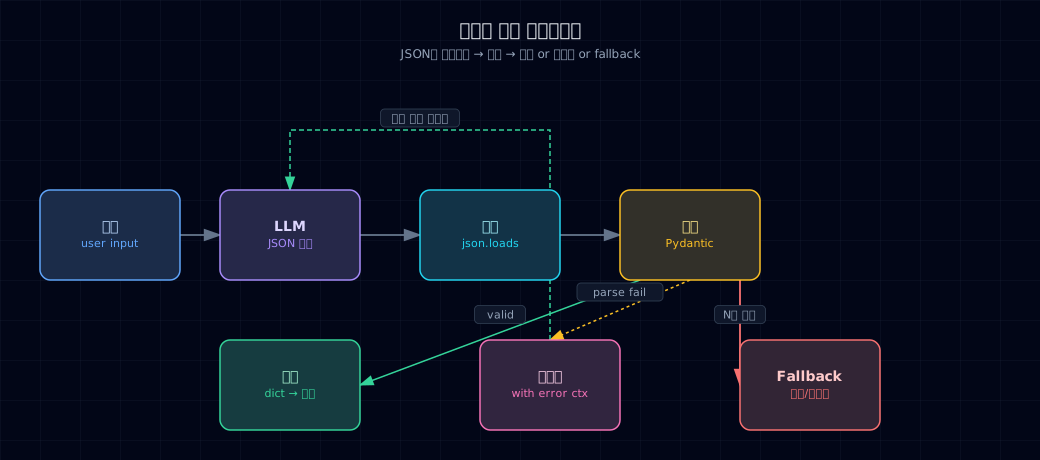
The biggest failure mode with prompt hints: the model mixes speech around the JSON. Here's the three-step defense:
The pattern:
- Extract JSON block only (defend against surrounding speech)
- Validate with Pydantic (types, required fields, constraints)
- Retry with error details — the model self-corrects
Tool-use eliminates steps 1 and 2
With tool-use, JSON extraction is gone (SDK handles it) and parse failures disappear. But keep Pydantic validation anyway — models sometimes skip required fields.
5.4 Real-world schema patterns¶
Field(..., pattern=...)enforces a regex constraint.
Heads up: when you pass this whole schema to the model, use model.model_json_schema() to extract the JSON Schema, then feed that to your prompt or tool_use:
6. Common pitfalls¶
Pitfall 1: unescaped quotes in output
When text contains double quotes, the model produces invalid JSON: "content": "He said "hello" then left". Result: json.JSONDecodeError.
Fix: add to system prompt: "Escape double quotes as \\" or use tool-use (SDK handles it).
Pitfall 2: dates and currency format drift
Models output "ship_date": "next Monday" or "price": "₩15,000" instead of structured formats.
Fix: put examples in the schema ("e.g. 2026-04-18"), use Pydantic Field descriptions aggressively, retry on validation failure (§5.3).
Pitfall 3: missing required fields
Models sometimes omit fields, especially when optional and required are mixed.
Fix: use ... in Pydantic to mark required, use required array in tool-use, include which field is missing in the error message on retry.
Pitfall 4: schema too deep and complex
5+ levels of nesting confuses both models and humans. Retries won't help.
Fix: flatten to 2–3 levels. Break complex structures into multiple separate calls (each with one simple schema).
Pitfall 5: infinite retry loops
Every validation failure triggers a re-query. Your bill skyrockets.
Fix: cap retries at 2–3. After that, fallback (rule-based parser, defaults, escalate to human).
7. Production checklist¶
- Pydantic models in one module (
schemas.py) — shared across the pipeline - Tool-use is default — if you're still using prompt hints, plan a migration
- Log validation failure rate — 5%+ is a signal to redesign schema/prompt
- Retry cap 2–3 with mandatory fallback path
- Schema changes consider backwards compatibility — write Pydantic validators to accept old formats
- Keep test fixtures of real LLM responses for regression testing
- Sensitive fields (SSN, card numbers) rejected at schema level (Part 6 Ch 28)
8. Exercises¶
- Add a
color: strfield to §4'sOrderschema and update the prompt. Verify extraction works. - Intentionally call with garbage input (
"just send me anything"). Record theValidationErrormessage. - Convert §5.2's tool-use example to use the emotion classification from Ch 5 and measure validation failures.
- Build §5.3's retry logic with a deliberately wrong schema hint. Watch it fail after 2 retries and return
None. - Extract §5.4's nested
Addressin anOrder. When the model dropsaddress.city, see which error message appears.
9. References & further reading¶
- Anthropic Tool Use: docs.anthropic.com/tool-use —
tools,tool_choice, JSON Schema spec - OpenAI Structured Outputs: platform.openai.com/docs/guides/structured-outputs
- Pydantic v2 official: docs.pydantic.dev
- JSON Schema spec: json-schema.org
Next → Ch 7. Streaming and UX So far you've waited for the full response. Now: token-by-token streaming to make users feel instant.