What is an LLM¶

What you'll learn
- The one-line intuition: an LLM is just a next-token guesser, run in a loop
- The four terms you'll meet in every chapter that follows: token, context window, temperature, system prompt
- Ten lines of Python that make your first API call, and a feel for how the response is built one piece at a time
- Why LLMs make things up (hallucination) — at the structural level
1. You're already using a relative of the LLM¶
Type "thank y" on your phone and "ou" pops up. Type "good mor" in a search box and "ning" appears. Your email app finishes "Best reg" with "ards" before you've thought about it.
These features all run on the same idea:
Predict the most likely next character or word, given everything seen so far.
An LLM (large language model) does exactly this — only at vastly larger scale, over much longer context, with broader knowledge baked in.
Memorize this one line
An LLM is a machine that, over and over, picks the next token (≈ word fragment) that best follows the text so far. Every other concept in this chapter falls out of that sentence.
2. Tokens — neither characters nor words¶
An LLM doesn't read or write characters or words. It reads and writes tokens — chunks larger than a character and smaller than or equal to a word.
English¶
| Word | Tokens | Role of each |
|---|---|---|
unbelievable |
un · believ · able |
prefix · root · suffix |
tokenizer |
token · izer |
root · suffix |
Korean¶
| Word | Tokens |
|---|---|
안녕하세요 (hello) |
안녕 · 하 · 세요 |
자연어처리 (NLP) |
자연 · 어 · 처리 |
The model sees integer IDs (e.g. token → 42), not strings. To you, words feel natural; to the model, the input is a sequence of numbers.
Why this matters¶
- Length and cost are measured in tokens, not characters. APIs price tokens, not bytes.
- English averages ~1 token per 4 characters. Korean is ~1.5–2 tokens per character — same meaning, more tokens.
- "Why is GPT-4 cheaper and faster in English?" — that's why.
See it for yourself
Drop a sentence into OpenAI's tokenizer or Anthropic's. Korean "안녕하세요" can run more tokens than English "Hello".
3. How is the next token chosen?¶
Strip an LLM down to three steps:
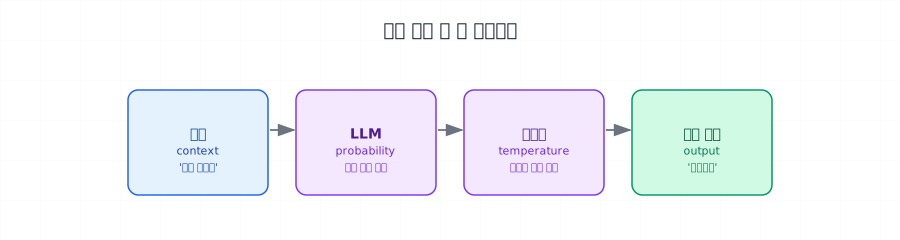
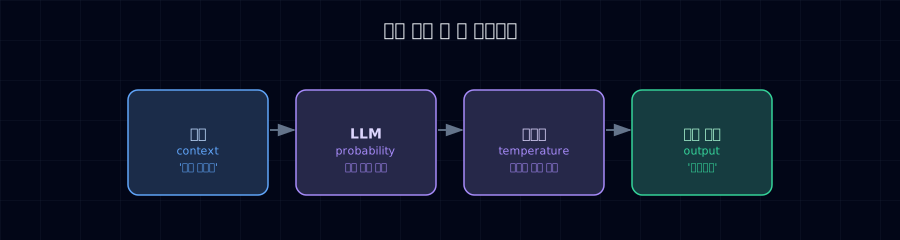
Step 2 produces a probability distribution over candidate tokens — say pizza 42% · pasta 18% · salad 12% · everything else 28%. With temperature 0, the top one always wins. Higher temperature mixes things up.
Then the chosen token is appended to the input and the loop runs again, until the sentence finishes or hits a stop condition.
| Step | Input (cumulative context) | Next token chosen |
|---|---|---|
| 1 | Lunch should be |
pizza |
| 2 | Lunch should be pizza |
, |
| 3 | Lunch should be pizza, |
clearly |
| 4 | Lunch should be pizza, clearly |
. (stop) |
What looks like "one sentence" is actually the loop running tens or hundreds of times1.
4. Context window — the model's "one sheet of paper"¶
The model can't see infinite text. There's a hard cap on how many tokens fit in one call: the context window.
Analogy: one sheet on the desk
Imagine the LLM as a person who can only see one sheet of paper at a time. The character limit on the page is the context window. Anything off the page is forgotten.
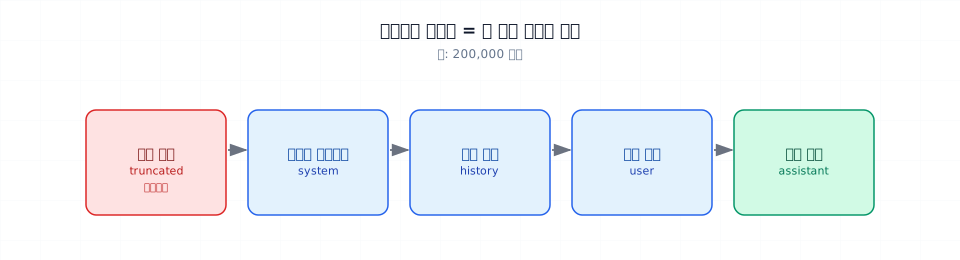
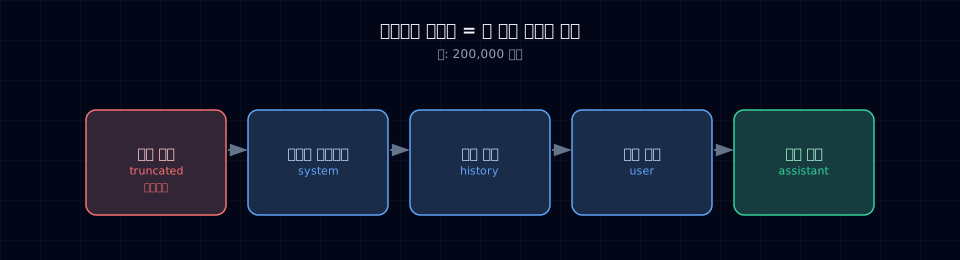
Five things compete for that page (e.g. 200,000 tokens): system prompt, conversation history, retrieved documents, user message, expected output. Anything that doesn't fit gets dropped from the front.
Rough sizes (as of 2026)¶
| Tier | Context | Feels like |
|---|---|---|
| Small / fast models | 8K–32K | One or two long conversation turns |
| Mid (most chatbots) | 128K | The core of a single book |
| Long-context | 1M+ | Several books or a real codebase |
Why this connects to RAG (Part 3)¶
- You can't stuff every internal manual into the context — too big, too expensive.
- So you retrieve only the relevant chunks and inject those into the context. That's RAG.
- The context limit is the reason RAG exists.
5. Temperature — the creativity dial¶
Same prompt, two days, two different answers — that's temperature at work.
Analogy: a weighted die
Three candidate tokens: pizza (42%) · pasta (18%) · salad (12%).
- Temp 0 → always picks the highest (pizza). Predictable, boring.
- Temp 1 → roll the die at the actual probabilities. Mostly pizza, sometimes others.
- Temp 1.5 → flatten the die. Salad becomes plausible.
What to use¶
| Task | Suggested temperature | Why |
|---|---|---|
| Classification, extraction, factual QA | 0.0–0.3 | Consistency wins |
| Summarization, translation | 0.3–0.7 | Accuracy + naturalness |
| Brainstorming, copywriting | 0.7–1.2 | Variety is the point |
Temperature 0 ≠ identical responses
Server parallelization and floating-point quirks can produce different outputs at temp 0. If reproducibility matters, don't rely on it alone.
Mathematically, temperature \(\tau\) reshapes the softmax:
Smaller \(\tau\) sharpens (mass concentrates on one token), larger \(\tau\) flattens (several tokens share probability).
6. The system prompt — your standing orders to the model¶
First-time examples often only have "role": "user". In production, you almost always have a "role": "system" message too.
Analogy: day-one onboarding
The user message is "handle this customer ticket today." The system prompt is the manager's day-one briefing: "We work this way. Always do this. Never do that."
Roles¶
| Role | Content | Frequency |
|---|---|---|
system |
Role, tone, rules, prohibitions | Once at conversation start (usually) |
user |
Actual question or request | Every turn |
assistant |
Model's reply | Every turn |
A good system prompt covers¶
- ✅ Role: "You are the company IT support assistant."
- ✅ Tone: "Friendly but concise. No filler greetings."
- ✅ Knowledge boundaries: "Don't answer from outside the supplied documents."
- ✅ Failure behavior: "If unsure, say 'Let me check and follow up.'"
- ✅ Output format: "Always answer in three sentences or fewer."
These five lines decide most of an assistant's personality and safety. Part 2 goes deeper.
7. Why LLMs hallucinate¶
When an LLM confidently invents facts, that's a hallucination. Why does it happen?
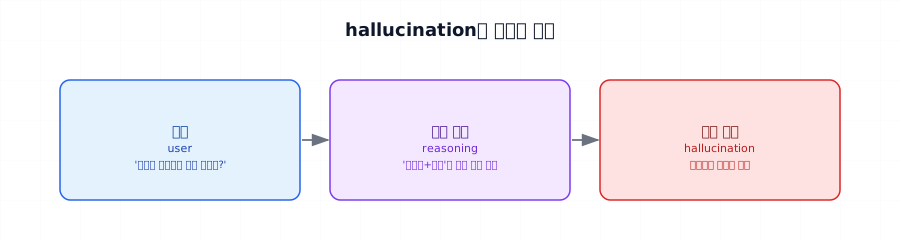
The LLM has no built-in mechanism for "I don't know." It's a "most likely next token" machine, so it produces a fluent sentence regardless of truth.
Common causes¶
- Knowledge gap — recent events, internal documents, niche topics.
- Bad training data on the topic — model learns the wrong pattern.
- Vague question — model picks an interpretation that suits the priors.
- End of long responses — to stay coherent with the start, it fabricates.
Mitigations (covered later)¶
| Technique | Where | Effect |
|---|---|---|
| System prompt: "Say 'I don't know' when unsure" | This chapter §6 | Low–medium |
| Structured output (JSON Schema) | Part 2 | Medium |
| RAG (ground answers in documents) | Part 3 | High |
| LLM-as-a-Judge to verify | Part 4 | Medium |
| Fine-tuning | Part 7 | Medium–high |
8. Hands-on — your first call in 10 lines¶
Time to actually call an LLM.
Setup¶
Code¶
- The API key is read from the
ANTHROPIC_API_KEYenvironment variable automatically. - Claude Opus — high-end. Swap to
claude-haiku-4-5for lighter tasks. - The system prompt from §6. Role and format declared in one place.
- The actual user question. As conversations grow, this list interleaves
userandassistant. - The response is a list of "content blocks." Pull text from the first one.
Sample output¶
An LLM is a really smart parrot that has read tons of books.
It got so good at "guess the next word" that it sounds
just like a person.
What's actually happening¶
| # | From | To | Payload |
|---|---|---|---|
| 1 | Your code | Anthropic server | System prompt + user message |
| 2 | Anthropic server | Claude model | Tokenized input |
| 3 | Claude model | Itself | Compute next-token probability → sample (repeat to end) |
| 4 | Claude model | Anthropic server | Generated token sequence |
| 5 | Anthropic server | Your code | Decoded text response |
A single client.messages.create(...) call drives all five steps. Step 3 runs tens to hundreds of times — the longer the answer, the longer the wait.
9. Get a feel — temperature play¶
Run the same question multiple times, varying only temperature.
Watch for:
- At temp 0, do the three runs come back nearly identical?
- At temp 1.2, how much variety do you see?
- When does the model start producing unusual or incoherent answers?
10. Common pitfalls¶
Pitfall 1: max_tokens too small, response cut off
max_tokens is an upper bound on output length. 200 tokens for a summary will get clipped mid-thought. Default to 1024 if unsure.
Pitfall 2: assuming temp 0 is deterministic
Server parallelization and floating-point math don't guarantee bit-identical output. Don't == compare in tests.
Pitfall 3: forgetting to include conversation history
LLMs are stateless. To "remember" earlier turns, you have to send the full history in messages every time. Part 5 automates this with memory.
Pitfall 4: estimating Korean costs at English rates
Korean-to-English token ratios vary by model and tokenizer. Measure representative text with the tokenizer you will deploy.
11. Production checklist¶
Before any of this hits production:
- API key in environment variables or a secrets manager (never hardcoded)
- Spending caps set per API key
- Timeouts and retries configured — network hiccups happen
- Temperature chosen explicitly per use case (don't ride defaults)
-
max_tokensmapped per use case - User input that's too long is truncated or refused before the call
12. Exercises¶
You'll thank yourself in the next chapter for actually doing these.
- Drop "안녕하세요" and "Hello" into the tokenizer. Screenshot the token counts.
- Run §8's code. Change the system prompt to "Reply only with emoji." See what happens.
- Set
max_tokens=20. Watch the response get clipped. - Run §9's code. Write one paragraph comparing temp 0, 0.7, and 1.2.
- Craft a question designed to induce hallucination. Then add "If unsure, say so" to the system prompt and rerun. Note the change.
13. At a glance¶


"Next token → append to input → next token" loops until a stop condition (max length, stop token, or natural end).
Next → Assistant System Overview With this much, you're ready to design what blocks make up an assistant.
-
Real serving uses KV caches, speculative decoding, and other tricks to run this loop much faster. Part 7 covers them. ↩