Ch 8. Tool Calling Fundamentals¶

What you'll learn
- Tool Calling (Function Calling) — how to let an LLM invoke functions in your code
- Three types of tools (Data / Action / Orchestration) — OpenAI's Practical Guide taxonomy
- The tool_use ↔ tool_result loop structure between LLM and tools
- Pydantic validation of parameters + approval-based execution for risky tools
- Infinite loops · bad parameters · side effects — where real implementations blow up
- The bridge into Part 5 Agents
Prerequisites
Ch 4–7 completed. Especially Ch 6 structured output — tool definitions are just JSON Schema.
1. Concept — giving the LLM hands¶
Until now, the LLM has only read and written. It can't query the outside world (databases, APIs, files) or perform actions.
Tool Calling gives the LLM a pair of hands:
- We declare a list of functions (name · description · parameter schema)
- When the LLM reads the user request, it decides "I need this tool" and returns a
tool_useresponse - Our code executes the function
- We pass the result back as
tool_result - The LLM reads the result, continues reasoning → final answer
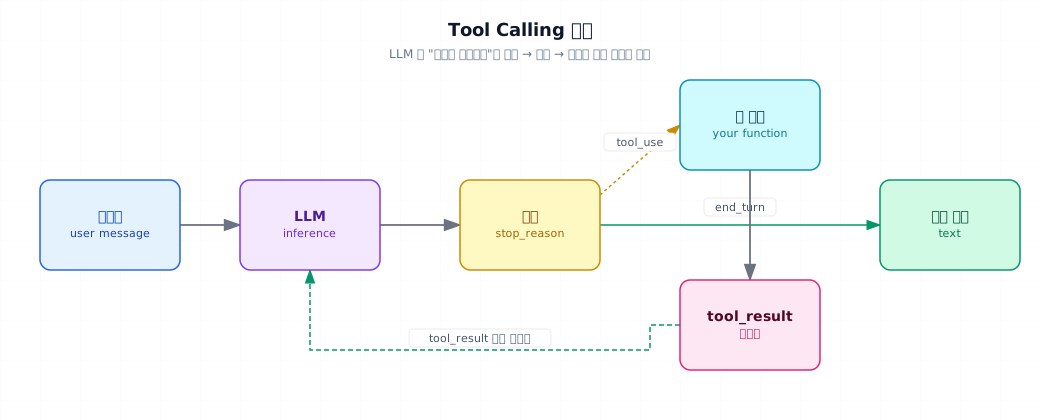
The critical point: the LLM never executes the function directly. It only decides which function to call and what arguments to pass. Execution always happens in our code. That boundary is where safety begins.
2. Why you need it¶
- Freshness — information after training (weather · stock prices · inventory)
- Private data — company databases · customer order history
- Actions — sending email · charging cards · creating tickets · making reservations
- Computation accuracy — letting the model do math isn't reliable → use a calculator tool instead
Relationship to Part 5 Agents
Tool calling is the foundation of agents. This chapter covers one or two tool calls. Part 5 adds length — longer loops, memory attachments, layered guardrails.
3. Three types of tools¶
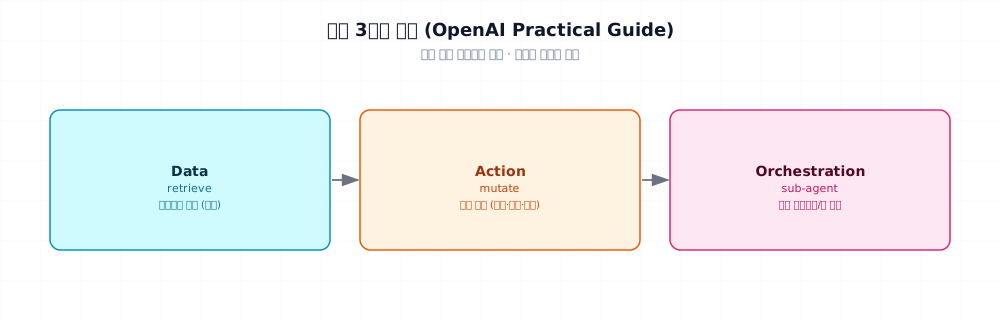
Classification from OpenAI's Practical Guide (_research/openai-practical-guide-to-agents.md):
| Type | Examples | Safety angle |
|---|---|---|
| Data (read) | DB query, document search, web search, file read | Read-only — relatively safe |
| Action (write) | Email send, charge card, cancel order, issue ticket | Side effects — approval + audit required |
| Orchestration (compose) | Call another agent, bundle sub-tools | Complexity ↑, Part 5 territory |
On the path from PoC to enterprise:
- PoC focuses on Data (safer)
- Production adds Action → approval queue + audit log mandatory (Part 6 Ch 29)
4. Minimal example — calculator tool¶
- Execution is our code. The LLM only passes the expression.
evalhas risks covered in §6 mistake 1. Production uses a safe evaluator likeasteval.
5. Real-world tutorial¶
5.1 Multiple tools · Pydantic validation¶
When the LLM passes bad parameters, we validate tool input with Pydantic.
- Extract JSON Schema from Pydantic — validation logic and tool definition live in one place.
- Even if the LLM passes wrong types, ValidationError becomes a fallback.
5.2 Loop runs multiple times¶
One request may need multiple tool calls. If the LLM returns stop_reason=="tool_use" again, execute again.
- Upper bound mandatory. Prevents infinite loops (§6 mistake 2).
5.3 Approval-based execution (Action tools)¶
Tools with side effects must be approved by a human before execution. Simplest pattern:
In production, not CLI input:
- Slack button (team approval)
- Internal dashboard approval queue
- LangGraph
interrupt(Part 5 Ch 23)
5.4 Error and timeout handling¶
Tool execution can fail (external API down, etc.). Pass the error back to the LLM as tool_result — the model attempts recovery:
| tool_with_timeout.py | |
|---|---|
- Return the error as a string — the LLM naturally responds in English like "The server is slow; let me check again in a moment."
6. Common failure points¶
Mistake 1: using eval directly
eval(expression) runs arbitrary code. If the LLM passes __import__('os').system('rm -rf /'), disaster.
Fix: use safe evaluators like asteval · numexpr. Or ast.parse + whitelist validation. Production uses sandboxing (Docker · WASM).
Mistake 2: infinite loops
LLM calls the same tool over and over → without max_steps, tokens and costs explode.
Fix: loop limit of 5–10. Exceed it and return an explicit error. Detect repeated tool calls and steer to a different path.
Mistake 3: missing parameter validation
LLM passes quantity: "two" instead of a number — code runs anyway, data corrupted.
Fix: always validate with Pydantic (§5.1). On failure, return invalid_input tool_result → model retries.
Mistake 4: executing Action tools without approval
Charges · deletes · sends all execute by model judgment alone — you're waiting for a disaster.
Fix: §5.3. Maintain a RISKY_TOOLS list. In production, approval queue + human sign-off before execution.
Mistake 5: vague tool names and descriptions
Tools like query_data · do_thing confuse the LLM. Overlapping tools (search_db · lookup_db) also fail.
Fix: verb + clear noun (create_order · cancel_subscription). In description, say "when to use this" and "when not to." Reference OpenAI Practical Guide's ACI design principles (§9).
Mistake 6: forgetting tool_result before next call
Receive tool_use and send a new user message immediately — LLM gets confused. After assistant + tool_use, always send user + tool_result pair.
Fix: wrap the loop (§5.2) in a function to prevent mistakes.
7. Production checklist¶
- Loop limit
max_stepsset to 5–10 - All tool inputs validated with Pydantic · return
invalid_inputon failure - Action tool whitelist + approval queue + audit log
- Output size limit — big query results overflow context
- Per-tool timeouts — Data 5s, Action 30s, etc.
- Observability — log which tools · how many times · how long (LangSmith/Langfuse)
- Cost · latency monitoring — tool loops raise costs fast
- Sandboxing — code-execution tools run in isolated Docker or WASM
8. Exercises¶
- Run §4's calculator example. Watch the LLM generate expressions for 3 different questions.
- §5.1's
WeatherArgs— deliberately sendunits="centigrade"from the LLM and confirm ValidationError catches it - §5.2 with
max_steps=2— reproduce "[max_steps exceeded]" on a complex request - Implement approval-based execution via Slack button or console input. Record how the LLM responds to rejection.
- Deliberately vague tool description (
"something useful") — measure LLM tool-selection failure rate
9. Sources and further reading¶
- Anthropic Tool Use: docs.anthropic.com/tool-use
- OpenAI Function Calling: platform.openai.com/docs/guides/function-calling
- OpenAI Practical Guide to Building Agents — tools' three categories (Data / Action / Orchestration) · ACI design principles. Summarized in project
_research/openai-practical-guide-to-agents.md - Anthropic Building Effective Agents — importance of tool naming and descriptions. See
_research/anthropic-building-effective-agents.md
10. Part 2 review¶
What Part 2 covered (5 chapters):
| Ch | Skill | Production value |
|---|---|---|
| 4 | API calls · error · retry | Foundation of every LLM app |
| 5 | Prompts · Few-shot · CoT | Model behavior locked in by contract |
| 6 | Structured output (Pydantic · tool-use schema) | JSON for downstream pipelines |
| 7 | Streaming · UX | Perceived latency matters |
| 8 | Tool Calling | Giving the LLM hands — start of agents |
Part 2 completion — from here, you should be able to build one of these at PoC level:
- Customer inquiry auto-classification + simple response (structured output–based)
- Document + tool lookup bot (tool calling + basic RAG preview)
- Streaming chatbot web UI (FastAPI + SSE)
Next → Part 3. RAG — Attaching External Knowledge
So far we've used only what the model learned. Now we add your company's documents and databases to ground answers in evidence.