Ch 9. Why RAG is necessary¶

What you'll learn
- The fundamental limit: LLMs only know what they learned — knowledge cutoff · private data · freshness
- The concept of RAG (Retrieval-Augmented Generation) and why you need it
- A direct side-by-side comparison: LLM-only response vs LLM + RAG response
- Fine-tuning vs RAG — when to pick which
- Three pitfalls you must think through before adopting RAG
1. Concept — LLMs only know what they learned¶
Claude and GPT models are built from data up to their training cutoff. They have no way to learn three things:
| What they don't know | Why |
|---|---|
| Information after the cutoff date | Not in training data (today's stock price, for example) |
| Private data | Not on the public internet (your company's documents and databases) |
| Frequently changing data | Model retraining cycles >> data change cycles (inventory, events, policies) |
This problem doesn't go away with better prompts. Part 2 Ch 5's "admit when you don't know" instruction prevents lies, but it doesn't deliver the right answer.
The core intuition
"What the model learned is a book it read five years ago. Today's news and your company manual? Never read them."
→ Give it the reading material as you go = RAG.
2. RAG in one sentence¶
RAG = find the documents that match the question, then put them in the prompt so the model can answer.
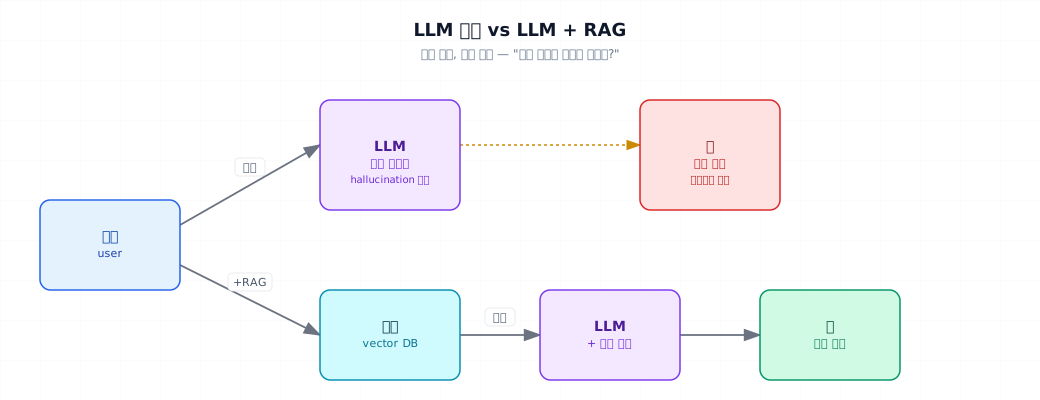
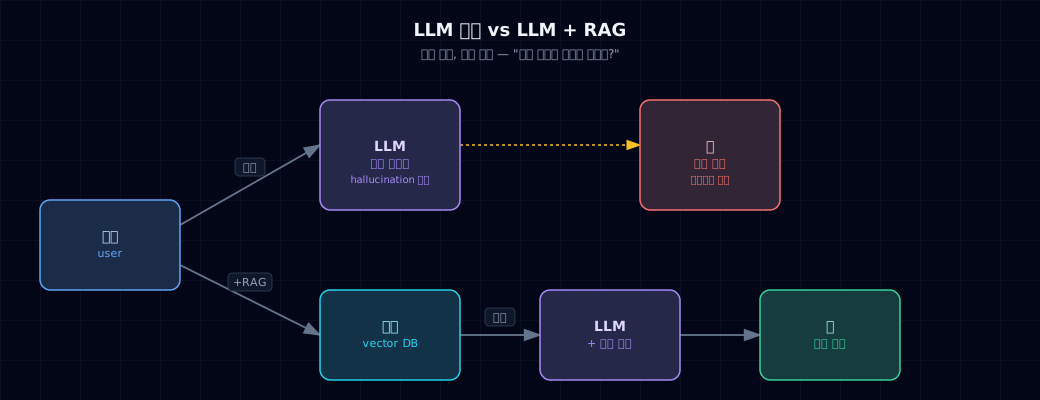
That's it. The complexity comes from how to find documents — the remaining Part 3 chapters cover that.
Three wins from RAG:
- Freshness — update your documents without retraining the model
- Private knowledge — ground answers in company policy, manuals, codebases
- Traceability — show which document and which section the answer came from
3. Where it's used¶
Common use cases¶
| Use case | Search target | Example |
|---|---|---|
| Customer support bot | FAQ · policy docs | "What's your refund policy?" → Policy A4, section 3.2 |
| Internal knowledge search | Wiki · meeting notes · onboarding materials | "What's the new-hire onboarding process?" |
| Product manual QA | Product guides | "How do I configure feature X?" |
| Codebase QA | Source code + commit history | "Where's the auth logic in the payments module?" |
| Legal and medical support | Case law · papers (citation required) | "According to recent case law…" |
Where it sits in the 8-block diagram from Part 1 Ch 3¶
The "Retrieve" block in Part 1 Ch 3 is exactly where RAG lives. All of Part 3 explains how you build it.
4. Minimal example — same question, two paths side-by-side¶
- The simplest RAG — dump the entire document into the prompt. Works fine when documents are small.
What to watch for:
- Response 1 is generic ("two weeks in advance…" typical company policy guessing) or a refusal ("varies by company")
- Response 2 is exact from the document — "at least 2 weeks, team lead approval, 5+ days need executive sign-off"
This example works when documents fit. At hundreds of pages, you hit token limits → the rest of Part 3 teaches you search to "find only the relevant parts."
5. Hands-on¶
5.1 Test the knowledge cutoff¶
Understanding what the model doesn't know is where RAG design starts:
Typical results:
- Questions 1, 2, 3 → "I don't know" or vague guessing (hallucination risk)
- Question 4 → answers well (public training data)
Questions 1, 2, 3 are RAG candidates.
5.2 Distinguish fine-tuning from RAG¶
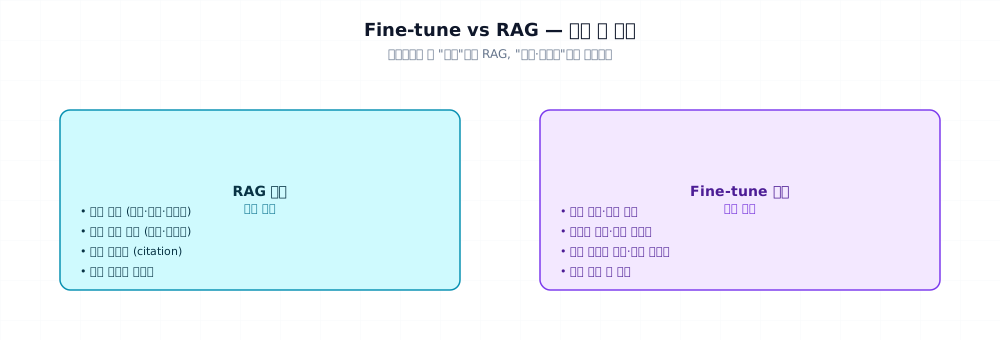
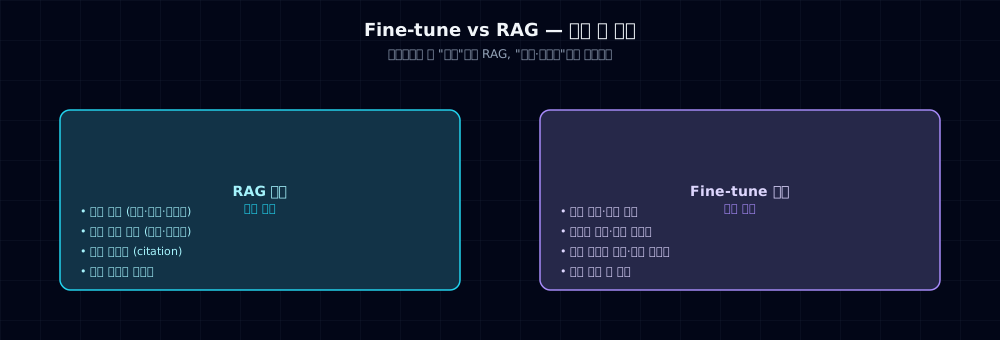
RAG and fine-tuning solve different problems:
| RAG | Fine-tune (Part 7) | |
|---|---|---|
| Solves | Knowledge gap | Behavior/style gap |
| Example | "What's our company policy?" | "Answer in our company's voice" |
| Update cycle | Anytime (update document) | Rarely (needs retraining) |
| Cost | Search infrastructure | GPU · data prep |
| Traceability | High (citation) | Low |
| Adoption difficulty | Low | High |
Recommended order: prompt → RAG → fine-tuning. Most problems solve at the RAG step. Fine-tuning is only for tone, format, specialized classification that RAG can't handle.
5.3 RAG pipeline preview¶
What Part 3 covers from here:
| Ch | Topic | Solves |
|---|---|---|
| 9 (you are here) | Why RAG | Necessity · decision |
| 10 | Embeddings and vector search basics | The math behind "finding" documents |
| 11 | Full RAG pipeline flow | end-to-end build |
| 12 | Improving search quality | hybrid · rerank |
| 13 | Advanced RAG (HyDE · GraphRAG etc.) | Complex cases |
| 14 | LangChain in production + multimodal | PDFs · images |
This chapter is "should we do RAG." If yes, start Ch 10.
6. Common pitfalls¶
Mistake 1: 'RAG eliminates hallucination' myth
Even with the right document in the prompt, models can twist the meaning or mix document content with their own guesses. RAG lowers the rate, not to zero.
Fix: (1) system prompt: "admit when you don't know," (2) Part 4's LLM-as-Judge to validate, (3) force citations so users verify the source.
Mistake 2: Ignoring search failures
User questions outside your document corpus result in zero hits or irrelevant documents. Feeding irrelevant documents to the model makes it confabulate based on the noise.
Fix: when search confidence falls below threshold, route to "insufficient info — contacting support" flow. See Part 1 Ch 3's human handoff block.
Mistake 3: Corrupt documents poison everything
RAG doesn't validate document truth. Outdated manuals or wrong FAQs → confidently wrong answers.
Fix: (1) document curation and versioning, (2) include "last updated" in responses, (3) regular eval sets (Part 4) to catch and fix errors.
Mistake 4: Trying to solve everything with RAG
Behavioral problems like "answer in our company's voice" don't solve with RAG. Voice, format, complex classification are prompt + fine-tuning territory.
Fix: use the decision tree from §5.2. RAG is knowledge-only.
7. Production checklist¶
- Knowledge cutoff audit — quarterly: test 20 questions the model should fail on
- Document freshness — every document needs a "last updated" timestamp
- Search failure log — collect "zero results" cases separately → identify knowledge gaps
- Hallucination monitoring — track thumbs-down feedback labeled "factual error"
- Citation enforcement — every answer includes source document and section
- Sensitive document isolation — PII and confidential docs in separate, access-controlled corpus
- Quarterly RAG vs fine-tune review — "is RAG still the right tool for this?"
8. Exercises¶
- Run §4's
llm_vs_rag_compare.pywith your own documents (or any). Write one paragraph on the response difference. - Run §5.1's knowledge cutoff probe with 5 questions. Classify which get "I don't know" vs which get speculative answers.
- Use the decision tree from §5.2 on three real problems from your project. Decide: RAG or fine-tune?
- Intentionally feed irrelevant documents to the model. Measure the impact of "don't answer if document doesn't support it" in the system prompt.
- Find one case where RAG won't work. Argue whether prompt engineering or fine-tuning is the better fix.
9. Sources and further reading¶
- RAG origin: Lewis et al. (2020), "Retrieval-Augmented Generation for Knowledge-Intensive NLP Tasks"
- Stanford CME 295 Lecture 7 — RAG, function calling, ReAct. Summary at
_research/stanford-cme295.md - Anthropic: "Adding context with RAG" (docs.anthropic.com)
- LangChain RAG Tutorial: python.langchain.com/docs/tutorials/rag
Next → Ch 10. Embeddings and Vector Search Basics
How do you find relevant documents mathematically? Embeddings · cosine similarity · vector databases.