Ch 4. Getting Started with OpenAI and Anthropic APIs¶

What you'll learn
- API calls are just HTTP requests to a remote model — the intuition that makes everything else click
- SDKs (Python libraries) that let you call Anthropic and OpenAI in 10 lines
- Why messages split into three roles (
system·user·assistant) — and why that separation matters - Four core parameters (
model·max_tokens·temperature·stop_sequences) — enough to feel in control - Errors · retries · timeouts · cost — the minimum discipline to move from a one-liner to production code
Prerequisites
You've read Part 1 Ch 2 — What is an LLM and understand that LLMs pick one token at a time. Colab or local Python 3.10+.
1. Concept — An API is how you call a remote model¶
We don't download model files to our notebooks. Claude and other large models are tens of GB; running them requires a GPU. Instead, you send a request to servers run by Anthropic or OpenAI, and get back a response. That's an API (Application Programming Interface) call.
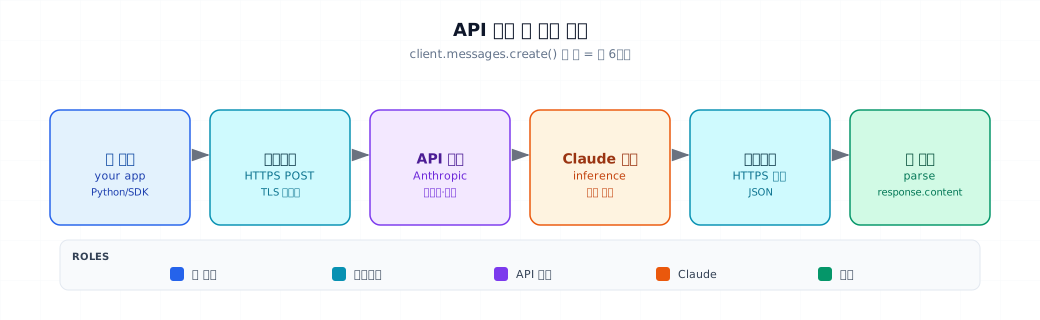
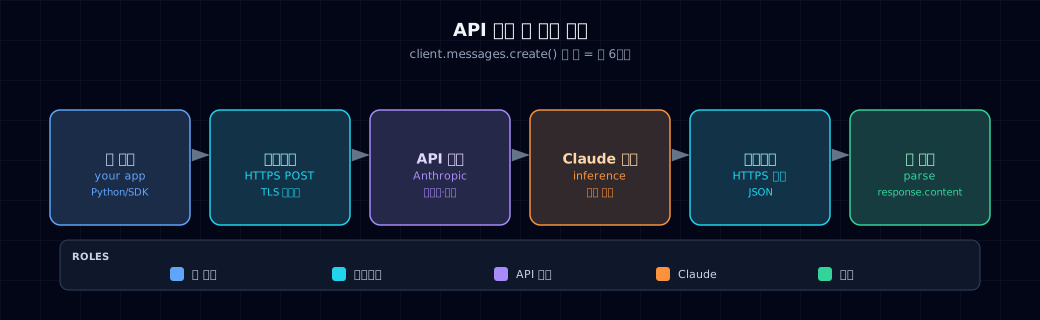
- SDKs (Software Development Kits) wrap this HTTPS request in Python functions.
anthropic.Anthropic()andopenai.OpenAI()are examples. - Requests always use HTTPS POST — text is encrypted in transit.
- Responses come back as JSON — the SDK converts it to Python objects.
2. Why use the API (instead of local models)¶
| API (the standard for this book) | Local models | |
|---|---|---|
| Setup | pip install anthropic and done |
GPU · download · CUDA setup |
| Latest models | Instant access (Claude Opus 4.7, etc.) | Open models only (Llama 3, Qwen) |
| Cost | Per-token billing | Upfront hardware + electricity |
| Data | Sent to servers (privacy concerns possible) | Stays on your machine |
| Latency | Network + server processing | GPU speed, but network-free |
This book defaults to the API. Local fine-tuning comes in Part 7.
3. Where APIs are used¶
Your first API call is the seed for everything that follows:
- Chatbots · customer-support assistants — Agent-based (Part 5)
- Document summarization · classification · extraction — Batch scripts
- Automation helpers — CLI tools for drafting messages, code review, meeting notes
- The "generation" step in RAG pipelines — Part 3 revisited
4. Minimal example — 10 lines¶
Setup¶
Code¶
| hello.py | |
|---|---|
- Automatically reads the
ANTHROPIC_API_KEYenvironment variable. Never hardcodeapi_key="sk-..."in the code (see §6, mistake 1).
Run: python hello.py or execute the cell in Colab. Response arrives in 2–5 seconds.
5. Hands-on¶
5.1 The message array — three roles¶
The core of any API call is the message array. Three types:
| role | Who speaks | When |
|---|---|---|
system |
You, the developer (standing instructions) | Once at conversation start (typically) |
user |
End user | Each turn |
assistant |
The model (its previous response) | When replaying earlier turns |
Multi-turn conversations send this array in full every time. LLMs are stateless — they don't retain memory of past turns.
- The model only remembers "desty" if you send the full
historyhere. If you send just the third message, the model has no idea.
5.2 Four core parameters¶
| Parameter | Meaning | Recommended |
|---|---|---|
model |
Model name (Opus · Sonnet · Haiku) | Classification → haiku, complex reasoning → opus |
max_tokens |
Output length upper bound. Not input length. | Short answer 64 · summary 512 · long essay 2048 |
temperature |
Probability sharpness | Classification 0.0 · summary 0.5 · creative 0.8–1.2 |
stop_sequences |
Cut generation at this string | Format control (e.g., "\nUser:") |
The theory behind these parameters is Part 1 Ch 2
The temperature formula, how max_tokens works, why models are stateless — all covered in Part 1 Ch 2.
5.3 Anatomy of the response object¶
response = client.messages.create(...)

response.content[0].text           # Actual text
response.content[0].type           # "text" · "tool_use" · ...
response.stop_reason               # "end_turn" · "max_tokens" · "stop_sequence"
response.usage.input_tokens        # Billable input tokens
response.usage.output_tokens       # Billable output tokens
response.model                     # Which model actually responded (version pin check)
Cost math:
Pricing changes frequently
The numbers above are reference only. Always check the official Anthropic pricing page for current rates.
5.4 Errors · retries · timeouts¶
Networks fail. Production code must handle three things.
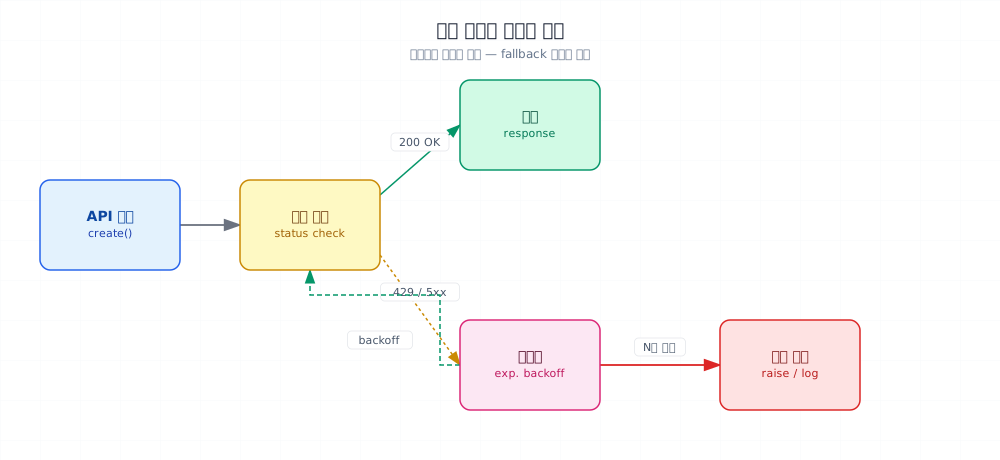
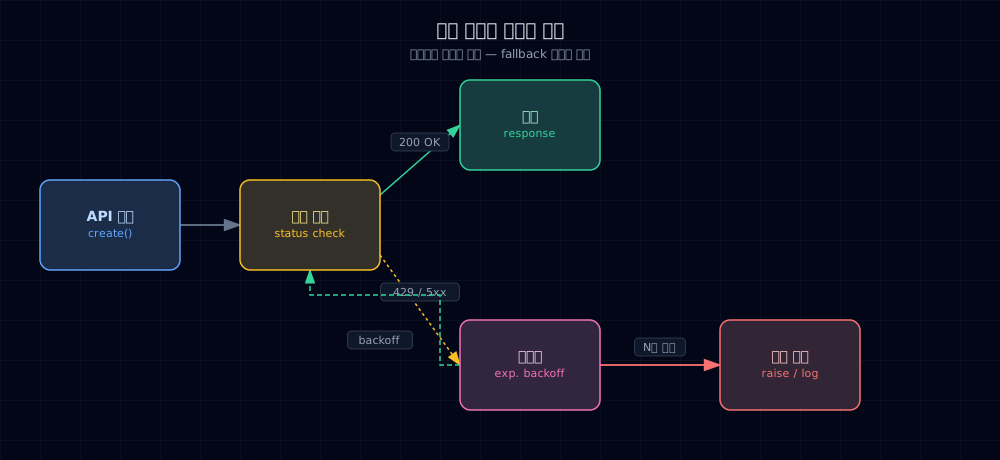
Common failure modes:
| HTTP code | Cause | Action |
|---|---|---|
401 |
Wrong API key | Terminal failure — check your key |
429 |
Rate limit exceeded | Backoff and retry |
500/502/503 |
Server hiccup | Backoff and retry |
overloaded_error |
Server busy | Retry (Anthropic-specific) |
Retry wrapper — 5 lines with tenacity:
- Timeout: 30 seconds. The default can be
None, which hangs forever — always set it explicitly.
Now ask("Hello") includes retries with a single line.
6. Common pitfalls¶
Mistake 1. Hardcoding API keys in code
client = Anthropic(api_key="sk-ant-xxxxx") — never. Commit it to Git and a bot discovers it in a second, costs explode.
Fix: environment variables · .env + python-dotenv · Colab Secrets · AWS Secrets Manager. If a key leaks, revoke it immediately in the Anthropic console.
Mistake 2. Confusing max_tokens — it's output length, not input
max_tokens=256 caps the output, not the prompt. Inputs are bounded by the model's context window. Set this to 256 for a long essay and it gets cut off mid-sentence.
Fix: set max_tokens to 1.5–2× expected output. If unsure, start with 1024.
Mistake 3. No timeout or retry
One network blip and your program dies. One rate-limit hit and all requests fail.
Fix: tenacity wrapper from §5.4 + timeout=30. Circuit breakers come in Part 6.
Mistake 4. Fake assistant messages in the history
{"role": "assistant", "content": "I should be polite"} is treated as the model already said this. Don't invent assistant messages.
Fix: put instructions in system, examples in few-shot format (Part 2 Ch 5).
Mistake 5. Infinite retry loops on rate limit
Retry without a ceiling (stop_after_attempt(3)) and you hammer the server at 429 until your key gets cut off.
Fix: exponential backoff + cap retries at 3–5.
7. Production checklist¶
Before deployment:
- API key in environment variables or secrets manager (never in code, logs, error messages)
- Cost ceiling set in the Anthropic console
- Timeout ≤30 seconds (long requests need a separate strategy)
- Retries configured:
tenacitywith 3–5 attempts, exponential backoff - Model pinned to minor version:
"claude-haiku-4-5"not just"claude-haiku" - Token and cost logging — record
usage.input_tokens,usage.output_tokens, estimated cost per call - Latency tracking — p50 / p95 / p99
- PII masking — scrub before sending (Part 6 Ch 28)
Observability frameworks are Part 6
Tools like LangSmith and Langfuse come in Ch 27.
8. Exercises¶
Run these by hand. You'll appreciate the next chapter more.
- Successfully run §4's
hello.py(screenshot the output) - Same prompt, but swap
modelfromclaude-haiku-4-5toclaude-opus-4-7— compare quality and latency - Drop
max_tokens=20and spot where the response gets cut. Confirmstop_reason="max_tokens" - Run the same question 3 times each at
temperature=0.0vs1.2— document the differences - Intentionally use a bad model name (
"claude-xxx") and check the exception type and HTTP code - Apply the
tenacitywrapper, call with a bad API key, and verify that 401 doesn't retry (it shouldn't)
9. Sources and further reading¶
- Anthropic Python SDK: docs.anthropic.com
- OpenAI Python SDK: platform.openai.com/docs
- OpenAI "A Practical Guide to Building Agents" — "The three pillars of an agent: Model · Tool · Instruction" (preview in Part 5). Summary in
_research/openai-practical-guide-to-agents.md.
Next → Ch 5. Prompt Engineering & Chain-of-Thought Basics
Right now you fire off a question and catch the answer. Write the system prompt well and the model becomes a completely different assistant. Next chapter shows how.