Ch 20. What Is an Agent?¶

What you'll learn
- The sharp boundary between LLM App and Agent (they're different animals)
- OpenAI's three pillars of an agent — Model · Tool · Instruction
- The autonomy spectrum: four stages from rules to real agents
- Single call vs. loop — 30 lines each to see the gap
- How to stop over-claiming — "is this actually an agent?" and "should it be?"
Prerequisites
All of Part 2 (Ch 4–8, especially tool calling) + Part 3 RAG foundations. You've hand-assembled a single LLM call with tool_use at least once.
1. Concept — An agent is "LLM + loop + tools"¶
On news sites, blogs, LinkedIn — almost every LLM-powered app gets called an "agent." In this book, we're much narrower.
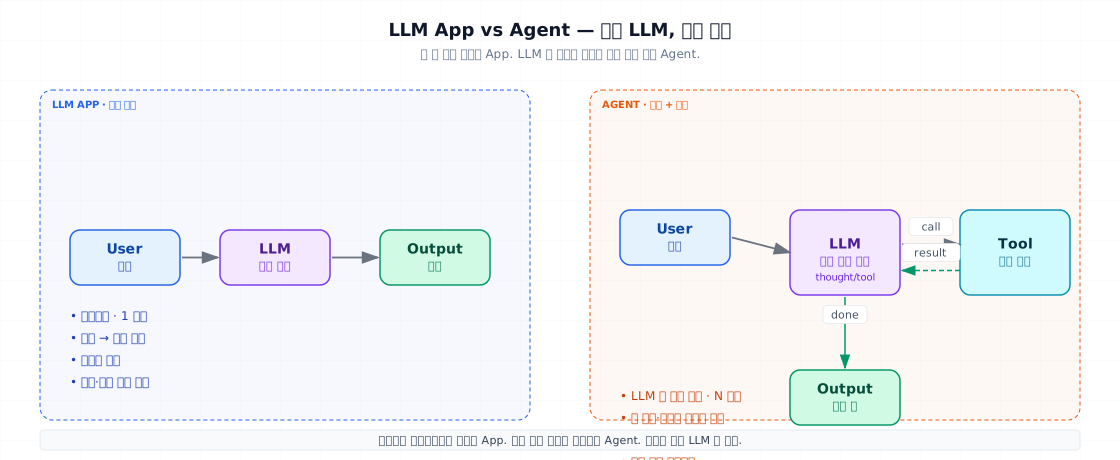
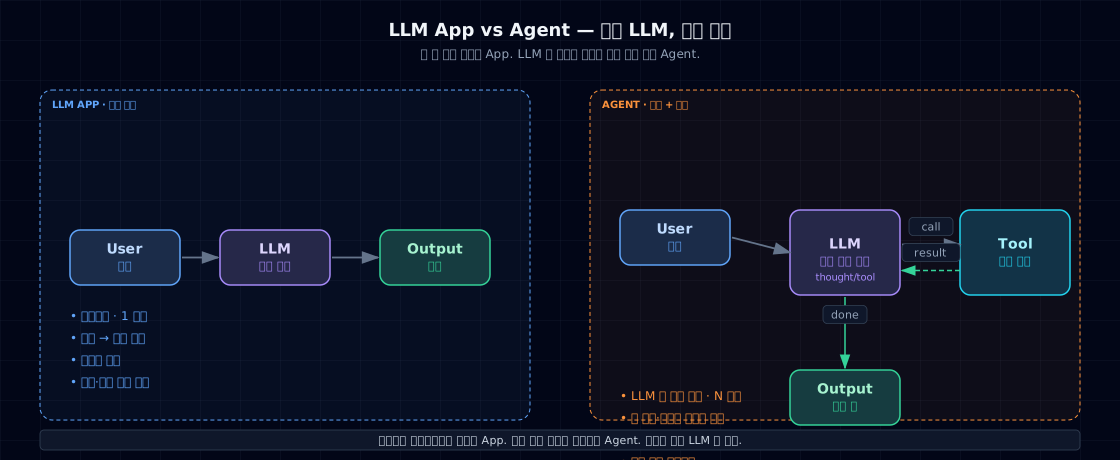
Agent = An LLM that picks which tool to call, sees the result, and decides what to do next — in a loop.
LLM App, by contrast, is linear: input → single call → output. Both use LLMs, but who controls the flow is the difference.
OpenAI's three pillars of an agent¶
OpenAI's "A Practical Guide to Building Agents" boils agents down to three things:
- Model — the LLM making decisions
- Tool — external functions, APIs, or databases the model can invoke
- Instruction — system prompt, policies, and stopping rules
All three must loop together for it to be an agent. Remove one and you have an app.
2. Why you need this — what loops buy you¶
① Problems that resist hardcoding. "Customer inquiry arrives → look up different DBs depending on the situation → maybe refund → escalate if we can't." Each path is different. Writing 50 if-else branches kills you.
② Tool sequencing you can't predict. You have 5 tools; which one, in what order, depends on the input. You can't draw the flow diagram beforehand.
③ Self-correcting loops. "Write SQL → error → revise → retry." The agent figures out the repair cycle.
When NOT to use an agent: - Paths are 1–3 and predictable → workflow (next chapter) - Failure cost is massive (healthcare, payments) → deterministic + human gate - Latency or cost is strict (chat SLO ≤2s) → single call + RAG
3. Where agents live — the autonomy spectrum¶
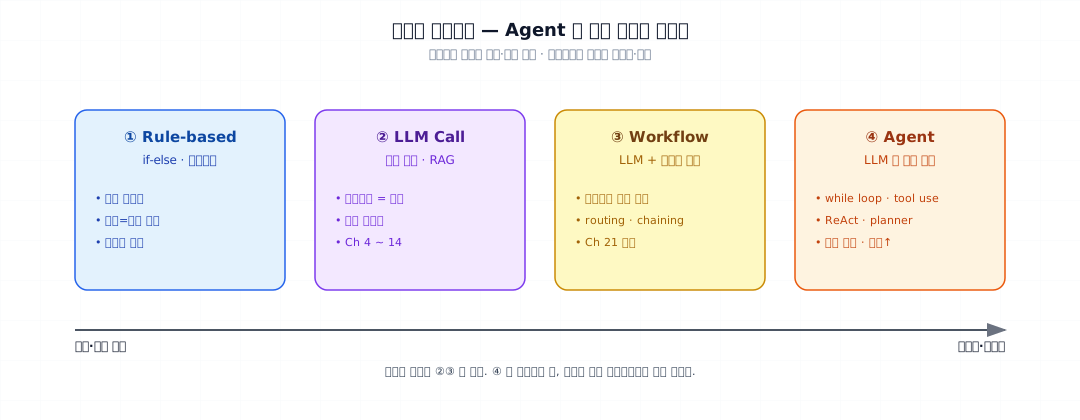
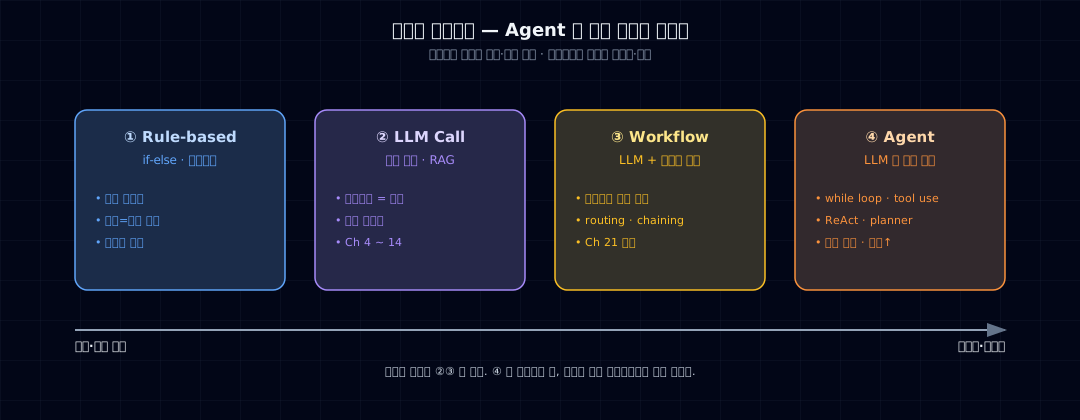
Autonomy isn't binary. It's a spectrum:
| Level | Example | Traits |
|---|---|---|
| ① Rule-based | FAQ bot trees, Python functions | Fully deterministic · debug-friendly |
| ② LLM call | Ch 4 "summarize this" · RAG | Prompt = logic · probabilistic output |
| ③ Workflow | Ch 21 patterns (chaining, routing) | Multiple LLM calls, but developer picks the path |
| ④ Agent | ReAct · tool-use loop | LLM picks the path · nondeterministic |
True agents are level ④. In practice, ②+③ dominate and usually suffice.
Decision rule
Ask first: "Can I solve this at level ③?" If yes, stop there. Only move to ④ when you absolutely must.
4. Minimal example — same problem, app vs. agent¶
Question: "Can I refund order O-1024?"
4-1. App style — single call + preloaded data¶
Signature: order data is fetched by your code first, then fed to the prompt. LLM just judges. 1 call. Costs and latency are predictable.
4-2. Agent style — LLM picks the tool¶
- Tool function — LLM decides if to call it; your code runs it.
- Loop ceiling — no infinite spirals. Give up after 5 turns.
- tool_use → tool_result handoff — Anthropic's format. OpenAI uses
function_call.
Signature: LLM decides whether to fetch the order. 1–3 calls depending on the input. Cost and latency vary.
The gap between them¶
| Axis | App | Agent |
|---|---|---|
| Calls | 1 (fixed) | 1–N (varies) |
| Control | Your code | LLM |
| Debugging | Straightforward | Requires trace |
| New questions | Code new flow | Often works with just new tools |
5. Real agent loops need five elements¶
Production agent loops aren't simple for statements. You need:
- Errors are feedback, not fatalities — send the error back as a tool_result so the LLM can see and retry.
- Size limit on results — giant tool responses blow out context. Truncate or summarize to ~2KB.
- Return control on max_steps — prevents runaway costs and infinite loops. The user sees "I can't solve this, help?"
Five essentials: 1. Stop conditions (end_turn · max_steps · user interrupt) 2. Error handling (errors become messages, not crashes) 3. Tool result size caps 4. Tracing (Part 4 Ch 19 · LangSmith / Langfuse) 5. Fallback to human — when stuck or unsure
6. Common breakages¶
6-1. Calling a single-call classifier "agent"¶
"Built a classifier with Claude — it's an agent." No. Without a loop, it's not. Calling things by the right name matters so your team can have real design conversations.
6-2. Using agents for deterministic problems¶
"Email arrives → classify → save to DB." That's a workflow. Building it as an agent gives you: - 3–10× cost - 3–10× latency - Debugging hell - Occasional wrong tool calls
Use agents when you have a real reason — nondeterminism in the problem, not in the solution.
6-3. No max_steps¶
Endless loop = endless costs. Always set max_steps=10 or similar.
6-4. Raising on tool errors¶
If a tool fails and you raise, the loop dies. The LLM should see the error and fix it. Return it as a tool_result.
6-5. Ignoring cost and latency¶
Agents are N=1–20 calls. If you don't measure average and worst-case costs and latency, production will punish you. Skip to Part 6 if you have SLO requirements.
7. Operational checklist¶
- Rationale documented — why can't this problem be solved deterministically?
- max_steps ceiling — is it in place?
- Tool errors return tool_result (not
raise) - Tool result truncation — is it capped?
- Tracing enabled — are all calls logged? (LangSmith/Langfuse/custom)
- Stop conditions explicit — end_turn + max_steps + user override
- Cost/latency measured — on your eval set
- Fallback path exists — when the agent gives up, what happens?
8. Exercises and next steps¶
Check your understanding¶
- Write one sentence each: what's an "LLM App" vs. an "Agent"? What's the key difference word?
- Map OpenAI's three pillars to your prototype: what's your Model, Tool, and Instruction?
- On the autonomy spectrum, where does your product sit? Why?
- Name one problem that needs an agent and one that's happy as a workflow. Specifics matter.
Hands-on¶
- Run §4-1 (app style). Watch it work.
- Rewrite it as §4-2 (agent style). Trace to confirm the LLM actually called
get_order. - Break it: use a nonexistent order ID. Watch the agent handle the error tool_result.
Sources¶
- Anthropic — Building Effective Agents (Schluntz & Zhang 2024) — defines "agent = LLM in a loop with tools." See
_research/anthropic-building-effective-agents.md - OpenAI — A Practical Guide to Building Agents — the three pillars (Model · Tool · Instruction) · single vs. multi-turn. See
_research/openai-practical-guide-to-agents.md
Next → Ch 21. Seven Agent Patterns Anthropic's 5 + OpenAI's 2 — and how to choose the right one.